

Our Top Picks
 ASUS ProArt PA278CGRV 27 Inch 1440p USB-C Professional27 Inch7.5 x 24.1 x 21.1 inches14.6 poundsCheck on Amazon

The video-editing question is the color question: a gaming monitor is judged in frames per second; an editing monitor is judged in how faithfully it shows the footage you shot. At 27 inches, a 4K panel shows a full 4K timeline at 1:1.
The pick is the face that led the office guide one batch ago: the Dell 27 Plus 4K USB-C S2725QC at $299.99 — 27-inch 4K IPS at a real 120Hz with 65W USB-C, a hub, and speakers, and 99% sRGB coverage. It fits by one cent.
$300 buys the monitor, not the edit suite: the calibrator is $119, the footage drive is $99.99, and the GPU is $450. Prices are a November 2026 snapshot — check the current price on Amazon before you buy.
Our top picks

Best for: The laptop edit desk that wants one cable for video, charging, and accessories
Check price on Amazon
Best for: The editor who grades in DCI-P3 and switches two machines
Check price on Amazon
Best for: The desktop edit desk that wants the sharpest 4K timeline for the least money
Check price on Amazon
Best for: The editor on the tightest budget who will calibrate anyway
Check price on Amazon
Best for: The desk that wants the biggest 4K timeline under $300
Check price on AmazonQuick Picks
| Monitor | Price | Key Spec | Best For |
|---|---|---|---|
| Dell S2725QC | $299.99 | 27″ 4K IPS, 120Hz, 99% sRGB, 65W USB-C | Best overall |
| ASUS ProArt PA278CGRV | $299 | 27″ 1440p, 144Hz, ΔE < 2, 97% DCI-P3 | Best color accuracy |
| Dell S2725QS | $279.99 | 27″ 4K IPS, 120Hz, 99% sRGB, DP + HDMI 2.1 | Best value 4K |
| ASUS VY27UQ | $217–$257 | 27″ 4K IPS, 60Hz, 99% sRGB, speakers | Cheapest 4K with 99% sRGB |
| Samsung ViewFinity S71H | $189.99 | 32″ 4K IPS, 60Hz, HDR10 | Biggest 4K |
How to Choose a 4K Gaming Monitor for Video Editing Under $300
Color accuracy is the editing spec — and coverage is not accuracy. A panel that covers 99% of sRGB can still show the wrong red. What matters is Delta E, the distance between the color shown and the color requested; under 2 is the professional line. Only one pick here publishes a Delta E: the ASUS ProArt PA278CGRV at under 2, Calman Verified at the factory. The Dells cover 99% of sRGB but publish no Delta E. The honest fix is the same on every pick: a $119 calibrator.
A 4K panel shows the full 4K timeline at 1:1. A 1440p panel takes a 4K signal and downscales it to 2560×1440 — the panel is the resolution, not the input. On a 4K panel, the preview is the footage; on a 1440p panel, it is a smaller version of it, and fine detail — focus, noise, sharpening — is a guess. That is the whole case for 4K — and against the most accurate panel here.
60Hz is fine for editing and a bad gaming panel. The timeline does not need more than 60Hz, but 120Hz buys one real editing thing: high-frame-rate footage. A 120Hz panel plays 120fps footage at full speed; a 60Hz panel at half speed.
USB-C is the one-cable question. Four picks in this family clear 90W. The two 4K USB-C picks here manage 65W — enough for a 13- or 14-inch laptop. The Alienware’s USB-C is downstream only at 15W, and the S2725QS has no USB at all. Check the wattage, not the port.
The KVM is the two-machine question — and it does not live on a 4K panel under $300. The ASUS PA278CGRV (Auto KVM), BenQ PD2706QN (manual KVM), and Dell P2724DEB (Auto KVM) switch two computers with one keyboard and mouse. None of the 4K picks here has one.
The Honest Edit Math: What $300 Really Buys
| Setup | Total |
|---|---|
| Samsung S71H on the stock stand | $189.99 |
| Samsung S71H + Calibrite Display 123 $119 | $308.99 |
| Samsung S71H + arm $30 + Calibrite $119 | $338.99 |
| Dell S2725QC + Calibrite $119 | $418.99 |
The cheapest calibrated desk in this family is the Samsung at $308.99 — and it still misses by $8.99. No full edit desk fits $300. The full suite — monitor, arm, calibrator, and a 1TB T7 Shield for footage — starts at $438.98 on the Samsung and $548.98 on the Dell.
1. Dell S2725QC — $299.99
Specs: 27-inch IPS, 3840×2160, 120Hz, 350 nits, 1500:1, 99% sRGB, 163 PPI, 2× HDMI 2.1 (full FRL), USB-C (65W PD, DP 1.4 Alt Mode), 3× downstream USB, 2×5W speakers, FreeSync Premium, full ergonomic stand, VESA, 3-year warranty.
The editing pick: the QS panel with the dock built in — the same 27-inch 4K IPS panel at a real 120Hz and 163 PPI text, plus USB-C that carries video, charges a laptop at 65W, and runs a three-port hub over one cable. Amazon reads $299.99 in stock against a $349.99 list — it fits only at the low read.
Honest flag: 99% sRGB is a coverage claim, not an accuracy claim. Dell publishes no Delta E for this panel, so the color you see is uncalibrated out of the box — the $119 Calibrite is what makes it a real editing panel. The port fork, resolved: the S2725QS has a DisplayPort input and no USB; the S2725QC has USB-C and no DisplayPort input, per Dell’s own May 2026 manual. Buy the QC for a laptop and the QS for a desktop. One listing trap: a retailer listing prints “(HDMI, DisplayPort, USB)” in the title — the manual says there is no DisplayPort input.
Pros: 4K 120Hz with USB-C, hub, and speakers for $299.99
Cons: No DisplayPort input; fits only at the $299.99 read; 65W USB-C; no published Delta E
Best for: The laptop edit desk that wants one cable for video, charging, and accessories.
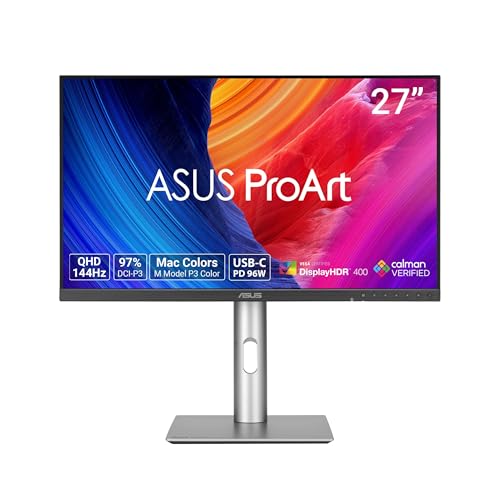
2. ASUS ProArt PA278CGRV — $299
Specs: 27-inch IPS, 2560×1440, 144Hz VRR, 5ms GtG, 350 nits, 97% DCI-P3 / 100% sRGB, Delta E < 2, Calman Verified, USB-C (96W PD), Auto KVM, DisplayPort 1.4 daisy chain, HDMI 2.1, USB hub, full ergonomic stand, VESA, 3-year warranty.
The honest alternative, and the most accurate panel under $300: a 1440p panel for the same $299, factory-calibrated to Delta E under 2 and Calman Verified, with 97% DCI-P3. It led the home-lab and 4K-streaming guides, and it is the only pick with a KVM and the only pick with 96W USB-C.
Honest flag: it is not 4K. A 1440p panel downscales a 4K signal to 2560×1440 — the panel is the resolution, not the input. The timeline preview is a smaller version of the footage, and fine detail is a guess. No webcam, mic, or speakers are listed, so calls need the Brio 100; the honest desk is $381.00, $81 over budget. The name is the trap: PA278CGRV is one letter from PA278CGV, and the older CGV still reads $369 — $70 more for a worse monitor. Buy the R.
Pros: 144Hz and ΔE < 2 for $299; Auto KVM + 96W USB-C; 97% DCI-P3
Cons: Not 4K; no webcam, mic, or speakers; honest desk is $81 over budget
Best for: The editor who grades in DCI-P3 and switches two machines.
3. Dell S2725QS — $279.99
Specs: 27-inch IPS, 3840×2160, 120Hz, 350 nits, 1500:1, 99% sRGB, 163 PPI, 2× HDMI 2.1 (full FRL), DisplayPort 1.4, FreeSync Premium, 2×5W speakers, height / tilt / pivot stand, VESA, 3-year warranty.
The value pick, and the panel the QC is built from: a name-brand 4K panel at a real 120Hz for $279.99 at Amazon right now, with a low of $229.99 on October 11 — honest budget $230–$300. Two full HDMI 2.1 ports carry a console at 4K 120Hz, and DisplayPort 1.4 carries a PC at the same — and 120Hz is the one thing this panel has that the 60Hz 4K picks do not: 120fps footage plays at full speed.
Honest flag: this is the desktop version of the top pick: there is no USB at all — no USB-C, no hub, no headphone jack. A laptop desk needs a $22 hub and a USB-C-to-DisplayPort cable, which is why the honest desk is $331.99. Some listings print a wrong 3,000:1 contrast — Dell’s own 1,500:1 is correct — and some print “USB-C” in the title. And like the QC, it publishes no Delta E — 99% sRGB is coverage, not accuracy.
Pros: Real 4K 120Hz under $300; full HDMI 2.1; DisplayPort; speakers
Cons: No USB at all; slow pixel response; no published Delta E
Best for: The desktop edit desk that wants the sharpest 4K timeline for the least money.
4. ASUS VY27UQ — $217–$257
Specs: 27-inch IPS, 3840×2160, 60Hz, 350 nits, 1000:1, 99% sRGB, 163 PPI, 5ms GtG, HDR10, 10-bit color (1.07 billion colors), DisplayPort 1.4, 2× HDMI 2.0, 2×2W speakers, Eye Care Plus, VESA, 3-year warranty.
The new face in this guide, and the cheapest 4K panel with a 99% sRGB claim: a 27-inch 4K IPS panel for $217.17 at the low read against a $229 list at the ASUS store — honest budget $217–$257. It is the only pick here under $250 that covers 99% of sRGB.
Honest flag: this panel publishes no Delta E and no factory calibration — the color you see is uncalibrated, and the $119 Calibrite is not optional on this one. It is 60Hz, so 120fps footage plays at half speed. There is no USB at all, and the stand tilts only, so the $30 arm is not optional. And the TMDS trap, again: the ASUS store lists the HDMI ports as “HDMI(v2.1) x 2 (TMDS)” — HDMI 2.0-class bandwidth wearing a newer label.
Pros: Cheapest 4K with 99% sRGB; 10-bit color; speakers
Cons: 60Hz; no USB at all; no published Delta E; tilt-only stand
Best for: The editor on the tightest budget who will calibrate anyway.
5. Samsung ViewFinity S71H — $189.99
Specs: 32-inch IPS, 3840×2160, 60Hz, HDR10, HDMI, DisplayPort, VESA, 3-year warranty.
The biggest 4K in this guide, and the cheapest desk in the family: a 32-inch IPS 4K panel for $189.99 at an authorized retailer, with a second read at $199.99. At 140 PPI it is less sharp than the 27-inch picks, but a 32-inch timeline is easier to read. The honest desk is $249.99 with a $30 arm and a $30 Brio 100 webcam.
Honest flag: this is the correction batch 184 made to batch 183: two authorized-retailer reads now show $189.99 and $199.99 for the 32-inch S71H, so the low read is verified and the honest budget is $190–$290. It is still 60Hz, with no speakers or USB, and Samsung publishes no sRGB coverage and no Delta E.
Pros: Only 32-inch name-brand 4K under $300; cheapest honest desk at $249.99
Cons: 60Hz; no speakers or USB; no published sRGB or Delta E
Best for: The desk that wants the biggest 4K timeline under $300.
What to Avoid
The no-name 4K 160Hz panel. The Z-Edge 27-inch 4K reads $224.99–$249.99, and the catalog title says 144Hz while a roundup says 160Hz. CUNPU and Gawfolk read $209.99, AGEX $179.99, CRUA $150. No independent test, no warranty story.
The HDMI 2.1 (TMDS) trap. “HDMI 2.1 (TMDS)” is HDMI 2.0-class bandwidth with a newer label — a console on it gets 4K at 60Hz, not 4K at 120Hz. The Dells’ ports are full FRL; the VY27UQ’s are TMDS too.
The HDR sticker. DisplayHDR 400 at 350 nits with no local dimming cannot show real HDR.
The QD-OLED burn-in trap, carried. The MSI MAG 272QP QD-OLED X24 at $349.99 is the best gaming picture under $500 — and the wrong panel for a static edit day.
Still Doesn’t Fit
| Monitor | Real Price | Honest Budget |
|---|---|---|
| ASUS TUF VG27UQ1A 27″ 4K 160Hz G-SYNC | $329 | $329 |
| ASUS ProArt PA279CV 27″ 4K, ΔE < 2, USB-C | $358.19 | $358–$399 |
| BenQ PD2706U 27″ 4K, ΔE ≤ 3 | $449.99 | $400–$484 |
| ASUS ProArt PA279CRV 27″ 4K, ΔE < 2, 96W USB-C | $429 | $429 |
| Dell P2725QE 27″ 4K dock monitor | $429.99 | $430–$443 |
The ASUS TUF VG27UQ1A is the closest miss: 27-inch 4K 160Hz Fast IPS with G-SYNC for $329 at the ASUS store — $29 over budget. The closest color-accurate miss is the ASUS ProArt PA279CV at $358.19 at an authorized retailer — 4K, Delta E under 2, Calman Verified, USB-C — $58 over budget. The BenQ PD2706U’s low read is thinning: catalog reads now run $449.99–$483.99, against $399.99 carried.
FAQ
What is the best 4K gaming monitor for video editing under $300?
The Dell S2725QC at $299.99 — 27-inch 4K IPS at a real 120Hz, with 65W USB-C, a hub, and speakers, and 99% sRGB coverage. The catch: no DisplayPort input, no published Delta E, and it fits only at the $299.99 read.
Is 4K worth it for video editing, or is 1440p enough?
For the timeline, 4K wins: a 4K panel shows the full 4K timeline at 1:1, while a 1440p panel downscales it. For color, 1440p wins: the ASUS CGRV at $299 is the only pick with a published Delta E under 2 and 97% DCI-P3.
Do I need a calibrator?
Yes, on every panel here except the CGRV, which is factory-calibrated to Delta E under 2. The Calibrite Display 123 at $119 is the cheapest way to make any panel here actually accurate.
Is 60Hz enough for video editing?
Yes for the timeline — cuts, fades, and color wheels all render at 60. No for high-frame-rate footage: a 120Hz panel plays 120fps footage at full speed, a 60Hz panel at half speed.
Verdict
For video editing at $300, the Dell S2725QC at $299.99 is the best monitor — 27-inch 4K IPS at a real 120Hz, with 65W USB-C, a hub, and speakers, 99% sRGB coverage, and the only desk here that needs nothing else. Catches: no DisplayPort input, no published Delta E, it fits only at the $299.99 read.
Color first: the ASUS ProArt PA278CGRV at $299 — Delta E under 2, Calman Verified, 97% DCI-P3, Auto KVM, 96W USB-C — but 1440p, not 4K. Value first: the Dell S2725QS at $279.99 — the same 4K 120Hz panel with DisplayPort — but no USB at all. Budget first: the ASUS VY27UQ at $217–$257 — the cheapest 4K with 99% sRGB — but 60Hz, no USB, and no published Delta E. Biggest first: the Samsung ViewFinity S71H at $189.99 — the only 32-inch 4K under $300 — but 60Hz with no speakers or USB. USB-C value first: the ViewSonic VX2776-4K-MHDU at $279.99 — 65W USB-C with speakers and a matte panel — but 60Hz and a 1300:1 contrast.
As an Amazon Associate, we earn from qualifying purchases.
Suggested Internal Links
- Best 4K Gaming Monitor for Gaming Under $300
- Best 4K Gaming Monitor for Office Under $300
- Best 1440p Gaming Monitor for 4K Streaming Under $500
More from Amazon
Programs that pair well with the guide above. Offers and eligibility are set by Amazon and may change.
Free shipping on eligible items, Prime Video and more. Eligible new members can start with a free trial.
Start a Prime free trialAudiobooks and podcasts to listen to on the go. Eligible new members can start with a free trial.
Try Audible freeAd-free music streaming. Eligible new subscribers can start with a free trial.
Try Music Unlimited freeA free business account with business pricing and bulk-buying tools for work, shop or home office.
Create a business accountAs an Amazon Associate we earn from qualifying purchases.

Write Your Review
No reviews yet. Be the first to share your experience!