

Our Top Picks
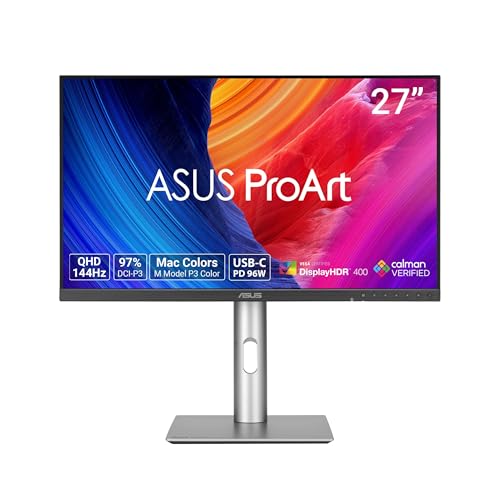 ASUS ProArt PA278CGRV 27 Inch 1440p USB-C Professional27 Inch7.5 x 24.1 x 21.1 inches14.6 poundsCheck on Amazon

A small business monitor works harder than a gaming monitor. It has to look sharp on a client video call at 9 a.m., hold invoices, spreadsheets, email, and a browser open at once, survive an eight-hour day, and still be good enough to game on after hours — all for under $300, with no IT department.
Here is the honest framing up front: $300 buys a monitor, not the whole business setup. The cheapest honest full desk — monitor plus webcam plus headset — only fits on the cheapest pick in this guide.
Our top pick is the Dell S2725QC at $299.99: a 27-inch 4K IPS panel with a true 120Hz refresh rate, 99% sRGB, USB-C with 65W laptop charging, a built-in hub, and built-in speakers. It fits by one cent, and only at the $299.99 reading — Dell’s own store lists it at $349.99, so check the current price before buying. Prices checked November 2026; they move.
As an Amazon Associate, we earn from qualifying purchases.
Our top picks

Best for: A laptop-first small business that wants one monitor to do everything and can buy the webcam separately
Check price on Amazon
Best for: A desktop-only small business, or a two-person business buying a matched pair, where the PC never leaves the desk
Check price on Amazon
Best for: A small business on a tight budget that wants a real desk — monitor, arm, and webcam — for under $300, and games casually
Check price on Amazon
Best for: A small business that needs a complete video-call setup for $300 today, or one buying two big matching screens on the tightest budget
Check price on AmazonQuick Picks
| Pick | Monitor | Price | Why it wins for a small business |
|---|---|---|---|
| Top pick | Dell S2725QC | $299.99 | USB-C 65W hot-desking, speakers, 120Hz, sharpest text |
| Best value | Dell S2725QS | $279.99 | Same 4K 120Hz panel, has DisplayPort, $20 cheaper |
| Budget pick | ASUS VY27UQ | $217–$257 | Cheapest 4K with 99% sRGB; only desk with an arm fits |
| Biggest screen | Samsung ViewFinity S71H | $189.99 | Only 32-inch 4K under $300; only full call desk fits |
| Color-accurate pick | ASUS ProArt PA278CGRV | $299 | Delta E < 2 and KVM, but 1440p, not 4K |
How to Choose a 4K Gaming Monitor for a Small Business
Start with text clarity, not refresh rate. A business monitor is a reading machine. At 27 inches, 4K packs 163 pixels per inch, making invoice numbers and spreadsheet cells visibly sharper than the roughly 138 pixels per inch of a 32-inch 4K panel. For document-heavy days, the 27-inch panel is the better business tool.
Count the windows, not the monitors. One 4K screen is four 1080p windows side by side with no bezel in the middle. Two Samsung S71H panels cost $379.98 against $599.98 for two Dell S2725QCs — but first ask whether one good 4K screen replaces two mediocre ones.
USB-C is a hot-desking feature, not a luxury. If anyone plugs a laptop into the desk, a monitor with USB-C video and charging turns it into a one-cable dock: the laptop charges, the screen lights up, and the hub powers the keyboard and mouse. The Dell S2725QC delivers 65W, enough for most business ultrabooks; the ASUS ProArt PA278CGRV delivers 96W, enough for heavier laptops. Monitors with no USB-C need a separate dock costing $50 or more.
Client calls and warranty are business specs. Built-in speakers mean you can hear a call without headphones, and no monitor here has a built-in webcam — the honest webcam budget in November 2026 is $38–$40, not the $30 older guides quoted. A monitor that dies in year two takes the workday down with it: Dell and ASUS back theirs with 3 years, Samsung with 1.
1. Dell S2725QC — Our Top Pick
Specs: 27-inch 4K IPS, 3840 x 2160, 120Hz, 99% sRGB, 163 ppi, USB-C 65W with DisplayPort Alt Mode, 2x HDMI 2.1, 3-port USB hub, 2x 5W speakers, height/tilt/swivel/pivot stand, 3-year Dell warranty. Price checked November 2026: $299.99 on Amazon; $349.99 at Dell direct. Check price on Amazon
One USB-C cable charges a laptop at 65W, carries the picture, and powers the hub, and the speakers work for client calls. The catch is the price: it fits by exactly $0.01, and only at the $299.99 Amazon reading, while Dell’s own store lists it at $349.99. At $349.99 it is $50 over budget — buy the S2725QS below, or wait. The other catch is the port fork, confirmed in Dell’s May 2026 manual: the QC has no DisplayPort, so a desktop with only DisplayPort out needs the QS instead. Desk math: monitor plus a $38 webcam is $337.99.
Pros: Sharpest text in the guide at 163 ppi; one-cable USB-C hot-desking at 65W; speakers good enough for client calls; true 120Hz; 3-year warranty.
Cons: Fits by $0.01 only at $299.99 — $349.99 at Dell direct; no DisplayPort; no money left for a webcam.
Best for: A laptop-first small business that wants one monitor to do everything and can buy the webcam separately.
2. Dell S2725QS — Best Value
Specs: 27-inch 4K IPS, 3840 x 2160, 120Hz, 99% sRGB, 163 ppi, DisplayPort 1.4, 2x HDMI 2.1, no USB hub, no speakers, height/tilt/swivel/pivot stand, 3-year Dell warranty. Price checked November 2026: $279.99 on Amazon; catalog readings $269.90–$299.99. Check price on Amazon
The QS is the same 4K 120Hz panel as the QC, minus the USB-C port, the hub, and the speakers, for $20 less. That $20 is half a webcam. More importantly, the QS has the DisplayPort the QC lacks, making it the right pick for a desktop-only business where the PC sits under the desk and never moves. The trade-offs are real: no USB-C docking, and no speakers, so calls need headphones. Desk math: $279.99 plus a $38 webcam is $317.99, missing by $17.99. Two cost $559.98, $40 less than two QCs.
Pros: Same sharp 4K 120Hz panel as the top pick for $20 less; has the DisplayPort the QC lacks; 3-year warranty; cheapest honest dual 27-inch 4K desk.
Cons: No USB-C, so no one-cable laptop docking; no USB hub; no speakers, so client calls need a headset; monitor plus webcam still misses by $17.99.
Best for: A desktop-only small business, or a two-person business buying a matched pair, where the PC never leaves the desk.
3. ASUS VY27UQ — Budget Pick
Specs: 27-inch 4K IPS, 3840 x 2160, 60Hz, 99% sRGB, 163 ppi, DisplayPort 1.4, 2x HDMI, built-in speakers, Eye Care Plus low blue light, height/tilt/swivel/pivot stand, 3-year ASUS warranty. Price checked November 2026: $217–$257; catalog readings $229 brand-direct and $226.71 at an authorized retailer. Check price on Amazon
The VY27UQ is the cheapest real 4K monitor with 99% sRGB in this guide, and the gap is large enough to change what the desk can be. At $217, the only full desk under $300 fits: VY27UQ at $217 plus a monitor arm at $37.99 plus a webcam at $38 is $292.99, with $7.01 to spare. The trade is refresh rate: 60Hz instead of 120Hz. For documents and video calls, 60Hz is fine. HDMI trap: the ports use TMDS, not FMC, so use DisplayPort for full 4K. The old $150–$170 price is dead; November readings start at $217.
Pros: Cheapest 4K with 99% sRGB; same 163 ppi text sharpness as the Dell picks; only monitor where a full desk with an arm fits under $300; built-in speakers; 3-year warranty.
Cons: 60Hz, not 120Hz; HDMI is TMDS-limited, so use DisplayPort; the old $150–$170 price is dead.
Best for: A small business on a tight budget that wants a real desk — monitor, arm, and webcam — for under $300, and games casually.
4. Samsung ViewFinity S71H — Biggest Screen
Specs: 32-inch 4K IPS, 3840 x 2160, 60Hz, HDR10, Eye Saver Mode, HDMI, DisplayPort, height/tilt/swivel stand, 1-year Samsung warranty. Price checked November 2026: $189.99 at an authorized retailer; a second authorized reading at $199.99. Check price on Amazon
The S71H is the only 32-inch 4K monitor under $300, and the cheapest monitor in this guide by $27. That gap buys the only complete call desk here: $189.99 plus a $38 webcam plus a $64.99 headset is $292.97, with $7.03 to spare. The trade is text sharpness: at 32 inches, the same 4K resolution gives about 138 pixels per inch instead of 163, so invoice numbers and spreadsheet cells are visibly less crisp. The second trade is warranty: 1 year against 3 years on the Dell and ASUS picks — the hidden cost of the low price. Two cost $379.98 — the cheapest matched pair here.
Pros: Only 32-inch 4K under $300; only pick where a full client-call desk — monitor, webcam, and headset — fits under $300; cheapest matched pair at $379.98.
Cons: About 138 ppi, so text is less sharp than the 27-inch picks; 60Hz; 1-year warranty against 3 years on the Dell and ASUS picks; no USB-C and no hub.
Best for: A small business that needs a complete video-call setup for $300 today, or one buying two big matching screens on the tightest budget.
5. ASUS ProArt PA278CGRV — Color-Accurate Pick
Specs: 27-inch 1440p IPS, 2560 x 1440, 144Hz, Delta E < 2, Calman Verified, 97% DCI-P3, 100% sRGB, Auto KVM, USB-C 96W with DisplayPort Alt Mode, DisplayPort, HDMI, USB hub, height/tilt/swivel/pivot stand, 3-year ASUS warranty. Price checked November 2026: $299. Check price on Amazon
Honest exception: this is not 4K. It is 1440p, about 109 ppi at 27 inches — visibly softer text than every other pick. For one kind of business — a print shop, photo studio, or design freelancer — color accuracy matters more than resolution: Delta E under 2 with Calman verification means screen color matches paper far more closely than any 4K panel here. Auto KVM switches one keyboard and mouse between two computers, and USB-C delivers 96W, the most here. For documents, invoices, and calls, buy the Dell instead: at $299 the ProArt leaves exactly $1 for a webcam that costs $38.
Pros: Delta E < 2, Calman Verified color — the most accurate in this guide; Auto KVM for two computers; 96W USB-C, the strongest charging here; 144Hz; 3-year warranty.
Cons: 1440p, not 4K — about 109 ppi, the softest text in the guide; $299 leaves no room for a webcam; color accuracy is wasted on documents-and-calls work.
Best for: A design, photo, or print business where a client approves color on screen, or a two-machine desk that needs KVM and 96W charging more than 4K.
What to Avoid
The “100W USB-C” LG 27US500-W claim — corrected. Our batch 188 guide flagged the LG 27US500-W at $249.99 as reportedly carrying 100W USB-C, marked unverified. We have now checked: LG’s own listing shows HDMI and DisplayPort only, and comparison data lists no USB port at all. The 100W claim is wrong. The 27US500-W is a 4K 60Hz panel with no USB-C, no hub, and no docking — it needs a separate dock to do what the Dell QC does over one cable.
The BenQ PD2706QN at $299.99. It appears in the catalog at $299.99 with 90W USB-C and a built-in KVM. But it is a 1440p panel — at the same $299 as the 4K Dell S2725QC, you are paying 4K money for fewer pixels.
Ports bought blind. The Dell QC has no DisplayPort; the Samsung has no USB-C; the ASUS VY27UQ’s HDMI is bandwidth-limited. None are defects, but each is a trap if you buy without checking your own ports first.
Dead prices and scam listings. The VY27UQ’s $150–$170 price is dead, with November readings starting at $217. The same pattern applies across this series: a fake RTX 4060 listing at $119.99 keeps reappearing in catalog searches. It is a scam listing, not a deal.
A capture card as a business expense. The Elgato 4K S costs $159.99, but its HDMI 2.0 passthrough tops out at 4K60, and HDR capture is limited to 1080p60 on Windows. A $300 monitor plus a $160 capture card is a $460 project, not a $300 one.
FAQ
Can a small business really get a 4K gaming monitor for under $300?
Yes. The Dell S2725QC is a genuine 4K 120Hz panel with USB-C at $299.99, the Samsung S71H is a genuine 32-inch 4K panel at $189.99, and the ASUS VY27UQ is a genuine 4K panel at $217.
Which monitor is best for client video calls?
The Samsung S71H, because it is the only pick where the monitor, a $38 webcam, and a $64.99 headset all fit under $300 together at $292.97. The Dell S2725QC has the best speakers and the sharpest image, but at $299.99 there is no money left for the webcam.
Do I need USB-C on a business monitor?
Only if a laptop ever plugs into the desk. For a fixed desktop, USB-C adds nothing. For a laptop or a shared desk, USB-C is the difference between one cable and three, and the Dell QC at 65W or the ProArt at 96W covers it.
Is 32-inch 4K or 27-inch 4K better for office work?
27-inch for reading, 32-inch for presence. The 27-inch panel’s 163 pixels per inch makes small text sharper, which is what eight hours of documents rewards. The 32-inch panel’s size makes video calls and meeting-room viewing better, and four windows feel roomier.
What does the $300 budget not cover?
On the Dell picks, everything except the monitor: the QC plus a $38 webcam is $337.99, and a headset takes it near $400. On the VY27UQ, an arm and webcam fit at $292.99; on the Samsung, a webcam and headset fit at $292.97. No all-four combo fits; the cheapest one is about $331.
Verdict
For most small businesses, buy the Dell S2725QC at $299.99 — but only at the $299.99 reading. It is the sharpest text, the best client-call speakers, the only one-cable laptop dock, and a 3-year warranty. If the price shows $349.99 on the day you buy, do not pay it under a $300 budget: buy the Dell S2725QS at $279.99 instead and put the $20 toward the webcam.
If the whole desk has to fit under $300, the choice splits by need. A desk with an arm means the ASUS VY27UQ at $217 plus arm and webcam at $292.99. A desk ready for client calls on Monday means the Samsung S71H at $189.99 plus webcam and headset at $292.97. Color-critical work means the ASUS ProArt PA278CGRV at $299, with eyes open about 1440p text.
The honest summary is the same as every guide in this series: $300 buys a monitor, not the whole business setup. What changed is that the monitor itself is finally, genuinely good — 4K, 120Hz, USB-C, and sharp enough to read all day. Buy the monitor now, budget the webcam separately, and check the price first — the one-cent margin leaves no room for a move.
Suggested Internal Links
- Best 4K Gaming Monitor for Home Office Under $300
- Best 4K Gaming Monitor for Students Under $300
- Best 4K Gaming Monitor for Streaming Under $300
More from Amazon
Programs that pair well with the guide above. Offers and eligibility are set by Amazon and may change.
Free shipping on eligible items, Prime Video and more. Eligible new members can start with a free trial.
Start a Prime free trialAudiobooks and podcasts to listen to on the go. Eligible new members can start with a free trial.
Try Audible freeAd-free music streaming. Eligible new subscribers can start with a free trial.
Try Music Unlimited freeA free business account with business pricing and bulk-buying tools for work, shop or home office.
Create a business accountAs an Amazon Associate we earn from qualifying purchases.

Write Your Review
No reviews yet. Be the first to share your experience!