

Our Top Picks
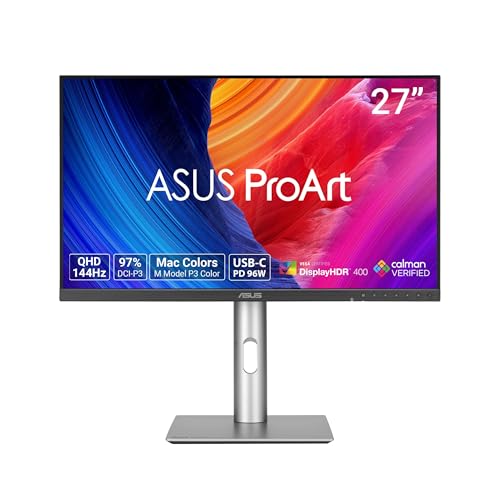 ASUS ProArt PA278CGRV 27 Inch 1440p USB-C Professional27 Inch7.5 x 24.1 x 21.1 inches14.6 poundsCheck on Amazon

A student buying a 4K gaming monitor under $300 is really buying two things at once: a study screen and a gaming screen. The same panel must render tiny textbook text crisply at 9 a.m., hold two windows side by side during a group project, and still run games at 4K in the evening. The honest news up front is that $300 buys a monitor, not the whole setup — no pick here leaves room for a monitor arm, a webcam, and a headset all at once. What $300 does buy, as of November 2026, is a genuinely good 4K panel, and on the cheapest pick, enough change for two of the three accessories.
Prices were checked against Amazon US and retailer listings in November 2026 — check the current price before buying.
As an Amazon Associate, we earn from qualifying purchases.
Our top picks

Best for: Students whose laptop charges over USB-C and who want one cable between laptop and desk
Check price on Amazon
Best for: Students with a desktop PC, or laptop owners who already own a USB-C dock
Check price on Amazon
Best for: Students on the tightest budget who want 4K text clarity and money left for a webcam and an arm
Check price on Amazon
Best for: Students with a wide desk who want the biggest study screen and the most money left for accessories
Check price on Amazon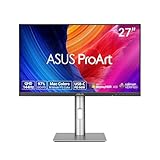
Best for: Design, photography, and video students who need verified color accuracy more than 4K text sharpness
Check price on AmazonQuick Picks
| Monitor | Price | Best For |
|---|---|---|
| Dell S2725QC | $299.99 | Best overall — USB-C single-cable laptop docking |
| Dell S2725QS | $279.99 | Best value 4K 120Hz — same panel, no USB-C |
| ASUS VY27UQ | $217–$257 | Best budget 4K — the only pick with room for extras |
| Samsung ViewFinity S71H | $189.99 | Biggest screen — only 32-inch 4K under $300 |
| ASUS ProArt PA278CGRV | $299 | Best color accuracy — but 1440p, not 4K |
How to Choose
Start with text clarity, not refresh rate. You will stare at words far longer than games. A 27-inch 4K IPS panel packs about 163 pixels per inch, making small fonts sharp in a way no 1440p panel at the same size can match. IPS also means wide viewing angles, useful when a roommate leans over to look at your screen. Every 4K pick here is IPS — do not buy a TN panel in 2026.
Measure the desk before you buy. A dorm desk is often 36 to 42 inches wide and 20 to 24 inches deep, and a 32-inch monitor on its included stand can eat half of it. A 27-inch panel is the safer dorm size, leaving room for a laptop, a notebook, and a coffee mug. If your desk is under 24 inches deep, budget for a monitor arm: most stock stands push the screen 8 to 9 inches from the wall, and a basic gas-spring arm costs about $38.
USB-C is the dorm-room superpower. Most students game and study on a laptop, and a monitor with USB-C power delivery turns one cable into video, charging, and a USB hub. The Dell S2725QC is the only pick here with that feature, delivering up to 65W — enough for most 13- and 14-inch laptops. If your laptop has no USB-C video output, check your laptop’s ports first — the feature is worth nothing without it.
Split-screen study, eye care, and textbooks. A 27-inch 4K screen split in half gives two windows each effectively 1920 pixels wide. A 1440p screen split the same way gives two cramped 1280-pixel windows. Look for flicker-free backlights and a low-blue-light mode; all five picks carry some eye-care certification. Dell and ASUS offer three-year warranties; Samsung’s S71H carries one year, so keep the original box. Finally, one new textbook costs roughly $100 to $200 — rent textbooks or use the library reserve copy.
1. Dell S2725QC — Best Overall
Specs: 27-inch 4K IPS, 3840 × 2160, 120Hz, AMD FreeSync Premium, 99% sRGB, USB-C with 65W power delivery, 2× HDMI 2.1, 2× USB-A downstream, 2× 5W speakers, height/tilt/swivel/pivot stand, $299.99.
The S2725QC is the best 4K gaming monitor for students under $300, and it fits by exactly one cent — but only at the $299.99 reading. Dell’s own store lists it at $349.99, so $299.99 is a deal reading, not the everyday price. At $299.99 it is the only monitor here that does everything a student needs with nothing extra to buy: 4K at a true 120Hz, USB-C laptop charging, a hub for keyboard and mouse, speakers for lectures, and a fully adjustable stand.
Pros: True 120Hz 4K panel; USB-C 65W single-cable docking; 99% sRGB; fully adjustable stand; built-in speakers.
Cons: Fits by $0.01 only at the $299.99 reading — Dell direct is $349.99; no DisplayPort input; 65W will not fully power a gaming laptop under load.
Best for: Students whose laptop charges over USB-C and who want one cable between laptop and desk.
Honest desk math: $299.99 leaves $0.01 — no arm, no webcam, no headset. If you need a webcam for online classes now, buy the QS or the Samsung instead.
2. Dell S2725QS — Best Value 4K 120Hz
Specs: 27-inch 4K IPS, 3840 × 2160, 120Hz, AMD FreeSync Premium, 99% sRGB, 2× HDMI 2.1, 1× DisplayPort 1.4, 2× 5W speakers, height/tilt/swivel/pivot stand, $279.99.
The S2725QS is the same 4K 120Hz panel as the QC, minus the USB-C port, for $20 less — the cheapest way to get a true 120Hz 4K IPS panel with 99% sRGB from a major brand. The QS reads $269.90 at one authorized retailer and $279.99 at others, so $279.99 is a fair street price. What you give up is the single-cable dream: your laptop needs its own charger and video cable.
Pros: Same 4K 120Hz 99% sRGB panel as the QC for $20 less; has the DisplayPort the QC lacks; fully adjustable stand; honest street price.
Cons: No USB-C at all — no single-cable docking, no laptop charging, no hub; $20 saved buys no accessory on its own.
Best for: Students with a desktop PC, or laptop owners who already own a USB-C dock.
Honest desk math: $279.99 leaves $20.01, which buys nothing on the accessory list: a basic arm is about $38, a decent webcam $38–$40, and even a budget headset $65.
3. ASUS VY27UQ — Best Budget 4K
Specs: 27-inch 4K IPS, 3840 × 2160, 60Hz, HDR10, 99% sRGB, 1× DisplayPort 1.2, 2× HDMI 2.0, 2× 2W speakers, Eye Care Plus, tilt-only stand, $217–$257.
The VY27UQ is the cheapest real 4K monitor in this guide, and the only pick that leaves genuine room for accessories. It reads $229 at the ASUS store and $226.71 at an authorized retailer, with others up to $257 — so budget $217 to $257 and verify the reading before you buy. It read $150–$170 in October 2026; November reads are $217 and up. What you give up is refresh rate: a 60Hz panel with HDMI 2.0 — fine for study, less smooth than 120Hz in fast games.
Pros: Cheapest real 4K panel here at $217–$257; 99% sRGB at a budget price; strongest eye-care feature set; DisplayPort included; leaves room for accessories.
Cons: 60Hz only; HDMI 2.0, not 2.1; tilt-only stand with no height adjustment; weak 2W speakers; the old $150–$170 price is gone.
Best for: Students on the tightest budget who want 4K text clarity and money left for a webcam and an arm.
Honest desk math: At $217, the VY27UQ plus a basic monitor arm ($37.99) plus a webcam ($38) totals $292.99 — the only full student desk here that fits under $300 with an arm included. A $64.99 headset on top pushes the total to $357.98, so prioritize the webcam.
4. Samsung ViewFinity S71H — Biggest Screen
Specs: 32-inch 4K IPS, 3840 × 2160, 60Hz, HDR10, 99% sRGB, 1× DisplayPort 1.2, 1× HDMI 2.0, Eye Saver Mode, tilt-only stand, $189.99.
The S71H is the only 32-inch 4K monitor under $300, and at $189.99 the cheapest pick here by a wide margin — with one big condition: measure your desk first. A 32-inch panel is about 28 inches wide, and on a 36-inch dorm desk it leaves almost no room for anything else. If your desk is 48 inches or wider, the S71H is a genuine luxury for split-screen study. There is no USB-C, no speakers worth mentioning, and no height adjustment — the stand tilts only — and the one-year warranty is the thinnest here.
Pros: Only 32-inch 4K under $300; cheapest pick by $27; biggest split-screen study canvas; 99% sRGB; largest leftover budget for accessories.
Cons: 32 inches overwhelms a standard dorm desk; 60Hz only; tilt-only stand; no USB-C and no usable speakers; one-year warranty is the shortest here.
Best for: Students with a wide desk who want the biggest study screen and the most money left for accessories.
Honest desk math: $189.99 plus a webcam ($38) plus a headset ($64.99) totals $292.97 — the only desk here that fits a monitor, a webcam, and a headset under $300. A $37.99 arm on top pushes the total to $330.96, so use the included stand.
5. ASUS ProArt PA278CGRV — Best Color Accuracy (1440p, Not 4K)
Specs: 27-inch 1440p IPS, 2560 × 1440, 144Hz, Delta E < 2, Calman Verified, 97% DCI-P3, USB-C with 96W power delivery, Auto KVM, 2× 2W speakers, height/tilt/swivel/pivot stand, $299.
This pick breaks the 4K rule on purpose, because some students should break it. The PA278CGRV is a 1440p panel, not 4K — say that plainly before anything else. What it offers in exchange is color accuracy no 4K panel under $300 can match: Delta E under 2, Calman Verified, and 97% DCI-P3 coverage, the wide color gamut that photography, video, and design coursework actually needs. It also has 96W USB-C and an Auto KVM switch. For design students, color accuracy is a grade and 4K is a luxury. For everyone else, 1440p is a real downgrade in text clarity: at 27 inches it renders about 109 pixels per inch against 163 for 4K.
Pros: Delta E < 2 with Calman Verification; 97% DCI-P3 for design work; 96W USB-C — the strongest laptop charging here; Auto KVM for laptop-plus-desktop setups; 144Hz, the fastest refresh rate here.
Cons: 1440p, not 4K — text is visibly softer than every other pick; $299 leaves nothing for accessories; 2W speakers are weak.
Best for: Design, photography, and video students who need verified color accuracy more than 4K text sharpness.
Honest desk math: $299 leaves $1 — no webcam, no arm, and no headset in this budget. If your classes are on camera, this pick forces a second purchase.
What to Avoid
The $150 4K monitor listing. In October 2026 the VY27UQ briefly read $150–$170, and stale roundups still quote it. Current November reads are $217 and up. Any listing still showing $150 for a new 4K monitor from a name brand is a dead price, a marketplace seller with no stock, or a different panel wearing a familiar name.
HDMI TMDS traps. Some budget 4K monitors use HDMI ports limited to 4K at 30Hz — fine for a static document, miserable for games and video. The VY27UQ avoids this with HDMI 2.0 at 4K 60Hz, but no-name 4K panels under $200 often do not.
The fake RTX 4060 $119.99 listing. A brand-direct listing for an RTX 4060 at $119.99 has surfaced repeatedly in catalog searches through November 2026. A real RTX 4060 costs several times that.
Console streaming gear that eats the monitor budget. An Elgato 4K S capture card costs $159.99 — but it has HDMI 2.0, so passthrough tops out at 4K60, meaning a console streamer on a 4K 120Hz monitor plays at 4K60 through the card, and HDR capture only reaches 1080p60 on Windows. A capture card plus any monitor here blows past $300 anyway.
Overpriced accessories and no-brand panels. A $38 basic gas-spring arm is sensible; a $120 premium arm on a $190 monitor is not — it eats the money that should have bought the webcam your classes require.
FAQ
Can a student really get a good 4K gaming monitor for under $300?
Yes — as of November 2026, genuinely. The Dell S2725QC at $299.99 and the S2725QS at $279.99 are true 120Hz 4K IPS panels with 99% sRGB, and the ASUS VY27UQ at $217–$257 and the Samsung S71H at $189.99 are real 4K panels from major brands.
Is 120Hz worth it over 60Hz for a student?
For study, barely — scrolling is smoother, but 60Hz is perfectly usable for reading and writing. For gaming, yes, noticeably: fast games feel more responsive at 120Hz.
Do I need USB-C on my monitor?
Only if your laptop outputs video over USB-C, which most laptops made since 2020 do. Check your specs for “DisplayPort Alt Mode” or a Thunderbolt port. If it has one, USB-C docking is the single biggest quality-of-life upgrade in this guide.
What is the cheapest honest full student desk under $300?
The Samsung S71H at $189.99 plus a webcam at about $38 plus a headset at $64.99 totals $292.97, using the included stand. If you need an arm instead of a headset, the ASUS VY27UQ at $217 plus a $37.99 arm plus a $38 webcam totals $292.99.
Should I buy the 1440p ProArt instead of a 4K monitor?
Only if your coursework grades color accuracy — photography, graphic design, or video editing with a calibrated workflow. The PA278CGRV’s Delta E under 2 and 97% DCI-P3 are real professional credentials. For every other student, 4K text clarity matters more.
Verdict
The best 4K gaming monitor for students under $300 is the Dell S2725QC at $299.99 — but only if you catch it at that price, and only if your laptop charges over USB-C. It is the only pick that is a complete student desk in a single box: true 120Hz 4K, 99% sRGB, one-cable docking, and a stand that adjusts every way a dorm desk demands. The catch is absolute: at $299.99 there is $0.01 left, and at Dell’s $349.99 direct price it is not under $300 at all. Verify the price before you buy.
If the QC reads over $300 when you check, buy the Dell S2725QS at $279.99 and accept the extra cables. If your budget needs breathing room, buy the ASUS VY27UQ at $217–$257 and spend the change on a monitor arm and a webcam. If your desk is wide and your wallet is thin, buy the Samsung ViewFinity S71H at $189.99 and add the webcam and headset for $292.97 all in. And if your degree grades color, buy the ASUS ProArt PA278CGRV at $299.
Whatever you buy, remember the honest framing: $300 buys a monitor, not the whole setup. Pick the panel first, count the desk second, and let the accessories wait a month rather than buying a worse panel to afford them today.
Suggested Internal Links
- Best 4K Gaming Monitor for Office Under $300
- Best 4K Gaming Monitor for Streaming Under $300
- Best 4K Gaming Monitor for Video Editing Under $300
More from Amazon
Programs that pair well with the guide above. Offers and eligibility are set by Amazon and may change.
Free shipping on eligible items, Prime Video and more. Eligible new members can start with a free trial.
Start a Prime free trialAudiobooks and podcasts to listen to on the go. Eligible new members can start with a free trial.
Try Audible freeAd-free music streaming. Eligible new subscribers can start with a free trial.
Try Music Unlimited freeA free business account with business pricing and bulk-buying tools for work, shop or home office.
Create a business accountAs an Amazon Associate we earn from qualifying purchases.

Write Your Review
No reviews yet. Be the first to share your experience!