

Our Top Picks
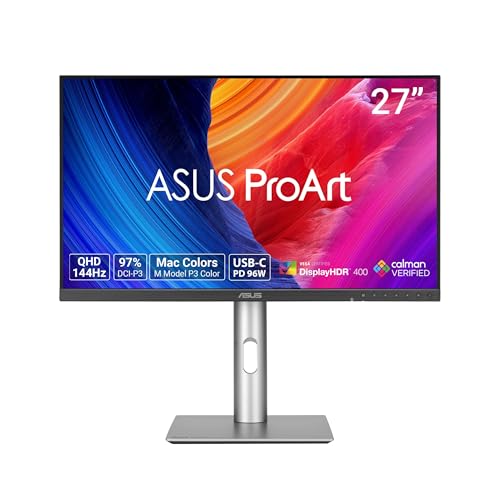 ASUS ProArt PA278CGRV 27 Inch 1440p USB-C Professional27 Inch7.5 x 24.1 x 21.1 inches14.6 poundsCheck on Amazon
A year ago this guide would have been one sentence: there is no 4K gaming monitor under $300, only 60Hz office panels that happen to take a 4K signal. The BenQ PD2706U, the cheapest true-4K panel this family has ever picked, is $399.99. That was the wall.
The wall has cracked. The pick is a name-brand panel with a real 120Hz refresh: the Dell 27 Plus 4K S2725QS at $279.99 — a 27-inch 4K IPS panel at 120Hz with two full HDMI 2.1 ports and speakers. It is the first 4K gaming monitor under $300, not an office panel.
$300 buys the monitor, not the 4K setup: the cheapest card that can drive 4K, the RTX 5060, is $450 in stock at Amazon. Prices are a November 2026 snapshot — check the current price on Amazon before you buy.
Our top picks
Best for: The desk that wants one 4K panel for work, console, and PC — the sharpest screen in this family
Check price on Amazon
Best for: The gamer who wants the fastest 4K panel under $300 and will use a headset anyway
Check price on Amazon
Best for: The desk that wants 4K sharpness for work and slow games, at the lowest name-brand price
Check price on Amazon
Best for: The desk that wants the biggest 4K image under $300 and sits far enough back to enjoy it
Check price on Amazon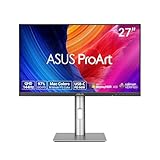
Best for: The gamer who wants the smoothest play under $300 — and will take 1440p to get it
Check price on AmazonQuick Picks
| Monitor | Price | Key Spec | Best For |
|---|---|---|---|
| Dell S2725QS | $279.99 | 27″ 4K IPS, 120Hz, HDMI 2.1, speakers | Best overall |
| Acer Nitro VG270K | $249.99 | 27″ 4K IPS, 160Hz, FHD 320Hz dual mode | Fastest refresh |
| LG 27US500-W | $249.99 | 27″ 4K IPS, 60Hz, DisplayHDR 400 | Cheapest name-brand 4K |
| Samsung ViewFinity S71H | $289.99 | 32″ 4K IPS, 60Hz, HDR10 | Biggest 4K |
| ASUS ProArt PA278CGRV | $299 | 27″ 1440p, 144Hz, ΔE < 2, Auto KVM | Best 1440p alternative |
How to Choose a 4K Gaming Monitor for Gaming Under $300
4K at 27 inches or 32 inches is a density question. A 27-inch 4K panel packs 163 pixels per inch; a 32-inch 4K panel holds 140. The 27-inch panel renders sharper text — the Dell S2725QS at 163 PPI is the sharpest screen this family has ever picked. The 32-inch panel is the better gaming size: bigger text at 100% scaling and a more immersive image. Buy 27 inches for sharpness, 32 inches for presence.
Refresh rate was the old trade — and it is the first thing to check. A 4K panel at $300 used to mean 60Hz, full stop. The Dell breaks that at 120Hz and the Acer at 160Hz. But 120Hz on the box is not 120 fps in the game: a mid-range card will not hold 120 fps at 4K in demanding games. Esports titles can; AAA games will run closer to 60.
HDMI 2.1 is the console question, DisplayPort is the PC question. A console needs HDMI 2.1 to carry 4K at 120Hz — and the port has to be full-bandwidth HDMI 2.1 with FRL, not “HDMI 2.1 (TMDS)”, which is HDMI 2.0-class bandwidth wearing a newer label. The Dell’s two HDMI ports are full FRL, which is why it is the console pick here. A PC can use DisplayPort 1.4 for 4K at 120Hz instead.
HDR on a $300 4K panel is a sticker, not a feature. The ceiling here is DisplayHDR 400: 350 to 400 nits, no local dimming, an HDR signal on a panel that cannot show real HDR. The only real HDR under $300 this family has found is the 1440p Mini-LED KTC M27T6S at $250–$260.
The GPU is the honest math. The panel is $300; the card that drives it is $450. A used RTX 3060 Ti at $295 (US median sold, pcprice.watch, November 18) is the cheapest card with a real 4K claim, the RTX 4060 is $437 in stock at Amazon, and the RTX 5060 is $450 — only $13 more, faster, with DLSS 4.
The Honest 4K Math: What $300 Really Buys
| Setup | Total |
|---|---|
| LG 27US500-W + arm $30 | $279.99 |
| Acer Nitro VG270K + arm $30 | $279.99 |
| Dell S2725QS on the stock stand | $279.99 |
| Samsung ViewFinity S71H + arm $30 | $319.99 |
| Dell S2725QS + arm $30 + hub $22 | $331.99 |
The full desk fits $300 only on the $250 picks with just an arm. The Dell’s honest desk is $331.99 with an arm and a hub — $31.99 over. And the setup math is the part the monitor budget hides: Dell $279.99 + RTX 5060 $450 = $729.99 for a PC that can actually game at 4K.
1. Dell S2725QS — $279.99
Specs: 27-inch IPS, 3840×2160, 120Hz, 350 nits, 1500:1 contrast, 99% sRGB, 163 PPI, 2× HDMI 2.1 (full FRL), DisplayPort 1.4, FreeSync Premium, 2×5W speakers, height / tilt / pivot stand, VESA 100×100, 3-year warranty.
The pick, and the reason the wall cracked: a name-brand 4K panel at a real 120Hz for $279.99 at Amazon right now, against a $299.99 list — and it has been down near $218 in the summer, so the honest budget is $218–$300. Two full HDMI 2.1 ports carry a console at 4K 120Hz, DisplayPort 1.4 carries a PC at the same, and RTINGS confirmed 4K at 120Hz and VRR.
Honest flag: this is a work monitor with gaming capability, not a dedicated gaming monitor. RTINGS found its pixel response relatively slow, so fast-moving scenes can look blurry — the 5ms-class response is the trade for 120Hz at this price. And there is no USB at all: no USB-C, no USB hub, no headphone output.
Pros: Real 4K 120Hz under $300; full HDMI 2.1 for consoles; speakers and a proper stand
Cons: Slow pixel response blurs fast motion; no USB-C, hub, or headphone jack; HDR is basic
Best for: The desk that wants one 4K panel for work, console, and PC — the sharpest screen in this family.
2. Acer Nitro VG270K — $249.99
Specs: 27-inch IPS, 3840×2160, 160Hz, FHD 320Hz dual mode (DFR), FreeSync Premium, HDR, DisplayPort, HDMI, VESA, 3-year warranty.
The fastest refresh per dollar in this guide: a 4K panel at 160Hz for $249.99 live (wikigamingpc, November 17), with a catalog read at $229.99 — honest $230–$250. The dual mode is the trick: 4K at 160Hz for the slow, pretty game, and 1080p at 320Hz for the fast one.
Honest flag: speed is the whole story here, and the rest of the monitor is thinner. There are no speakers listed, no USB-C, and no height adjustment worth writing home about — budget the $30 arm. The panel’s pixel response is not stated in the catalog listing.
Pros: 4K 160Hz for $249.99; FHD 320Hz dual mode; $30 cheaper than the Dell
Cons: No speakers or USB-C; response time unmeasured; cheapest read is a poor-quality seller
Best for: The gamer who wants the fastest 4K panel under $300 and will use a headset anyway.
3. LG 27US500-W — $249.99
Specs: 27-inch IPS, 3840×2160, 60Hz, HDR10, DisplayHDR 400, HDMI, DisplayPort, VESA, tilt stand, 3-year warranty.
The cheapest name-brand 4K in this guide: $249.99 at an authorized retailer, with catalog reads at $240.99, $221.90, and $219.99 brand-direct — honest $220–$250. The honest desk is $279.99 with a $30 arm. It is the panel for the buyer who wants 4K sharpness and does not care about refresh rate.
Honest flag: 60Hz is the trade, stated plainly. This is a 60Hz panel in a guide where the top two picks run 120Hz and 160Hz. DisplayHDR 400 is the HDR sticker, not real HDR. And the stand tilts only, so the arm is not optional.
Pros: Cheapest name-brand 4K here; DisplayHDR 400; real warranty story
Cons: 60Hz in a 120Hz guide; tilt-only stand; HDR is a sticker
Best for: The desk that wants 4K sharpness for work and slow games, at the lowest name-brand price.
4. Samsung ViewFinity S71H — $289.99
Specs: 32-inch IPS, 3840×2160, 60Hz, HDR10, HDMI, DisplayPort, VESA, 3-year warranty.
The biggest 4K in this guide: a 32-inch IPS 4K panel for $289.99 at an authorized retailer. At 140 PPI it is less sharp than the 27-inch picks, but it is the better gaming size. The honest desk is $319.99 with a $30 arm — $19.99 over — so buy it on the stock stand at $289.99.
Honest flag: a catalog read shows this panel at $199.99, unverified as the same 32-inch panel — the honest budget is $200–$290. It is 60Hz, like the LG. And at 32 inches the panel is the desk: measure the depth before you buy.
Pros: Only 32-inch name-brand 4K under $300; best gaming size; IPS viewing angles
Cons: 60Hz; full desk with an arm is $19.99 over; low catalog read unverified
Best for: The desk that wants the biggest 4K image under $300 and sits far enough back to enjoy it.
5. ASUS ProArt PA278CGRV — $299
Specs: 27-inch IPS, 2560×1440, 144Hz VRR, 5ms GtG, 350 nits, 97% DCI-P3 / 100% sRGB, Delta E < 2, Calman Verified, USB-C (96W PD), Auto KVM, DisplayPort 1.4 daisy chain, HDMI 2.1, USB hub, full ergonomic stand, VESA, 3-year warranty.
The honest alternative: a 1440p panel for the same $299. It led the home-lab and 4K-streaming guides, and it wins here for the opposite reason — it is a better gaming panel than any 60Hz 4K panel at this price. 144Hz against 60Hz, Delta E under 2 against an unrated panel, Auto KVM and 96W USB-C against no USB at all. ASUS’s own store lists it at $299 in stock.
Honest flag: it is not 4K. A 1440p panel takes a 4K signal and downscales it to 2560×1440 — the panel is the resolution, not the input. If the game is fast, or the GPU is mid-range, the 144Hz panel is the better buy.
Pros: 144Hz and ΔE < 2 for $299; Auto KVM + 96W USB-C + daisy chain; cheapest honest dock desk
Cons: Not 4K; no webcam, mic, or speakers; one letter from the older, pricier CGV
Best for: The gamer who wants the smoothest play under $300 — and will take 1440p to get it.
What to Avoid
A 1440p monitor sold as 4K. A 1440p monitor takes a 4K signal and downscales it to 2560×1440 — the panel is the resolution, not the input.
The no-name 4K 160Hz panel. The Z-Edge 27-inch 4K reads $224.99–$249.99, and the catalog title says 144Hz while a roundup says 160Hz — the refresh rate itself is disputed, and the 450-nit brightness claim is unverified. CUNPU and Gawfolk read $209.99 for a 4K 160Hz panel, AGEX $179.99 for a 4K 60Hz one, CRUA $150 for a 4K 120Hz one. No independent test, no warranty story.
The HDMI 2.1 (TMDS) trap. “HDMI 2.1 (TMDS)” is HDMI 2.0-class bandwidth with a newer label — a console on it gets 4K at 60Hz, not 4K at 120Hz. The Dell’s ports are full FRL. Check the port’s bandwidth, not its version number.
The HDR sticker. DisplayHDR 400 at 350 nits with no local dimming cannot show real HDR. The only real HDR under $300 this family has found is the KTC M27T6S Mini-LED at $250–$260 — a 1440p panel.
The old VA panel at a messy price. The Samsung UJ59 32-inch 4K VA reads $279.39 at one seller, $314.80 at another, and $339.99 brand-direct — a 2018-era panel with a tilt-only stand and 60Hz. Buy the S71H instead.
The QD-OLED burn-in trap, carried. The MSI MAG 272QP QD-OLED X24 at $349.99 is the best gaming picture under $500 — and the wrong panel for a static HUD: hours of the same health bar on the same pixels is the burn-in use case.
Still Doesn’t Fit
| Monitor | Real Price | Honest Budget |
|---|---|---|
| ASUS TUF VG27UQ1A 27″ 4K 160Hz G-SYNC | $329 | $329 |
| KTC 27″ 4K 160Hz | $339.99 | $340 |
| BenQ PD2706U 4K 60Hz | $399.99 | $400 |
| ASUS ProArt PA279CRV 4K 60Hz | $429 | $429 |
| ASUS ProArt Display OLED PA279CDV 4K 120Hz | $699 | $700 |
The ASUS TUF VG27UQ1A is the closest miss: a 27-inch 4K 160Hz Fast IPS panel with G-SYNC for $329 at the ASUS store — $29 over budget. The KTC 4K 160Hz reads $300 in a roundup but $339.99 in the catalog. The BenQ PD2706U at $399.99 is still the cheapest true-4K panel with a calibrated color story.
FAQ
What is the best 4K gaming monitor for gaming under $300?
The Dell S2725QS at $279.99 — a 27-inch 4K IPS panel at a real 120Hz, with two full HDMI 2.1 ports and speakers. The catch: slow pixel response, and no USB at all.
Can a $300 4K monitor really do 120Hz?
Yes — the Dell does 120Hz and the Acer VG270K does 160Hz, both under $300. But 120Hz on the box is not 120 fps in the game: a mid-range card will not hold 120 fps at 4K in demanding games.
Is 4K better at 27 inches or 32 inches for gaming?
27 inches is sharper — 163 PPI against 140 PPI at 32 inches — and 32 inches is more immersive, with bigger text at 100% scaling. Buy 27 inches for sharpness, 32 inches for presence.
Do I need HDMI 2.1 for a 4K gaming monitor?
For a console at 4K 120Hz, yes — and the port has to be full-bandwidth HDMI 2.1 with FRL, not “HDMI 2.1 (TMDS)”.
Is a 1440p 144Hz monitor better than a 4K 60Hz monitor for gaming?
For most gamers, yes. The ASUS PA278CGRV at $299 gives 144Hz, Delta E under 2, Auto KVM, and 96W USB-C, while a 60Hz 4K panel gives sharper pixels and a slower game. Buy 4K for the slow, pretty game; buy 1440p for the fast one.
Verdict
For 4K gaming under $300, the Dell S2725QS at $279.99 is the best monitor — a 27-inch 4K IPS panel at a real 120Hz, with two full HDMI 2.1 ports, FreeSync Premium, speakers, and a proper stand. Honest catches: slow pixel response blurs fast motion, HDR is basic, and there is no USB at all.
Fastest first: the Acer Nitro VG270K at $249.99 — 4K at 160Hz with a 1080p 320Hz dual mode — but no speakers or USB-C. Cheapest name-brand first: the LG 27US500-W at $249.99 — 4K sharpness with a real warranty — but 60Hz and a tilt-only stand. Biggest first: the Samsung ViewFinity S71H at $289.99 — the only 32-inch 4K under $300 — but 60Hz. Smoothest play first: the ASUS ProArt PA278CGRV at $299 — 144Hz, Delta E under 2, Auto KVM, 96W USB-C — but it is 1440p, not 4K.
As an Amazon Associate, we earn from qualifying purchases.
Suggested Internal Links
- Best 1440p Gaming Monitor for 4K Streaming Under $500
- Best 1440p Gaming Monitor for Competitive Gaming Under $500
- Best 1440p Gaming Monitor for Work from Home Under $500
More from Amazon
Programs that pair well with the guide above. Offers and eligibility are set by Amazon and may change.
Free shipping on eligible items, Prime Video and more. Eligible new members can start with a free trial.
Start a Prime free trialAudiobooks and podcasts to listen to on the go. Eligible new members can start with a free trial.
Try Audible freeAd-free music streaming. Eligible new subscribers can start with a free trial.
Try Music Unlimited freeA free business account with business pricing and bulk-buying tools for work, shop or home office.
Create a business accountAs an Amazon Associate we earn from qualifying purchases.

Write Your Review
No reviews yet. Be the first to share your experience!