

Key takeaways
- Canon PIXMA MX472 review: wireless office all-in-one with a 30-sheet ADF, built-in fax and AirPrint, plus FINE ink costs and limits to know first.
As an Amazon Associate we earn from qualifying purchases
The Canon PIXMA MX472 is an older office all-in-one that still shows up for sale years after its launch, which raises a fair question: does a discontinued inkjet with a document feeder and a fax modem still make sense? This canon pixma mx472 wireless office all-in-one printer review works through what the machine actually does, which of its headline features still hold up, and where its age shows. It is written for home-office users who print modest volumes, anyone replacing a worn-out MX-series Canon, and shoppers who have found one of the remaining new units and want to know what they are getting before they commit.
Two things frame everything below. First, this is a legacy model, so remaining stock is limited and the listing condition matters more than it would for a current printer. Second, the MX472 was built around office basics — a 30-sheet automatic document feeder, built-in fax, Wi-Fi printing and a front-loading design — rather than speed or photo quality. Judged on those basics, it has a clearer case than its age suggests.
Canon PIXMA MX472 Wireless Office All-in-One Printer Review: The Short Version
The MX472 is a four-in-one inkjet (print, scan, copy, fax) with built-in Wi-Fi, AirPrint support and a fully integrated 30-sheet ADF. Its rated speeds are modest — up to 9.7 images per minute in black and 5.5 ipm in color — and it uses a two-cartridge FINE ink system that is simple but not the cheapest way to print in volume. It earns its place in a small office that still faxes, scans multipage documents and prints a handful of pages a day. It is the wrong pick for heavy daily volume, automatic two-sided printing or anyone who wants a big touchscreen and modern app-driven setup.
Quick Picks
| Product | Best for | Key spec |
|---|---|---|
| Canon PIXMA MX472 Wireless Office All-in-One Printer | Home offices that still need fax and an ADF on a simple inkjet | 30-sheet ADF, Wi-Fi with AirPrint, up to 9.7 ipm black |
How to Choose
Confirm the Listing and Its Condition First
Because the MX472 is a discontinued model, the first buying decision is not about features at all. Check whether the unit on offer is new, who is selling it, and what the return terms are. Remaining new stock does exist — Amazon’s own Woot storefront has listed this exact model as new — but marketplace listings for older printers can also be used or refurbished units, and the difference matters for printhead condition and warranty coverage. A sealed unit with starter cartridges, the power cord and the telephone line cable in the box is the version this review describes.
Decide Whether You Still Need a Fax and an ADF
The MX472’s strongest argument is its office hardware. The 30-sheet automatic document feeder handles scanning, copying and faxing of multipage documents without feeding pages one at a time, and the built-in color fax works over a standard phone line. If you never fax and rarely scan stacks of paper, those features add little, and a simpler printer without them may suit you better. If you do both regularly, the ADF and fax together are exactly what cheaper home printers tend to leave out.
Understand the Two-Cartridge FINE Ink System
The MX472 uses Canon’s FINE cartridge system: one pigment black cartridge (PG-240, with XL and XXL high-capacity versions) and one tri-color cartridge (CL-241, with an XL version). Swapping ink is quick because the print head is integrated into the cartridge, and the XXL black cartridge stretches the interval between changes for text-heavy work. The trade-off is structural: when one color in the tri-color cartridge runs out, the whole cartridge is replaced, so color-heavy printing costs more per page than it would on a printer with individual color tanks.
Match the Connectivity to Your Devices
Connectivity is Wi-Fi (802.11 b/g/n) and USB 2.0 Hi-Speed; there is no Ethernet port. Apple devices print through AirPrint, and phones and tablets on either platform work through Canon’s PRINT app. One legacy feature needs a caveat: the MX472 was marketed with Google Cloud Print, but Google shut that service down, so Chromebook and Android printing now runs through the Canon app or standard network printing instead. Setup and current drivers are handled through Canon’s ij.start.canon setup page rather than the CD in the box.
Weigh Size and Noise Against Your Space
At 18.1 x 15.2 x 7.9 inches and 18.4 pounds, the MX472 is a desk-sized machine rather than a compact one, and its FastFront design loads both paper and ink from the front, so it can sit on a shelf or in a cabinet niche as long as the front stays clear. A Quiet Mode softens operating noise for shared rooms. Neither point is a headline feature, but both decide whether the printer is pleasant to live with day to day.
The Product in Detail
Canon PIXMA MX472 Wireless Office All-in-One Printer
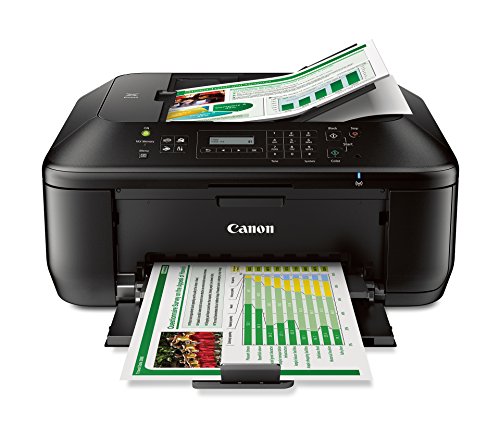
The MX472 is built around a straightforward idea: put every small-office function in one front-loading box. Printing runs at up to 9.7 ipm in black and 5.5 ipm in color (ESAT), with a maximum color resolution of 4800 x 1200 dpi and black resolution of 600 x 600 dpi. The FINE print head fires droplets as small as 2 picoliters across 1,792 nozzles (1,152 black, 640 color), which is enough for crisp text and respectable color documents, and a borderless 4 x 6 inch photo takes approximately 46 seconds. The flatbed scanner pairs with the 30-sheet ADF for multipage jobs, Auto Scan Mode detects the document type when scanning to a computer, and the fax side stores incoming pages in memory when paper runs out. Canon’s My Image Garden software handles photo organization and extras such as Full HD Movie Print, and the printer carries recognized energy-efficiency certification at the Silver tier of the EPEAT registry.
- Strength: A genuine office feature set — 30-sheet ADF, built-in fax, Wi-Fi and AirPrint — in a single front-loading machine that is easy to feed with paper and ink.
- Strength: The FINE system keeps maintenance simple; replacing a cartridge replaces the print head with it, and PG-240 XXL black stretches text printing between swaps.
- Strength: Document output is the priority: pigment black ink, 4800 x 1200 dpi color resolution and 2 picoliter droplets produce clean text and tidy color pages at this class’s pace.
- Trade-off: Speeds of 9.7 ipm black and 5.5 ipm color are slow by current standards, and there is no automatic two-sided printing — duplex jobs mean flipping the stack yourself with driver guidance.
- Trade-off: The control panel is a small monochrome display with buttons rather than a touchscreen, and Google Cloud Print, one of its original selling points, no longer exists.
- Trade-off: As a discontinued model, availability depends on remaining stock, so condition and seller vary between listings in a way they do not for a current printer.
Skip it if you print high volumes every day, need automatic duplex printing, or want a printer whose setup and controls are built around a large touchscreen and a modern app.
Which One Fits Your Situation
You Still Send and Receive Faxes From Home
This is the MX472’s home turf. The built-in color fax, the ADF for multipage sending and memory reception when the tray is empty cover the way small offices and home businesses still use fax, and the same hardware doubles for scanning and copying stacks of paperwork.
You Are Replacing a Worn-Out MX-Series Printer
Owners of an older MX model already know the cartridge family, the front-loading layout and the button-driven controls. Moving to an MX472 keeps the PG-240 and CL-241 ink you may already have on the shelf and avoids relearning a new interface, which is a practical reason to choose remaining stock over a current model.
You Print a Few Pages a Day, Not a Few Hundred
For invoices, forms, school documents and the occasional photo, the MX472’s speeds are adequate and the XXL black cartridge keeps interruptions rare. The math changes with volume: slow output and a tri-color cartridge make sustained heavy printing the machine’s weakest scenario.
You Want Occasional Photos Alongside Documents
Borderless 4 x 6 prints at roughly 46 seconds each and 4800 x 1200 dpi resolution are fine for snapshots and school projects, and My Image Garden adds simple filters and organization. Dedicated photo printers resolve finer detail, so treat photos here as a bonus rather than the main event.
You Run a Busy Office With Networked Staff
Skip it. There is no Ethernet port, no automatic duplexing and no high-capacity paper handling, and per-page costs on a two-cartridge system climb quickly across several users. A current workgroup model serves that setting far better.
Common Mistakes
- Assuming it prints two-sided automatically — it does not; duplex printing is manual.
- Counting on Google Cloud Print, which Google has discontinued; plan on AirPrint, the Canon PRINT app or a USB connection instead.
- Buying the standard PG-240 cartridge for text-heavy work when the XL and XXL versions exist for exactly that use.
- Ignoring the listing condition on a discontinued model — new, used and refurbished units circulate under the same product name.
- Blocking the front of the printer; FastFront loading needs the front face clear for paper and ink access.
- Expecting a fax to work without a phone line — the built-in fax needs a landline or compatible VoIP line connected.
- Judging it as a photo printer; its resolution and speed are tuned for documents first.
FAQ
Does the MX472 print from an iPhone or iPad?
Yes. It supports AirPrint, so compatible iPhone, iPad and iPod touch models print over the same Wi-Fi network without extra drivers, and the Canon PRINT app adds scanning and printing from both iOS and Android devices.
Can the MX472 print on both sides of the page automatically?
No. It has no automatic duplexer. The driver can guide a manual two-sided job, but you flip and re-feed the stack yourself, which is worth knowing before choosing it for long reports.
What ink does the MX472 use?
It uses Canon FINE cartridges: PG-240 black, with PG-240 XL and PG-240 XXL high-capacity options, and CL-241 color, with a CL-241 XL option. The black cartridge is pigment-based, which suits sharp text, and genuine Canon cartridges in these sizes remain widely stocked.
Does the MX472 have an automatic document feeder?
Yes. The integrated ADF holds up to 30 sheets and feeds scanning, copying and faxing jobs, which is the feature that most separates it from basic home all-in-ones without a feeder.
Is Google Cloud Print still available on the MX472?
No. Google discontinued Cloud Print, so that original feature no longer works. Wireless printing continues through AirPrint, the Canon PRINT app and standard Wi-Fi printing from a computer.
Will the MX472 work with a current computer?
Canon distributes setup and drivers through its ij.start.canon page for this model rather than relying on the CD in the box, and the printer connects over Wi-Fi or USB 2.0. Checking Canon’s support page for your exact operating system version before buying is the sensible step with any legacy model.
How big is the MX472?
It measures 18.1 x 15.2 x 7.9 inches and weighs 18.4 pounds, so plan on a permanent desk or shelf spot with the front kept clear for loading paper and ink.
More from Amazon
Programs that pair well with the guide above. Offers and eligibility are set by Amazon and may change.
Free shipping on eligible items, Prime Video and more. Eligible new members can start with a free trial.
Start a Prime free trialAudiobooks and podcasts to listen to on the go. Eligible new members can start with a free trial.
Try Audible freeAd-free music streaming. Eligible new subscribers can start with a free trial.
Try Music Unlimited freeA free business account with business pricing and bulk-buying tools for work, shop or home office.
Create a business accountAs an Amazon Associate we earn from qualifying purchases.
Write Your Review
No reviews yet. Be the first to share your experience!