

For most home offices, the HP OfficeJet Pro 9125e is the best all-round HP printer, and the HP Smart Tank 7301 is the better choice if you print a lot of color pages. Choose a laser model such as the LaserJet Pro MFP 4101fdw when you mostly print black text documents. The right HP printer depends on page volume, color needs and how you feel about HP’s ink subscription and firmware rules.
Our top picks
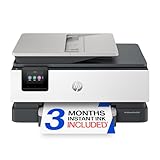
 HP OfficeJet Pro 8125 Wireless All-in-One Color
- The OfficeJet Pro 8125 is perfect for home…
- Subscribe to the Instant Ink delivery service to…
- Fast color printing, scan, copy, auto 2-sided printing,…
 HP Envy 6155 Wireless All-in-One Color Inkjet
- The Envy 6155 is perfect for homes printing…
- Subscribe to the Instant Ink delivery service to…
- Color print, copy and scan, plus auto 2-sided…
| Product | Key specs | |
|---|---|---|
| HP OfficeJet Pro 8125 Wireless All-in-One Color | The OfficeJet Pro 8125 is perfect for home… Subscribe to the Instant Ink delivery service to… Fast color printing, scan, copy, auto 2-sided printing,… | Check price |
 HP OfficeJet Pro 8135 Wireless All-in-One Color HP OfficeJet Pro 8135 Wireless All-in-One Color | Check price | |
| HP Envy 6155 Wireless All-in-One Color Inkjet | The Envy 6155 is perfect for homes printing… Subscribe to the Instant Ink delivery service to… Color print, copy and scan, plus auto 2-sided… | Check price |
 HP Color LaserJet Pro MFP 3301sdw HP Color LaserJet Pro MFP 3301sdw | Check price |
As an Amazon Associate we earn from qualifying purchases at no extra cost to you.
Quick comparison of the best HP printers
| Pick | Best for | Key specs | Price range |
|---|---|---|---|
| OfficeJet Pro 9125e | Best overall home office | About 22 ppm black / 18 ppm color, 250-sheet tray, 35-page duplex document feeder | Mid-range |
| Smart Tank 7301 | Best for high-volume color | Refillable ink tanks, ink in the box for roughly 8,000 color pages (HP claim), document feeder | Mid to upper-mid |
| Envy 6555e | Best budget all-in-one | Print, scan, copy, compact body, cartridge ink | Budget |
| Color LaserJet Pro MFP 3301fdw | Best color laser | Toner, automatic duplex, document feeder, fax | Upper-mid |
| LaserJet Pro MFP 4101fdw | Best for black-and-white documents | Mono laser, fast duplex, large toner yields | Mid-range |
Specs above follow HP’s published spec sheets and the figures repeated in major printer roundups. Check the exact model number before you buy, because HP sells many near-identical variants with different bundled ink and warranty terms.
Best overall: HP OfficeJet Pro 9125e
The OfficeJet Pro 9125e is the model that most printer roundups put first for a work-from-home desk. It prints at roughly 22 pages per minute in black and 18 in color, holds a 250-sheet paper tray and has a 35-page automatic document feeder that scans both sides. That feeder is the feature that separates a real office machine from a basic home printer, because scanning a stack of contracts or receipts without flipping each page saves real time.
The trade-off is the ink system. It uses cartridges, and HP promotes its Instant Ink subscription alongside them. If you print only a few dozen pages a month, the subscription can make sense; if you print in bursts, buying high-yield cartridges directly is usually simpler.
Best for high-volume color: HP Smart Tank 7301
The Smart Tank 7301 swaps cartridges for bottles that refill built-in tanks. HP states the starter ink is enough for several thousand pages, and the cost per page is a fraction of a cartridge printer. It also has an automatic document feeder and automatic two-sided printing, so it handles office tasks as well as school projects and photos.
Its main downside is upfront cost and size: it is bulkier than a cartridge inkjet, and it pays off only if you actually print regularly. If your printer sits idle for weeks, ink can dry in the printhead on any inkjet, so run a short print every couple of weeks.
Best budget: HP Envy 6555e
The Envy 6555e is a compact print, scan and copy all-in-one aimed at light home use. It works well for occasional homework, forms and shipping labels. It lacks the large paper tray and fast speeds of the OfficeJet Pro, and cartridge costs per page are higher, so treat it as a low-volume machine rather than a daily workhorse.
Best color laser: HP Color LaserJet Pro MFP 3301fdw
A color laser suits small offices that print sharp text, charts and presentations and do not want to worry about inkjet printheads drying out. Toner stays usable through long gaps between jobs, and text is crisp on plain paper. Photo quality is weaker than a good inkjet, and the printer is larger and heavier, so give it a stable shelf.
Best for black-and-white documents: HP LaserJet Pro MFP 4101fdw
If nearly everything you print is a contract, invoice or report, a mono laser such as the LaserJet Pro MFP 4101fdw is often the cheapest way to print per page. It offers automatic duplex printing, a document feeder and fax, and high-yield toner cartridges last for thousands of pages. The trade-off is simple: no color at all.
How to choose an HP printer
Start with how many pages you print and in what color, then match the ink system to that volume.
| Your situation | Best technology | Why |
|---|---|---|
| Under 50 pages a month, mostly occasional | Entry cartridge inkjet (Envy class) | Low purchase price matters more than ink cost |
| 100-400 pages a month, mixed color | OfficeJet Pro or Smart Tank | Duplex, document feeder and a sensible ink cost |
| 400+ pages a month, mostly text | Mono laser | Lowest cost per page and no clogging |
| Frequent color graphics or school projects | Smart Tank or color laser | Color pages are expensive on cartridge inkjets |
A quick cost-per-page example
Suppose you print 200 pages a month, which is 2,400 pages a year. Tank-printer ink typically runs about 0.2 to 0.5 cents per black page and under 2 cents per color page, while cartridge printers often land around 3 to 5 cents per color page, according to cost tables in several printer roundups. At 5 cents a page, that year costs about 120 currency units of ink; at 1 cent it costs about 24. The gap of roughly 100 units a year is how a pricier tank printer pays for itself within a couple of years.
Check the paper path and the feeder
If you scan multi-page documents, make sure the model has an automatic document feeder that scans both sides. Many cheaper HP printers have only a flatbed glass, which means you scan page by page.
Plan for HP’s ink rules
HP has used firmware updates on some models that reject non-HP cartridges, and its Instant Ink program requires an active subscription for enrolled cartridges. Read the current terms before buying and decide whether you are comfortable with them. If you would rather avoid the issue, a refillable-tank printer from another brand or a laser is an alternative.
Common mistakes when buying an HP printer
- Buying on purchase price alone and ignoring cost per page, which is where the money goes.
- Ignoring connectivity: confirm Wi-Fi and, if you need a wired connection, whether the model has an Ethernet port, since listings sometimes disagree.
- Skipping the document feeder and then scanning stacks by hand.
- Not powering the printer off with its own power button, which can leave inkjet printheads uncapped.
Frequently Asked Questions
Which HP printer is best for a home office?
The OfficeJet Pro 9125e is the most commonly recommended pick because it combines duplex printing, a 35-page document feeder and reasonable speed. If you print mostly black-and-white pages, a mono laser such as the LaserJet Pro MFP 4101fdw can be cheaper to run.
Are HP printers worth it with Instant Ink?
Instant Ink can save money for people who print a steady, moderate number of pages each month. It is a poor fit if your printing is irregular or if you do not want ink tied to a subscription. Compare the plan’s page allowance against your own monthly volume first.
Do HP printers work with third-party ink?
Some do and some do not. HP has pushed firmware updates that block non-HP cartridges on certain models, so check the manufacturer’s current policy for your exact model and update settings before relying on third-party ink.
Is an HP Smart Tank better than an OfficeJet?
For high page volumes the Smart Tank costs much less per page, but it costs more upfront and takes more space. For light to moderate printing, the OfficeJet Pro is often the better balance.
Is a laser or inkjet better for a home office?
Lasers suit text-heavy work and long gaps between jobs, while inkjets handle photos and occasional color better and usually cost less to buy. Pick based on whether your pages are mainly text or mixed color.





Write Your Review
No reviews yet. Be the first to share your experience!