

The best monitor stands depend on whether you need extra height, hidden storage, dual-monitor support, or the smallest possible footprint: choose a riser for simple organization, a monitor arm for maximum desk space, and a drawer-style stand when storage matters as much as screen position.
Our top picks
 HUANUO FlowLift™ Dual Monitor Stand
- Compatible with Wide Screens - To ensure compatibility…
- Regarding the compatibility with desks - Your desk…
- Dual C-Clamp Hold - Worried your dual monitors…
 gianotter Dual Monitor Stand Riser With Drawer
- 【Ample Storage Space】The dual monitor stand features two…
- 【Work with ease】The Gianotter monitor stand for desk…
- 【Maximize desktop space】By raising the monitor height, the…
 VIVO STAND-V002F Dual LED LCD Monitor Free-Standing
- Fits 13" to 27" Screens: Freestanding dual monitor…
- Full Articulation: Adjustable mount offers +90° to -90°…
- Heavy Duty Extra Large Base: Measures 13" x…
| Product | Key specs | |
|---|---|---|
| HUANUO FlowLift™ Dual Monitor Stand | Compatible with Wide Screens - To ensure compatibility… Regarding the compatibility with desks - Your desk… Dual C-Clamp Hold - Worried your dual monitors… | Check price |
| gianotter Dual Monitor Stand Riser With Drawer | 【Ample Storage Space】The dual monitor stand features two… 【Work with ease】The Gianotter monitor stand for desk… 【Maximize desktop space】By raising the monitor height, the… | Check price |
| VIVO STAND-V002F Dual LED LCD Monitor Free-Standing | Fits 13" to 27" Screens: Freestanding dual monitor… Full Articulation: Adjustable mount offers +90° to -90°… Heavy Duty Extra Large Base: Measures 13" x… | Check price |
 WALI Computer Monitor Stand for Desk WALI Computer Monitor Stand for Desk | Design: The monitor stand for the desk has… Ergonomic: The height-adjustable monitor riser can raise a… Ventilated: The computer stand has a large sturdy… | Check price |
As an Amazon Associate we earn from qualifying purchases at no extra cost to you.
Best monitor stands by desk situation
| Desk situation | Best choice | Typical height | Typical capacity | Why it fits |
|---|---|---|---|---|
| Small desk with one monitor | Compact fixed riser | 3–5 inches | 20–44 lb | Raises the screen without using much depth |
| Keyboard storage needed | Wide shelf riser | 3–6 inches | 20–60 lb | Creates a parking space for a keyboard or laptop |
| One heavy or ultrawide monitor | Single monitor arm | 13–25 inches of adjustment | 7–25 lb on common models | Frees the entire area beneath the display |
| Two monitors | Dual monitor arm | 13–27 inches of adjustment | Up to about 22 lb per arm on some models | Provides independent height and angle adjustment |
| Monitor plus accessories | Drawer-style stand | 3–4 inches | 20–45 lb | Stores small devices while keeping the desktop tidy |
Our top choices for different needs
Best all-around fixed stand: a wide metal or wood riser
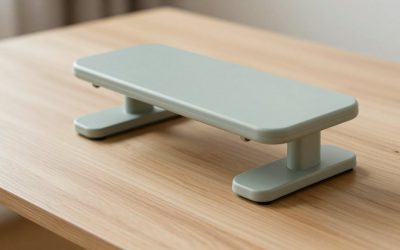
A fixed riser is the safest recommendation for most single-monitor desks. Look for a platform at least 18 inches wide, 9 inches deep, and rated for at least 30 pounds. That gives enough surface area for most 24- to 32-inch displays while leaving room for a small speaker or desk accessory.
Examples include the IKEA ELLOVEN monitor stand, which combines a raised shelf with a drawer, and the Fellowes Hana monitor stand, a more substantial premium-style riser. The IKEA option is particularly useful when you want storage without adding a separate organizer. A plain metal riser is usually cheaper and offers better ventilation, while a wood stand can look more integrated with a home-office setup.
Fixed stands are stable, easy to install, and unlikely to develop adjustment problems. Their limitation is height: a 4-inch riser may still be too low for a tall user or a desk with a low chair. Check the screen position while seated rather than choosing a stand based only on its advertised height.
Best for reclaiming desk space: a single monitor arm
A single arm is the best choice when the area below the monitor matters more than built-in storage. The Ergotron LX is a well-established premium example, with versions designed for monitors in the common 7- to 25-pound range. More affordable gas-spring arms cover similar screen sizes, but their weight ranges and clamp quality vary considerably.
Monitor arms are especially useful on desks narrower than 24 inches deep. A conventional stand can consume 8–12 inches of front-to-back space; a rear-mounted arm leaves most of that area available for a keyboard, notebook, or laptop. A clamp usually requires 2–3 inches of unobstructed space behind the desk, so measure the back edge before buying.
The main trade-off is movement. A lightweight desk or a thin particleboard top can flex when the monitor is adjusted. A reinforcing plate under the clamp spreads the load and reduces dents. For a heavy ultrawide monitor, check the arm’s weight rating with the monitor’s stand removed; the relevant figure is the display’s actual weight, not its shipping weight.
Best for two screens: an independently adjustable dual arm
A dual monitor arm is more flexible than a wide fixed stand because each screen can be positioned separately. This matters when the monitors differ in size, have different bezels, or are used at different angles. The VIVO STAND-V002 is a common example of the conventional central-pole design, while premium arms from Ergotron offer smoother adjustment and better cable management.
For two 24-inch monitors, allow about 42–48 inches of horizontal desk width once the screens are angled slightly toward you. Two 27-inch monitors generally need about 48–55 inches, depending on bezel width and viewing angle. If your desk is smaller, a stacked arrangement can work, but it requires an arm specifically rated for vertical positioning and a desk that can tolerate the concentrated load.
Do not assume that a “dual” arm can carry two large ultrawides. Two 34-inch screens may exceed both the per-arm weight limit and the available horizontal reach. Check four specifications separately: screen-size range, weight per arm, VESA pattern, and clamp capacity.
Best for storage: a drawer or cubby monitor stand
A drawer-style stand is the right choice if your desk collects USB hubs, notebooks, pens, or charging cables. It turns unused space beneath the screen into a defined storage zone without requiring wall-mounted organizers. The IKEA ELLOVEN is a useful example because its raised platform and drawer serve different purposes: the platform supports the display, while the drawer hides smaller items.
Storage risers are less suitable for very heavy monitors unless the platform is reinforced. A drawer also reduces ventilation beneath laptops and docking stations, so leave open space around devices that produce heat. Avoid stuffing the compartment with dense objects; the drawer runners usually wear before the top panel does.
What to compare before buying
Height
Measure from the desk surface to the top of your existing monitor stand, then compare that number with the riser height. A practical target is for the top third of the screen to sit near eye level when you are sitting upright. If the stand changes height by only 2 or 3 inches, a monitor arm may be the better solution because it provides finer adjustment.
Weight capacity
Choose a stand rated for at least 25 percent more than the monitor’s actual weight. For example, a 20-pound display should ideally sit on a stand rated for at least 25 pounds. This margin accounts for uneven loading, accidental bumps, and accessories placed on the platform.
Footprint and depth
A stand that is 10 inches deep can consume a substantial part of a 20-inch-deep desk. For a small desk, prioritize a platform no deeper than 8–9 inches or use a rear-clamped arm. Check whether the feet sit near the edges: a narrow stand with widely spaced feet may be more stable than a deeper stand with feet clustered in the center.
Materials and stability
Steel platforms usually offer the highest capacity for their size. Wood and laminated fiberboard can be perfectly stable, but inspect the joint between the top and its legs. Rubber feet should be thick enough to prevent sliding and soft enough not to scratch the desk. A glass platform can look light and modern, but it offers less forgiveness if a monitor is knocked over.
A quick sizing calculation for a small desk
Suppose your desk is 22 inches deep and your current monitor base extends 10 inches from front to back. That leaves only 12 inches for the keyboard and mouse. Replacing the base with a 4-inch-high riser that is 8 inches deep recovers 2 inches of usable depth. A monitor arm can recover approximately 8–10 inches, but only if the clamp can attach securely at the rear.
For a 27-inch monitor weighing 15 pounds, a 30-pound fixed stand provides a 2:1 capacity margin. For two 24-inch monitors weighing 11 pounds each, choose a dual arm rated for at least 15 pounds per arm rather than relying on the combined 30-pound figure.
Ownership details that affect long-term value
- Dust and cable buildup: Clean the platform and cable channels monthly. Dust under rubber feet can make a stand slide.
- Clamp tension: Recheck an arm’s clamp after the first week and after moving the desk. Do not overtighten it, which can crush a hollow-core desktop.
- Gas-spring wear: If an arm slowly drops, its tension may need adjustment. Persistent sagging usually means the monitor is outside the arm’s practical weight range.
- Drawer runners: Keep drawer-style stands below their stated load. Heavy books and power bricks can bend runners before the main platform shows damage.
- Cleaning products: Use a lightly damp microfiber cloth. Avoid soaking wood veneer, spraying liquid near a clamp, or using abrasive cleaners on powder-coated metal.
- VESA compatibility: Most arms use 75-by-75 mm or 100-by-100 mm mounting patterns, but some monitors require an adapter.
Final recommendation
Choose a fixed 18- to 24-inch-wide riser if you want the simplest, most stable upgrade. Choose a drawer model when hidden storage is a priority, and choose a single arm when your desk is shallow or you need flexible positioning. For two monitors, buy an independently adjustable dual arm and verify the per-arm weight rating rather than judging by the combined capacity. The best monitor stands are not necessarily the tallest or most feature-rich; they are the ones whose height, footprint, and load rating match the desk and displays you already own.









Write Your Review
No reviews yet. Be the first to share your experience!