

Our Top Picks

A small office buys two, three, or five monitors — one per desk — and the price that matters is the price per seat. The pick: the BenQ PD2706QN at $299.99 — the only monitor here with a KVM, 90W USB-C, speakers, and a Delta E ≤ 2 panel at the lowest per-seat cost.
$500 buys one desk, not the office: arm ~$30, webcam ~$30 if the monitor has none, hub ~$22. Prices are a November 2026 snapshot — check the current price on Amazon before you buy.
Our top picks

Best for: The small office buying one monitor per desk, with hot-desking and one-cable laptops
Check price on Amazon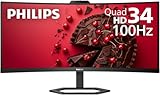
Best for: The shared desk, the hot desk, or the one desk that does two jobs at once
Check price on Amazon
Best for: The reception desk or the meeting desk — the one desk where the camera is the job
Check price on AmazonBest for: The small office where one desk works by day and games by night
Check price on AmazonBest for: The small office on the tightest budget that wants the whole office — five desks — for the least money
Check price on AmazonQuick Picks
| Monitor | Price | Key Spec | Best For |
|---|---|---|---|
| BenQ PD2706QN | $299.99 | ΔE ≤ 2, KVM, 90W USB-C, speakers | Best overall |
| Philips 34E1C5600HE | $369.99 | 34″ ultrawide, 5MP webcam, 65W USB-C | Best screen space |
| Dell P2724DEB | $411.99 | 4MP webcam, Auto KVM, 90W USB-C | Best client-call desk |
| ASUS ProArt PA278CGV | $369 | 144Hz, ΔE < 2, 90W USB-C | Best all-rounder |
| ASUS ProArt PA278QGV Gen2 | $259.99 | 120Hz, ΔE < 2, 95% DCI-P3 | Best for outfitting the office |
How to Choose a 1440p Gaming Monitor for Small Office Under $500
Per-seat cost is the core question. One monitor at $411.99 is a $500 desk; five are a $2,059.95 order. The cheapest panel here, the ASUS PA278QGV Gen2 at $259.99, outfits five desks for $1,299.95 — $550 less than five Dell webcam docks. Buy the same monitor for every desk.
One monitor per desk, or one shared ultrawide. The Philips ultrawide replaces two screens on one desk — but it does not replace two desks. Two people cannot share one 34-inch panel. The ultrawide belongs on the shared desk; the workstations get 27-inch panels.
The KVM question is the hot-desking question. Three picks switch two computers with one keyboard and mouse — the BenQ PD2706QN, the Dell P2724DEB (Auto KVM), and the BenQ PD2706U 4K at $399.99. The ASUS PA278CGV has neither KVM nor webcam, and the PA278QGV Gen2 has no USB-C at all, so a laptop on that desk charges from its own brick.
The webcam question is a which-desk question. The reception desk and the meeting desk need a camera; the back-office desks do not. Three picks have one built in: the Philips ultrawide (5MP), the ViewSonic VG2758V-2K ($379.99, 5MP), and the Dell P2724DEB ($411.99, 4MP). Other desks take a $30 Logitech Brio 100.
Text clarity is the eight-hour spec. QD-OLED’s triangular subpixels fringe small text, so the MSI MAG 272QP is the best gaming picture here and the wrong work panel. The text king is the Dell UltraSharp U2724D: IPS Black at 2000:1, no fringing. Four picks have speakers — Philips and ViewSonic at 2×5W, BenQ at 2×3W, ASUS at 2×2W. The Philips carries four years with advance replacement, the longest here.
The Honest Small-Office Math: What $500 Really Buys Per Seat
| Setup | Total |
|---|---|
| BenQ PD2706QN + arm $30 + Brio 100 webcam $30 + hub $22 | $381.99 |
| Philips 34E1C5600HE + arm $30 | $399.99 |
| ASUS ProArt PA278QGV Gen2 + arm $30 + Brio 100 webcam $30 + hub $22 | $341.99 |
| Dell P2724DEB + arm $30 + hub $22 | $463.99 |
| MSI MAG 272QP QD-OLED X24 + arm $30 + Brio 100 webcam $30 + hub $22 | $431.99 |
The cheapest honest desk is the ASUS PA278QGV Gen2 at $341.99:
| Desks | Cheapest honest way | Total |
|---|---|---|
| Two 1440p panels | Two PA278QGV Gen2 at $259.99 | $519.98 — $19.98 over $500 |
| Two screens in one panel | One Philips ultrawide | $369.99 — fits |
| Five desks | Five PA278QGV Gen2 | $1,299.95 |
| Five desks with docks | Five BenQ PD2706QN | $1,499.95 |
Five of the cheap panel cost $1,299.95; five of the dock monitor cost $1,499.95 — the $200 difference buys every desk a KVM and 90W charging. (Ignore the $12.91 junk listing for the AW2726DM; the real read is $349.99.)
1. BenQ PD2706QN — $299.99
Specs: 27-inch IPS, 2560×1440, 100Hz, 350 nits, 100% sRGB / 95% DCI-P3, Delta E ≤ 2, Calman Verified, Nano Matte, 2×3W speakers, headphone jack, USB-C (90W PD), KVM, daisy chain, USB hub, VESA, 3-year warranty.
The small-office pick: the only monitor here that is a dock, a KVM, and a calibrated panel for $299.99 — a catalog read against a $399.99 list. It leads this guide for the first time because the office question is its question: one keyboard and mouse switching between two laptops, one USB-C cable carrying video and 90W of charging.
Honest flag: the trade is the camera — no webcam and no microphone, so call desks need the Brio 100. At 100Hz it is the slowest refresh here, and this panel is ΔE ≤ 2 while the PD2706U 4K panel is ΔE ≤ 3.
Pros: Cheapest dock desk at $381.99; KVM and 90W USB-C; glare-free Nano Matte
Cons: No webcam or microphone; slowest refresh here at 100Hz
Best for: The small office buying one monitor per desk, with hot-desking and one-cable laptops.
2. Philips 34E1C5600HE — $369.99
Specs: 34-inch curved VA, 3440×1440, 100Hz, 3000:1 contrast, 300 nits, 5MP pop-up Windows Hello webcam, mic, 2×5W speakers, USB-C (65W PD), 4× USB-A hub, VESA, 4-year advance-replacement warranty.
The shared-desk pick: one panel that does the work of two, and the 5MP webcam and mic mean calls need nothing else plugged in. One reviewer paid $306.25 on Amazon in August 2026; a catalog read shows $319 (honest $306–$370). It led the last three guides in this family; it does not lead this one, because an office buys desks, not one wide screen.
Honest flag: the arm math changes on a 34-inch panel. Budget gas-spring arms are rated to 32 inches — the HUANUO FlowLift Dual runs about $60 — so a 34-inch ultrawide exceeds the rating, and the heavy-duty TitanLift runs about $110. On the stock stand the desk is $399.99; on a proper ultrawide arm it is $479.99, still inside $500 by $20. This cracks the work-ultrawide wall, not the gaming one: a 100Hz VA panel, while the cheapest gaming ultrawide with a verified US price is still the Alienware AW3426DW at $749.99.
Pros: Ultrawide + webcam + dock for $369.99; 4-year warranty; one panel replaces two screens
Cons: VA panel, 100Hz, not a gaming monitor; grainy webcam; 65W USB-C only; needs a heavy-duty arm
Best for: The shared desk, the hot desk, or the one desk that does two jobs at once.
3. Dell P2724DEB — $411.99
Specs: 27-inch IPS, 2560×1440, 100Hz, 350 nits, 99% sRGB, 4MP RGB + IR pop-up webcam (2K at 30fps, FHD at 60fps), 2 microphones, 2×5W speakers, USB-C (90W PD), DisplayPort out, RJ45 Ethernet, Auto KVM, USB hub, VESA, 3-year warranty.
The client-call pick: the only monitor here that is a webcam, a dock, a KVM, and a speaker in one box. One USB-C cable carries video, data, Ethernet, and 90W of charging. A catalog read shows $411.99 at an authorized retailer.
Honest flag: the price spread is the catch — other reads run $495 to $552.40 (both out of stock), so the honest budget is $412–$495 and it fits only at the low read. Buy it as a 100Hz panel: listings disagree on the refresh rate. Do not put it on every desk — five cost $2,059.95. It belongs on the one desk that takes client calls.
Pros: Webcam + KVM + 90W USB-C + Ethernet in one box; pop-up camera
Cons: Fits only at the low read; refresh-rate listings disagree; priciest per seat here
Best for: The reception desk or the meeting desk — the one desk where the camera is the job.
4. ASUS ProArt PA278CGV — $369
Specs: 27-inch IPS, 2560×1440, 144Hz, 350 nits, 95% DCI-P3 / 100% sRGB, Delta E < 2, Calman Verified, USB-C (90W PD), DisplayPort out (daisy chain), HDMI, 4× USB-A hub, full stand, VESA, 3-year warranty.
The all-rounder pick: the only panel here good at both halves of the day — 144Hz for ranked play, Delta E under 2 for design work. DisplayPort out daisy-chains a second screen. ASUS lists it at $369; one marketplace reads $364.37.
Honest flag: the price spread is the widest here — one roundup since April reads $224.99–$380.69, so the honest budget is $270–$370, and a catalog read of $481.69 from a marked-up seller is not a street price. No webcam, no microphone, no KVM, and the weakest speakers here at 2×2W.
Pros: Only true 1440p all-rounder here — 144Hz, ΔE < 2, 90W USB-C; daisy-chain
Cons: Price spread $224.99–$380.69; no webcam, mic, or KVM; weakest speakers here
Best for: The small office where one desk works by day and games by night.
5. ASUS ProArt PA278QGV Gen2 — $259.99
Specs: 27-inch IPS, 2560×1440, 120Hz VRR, 350 nits, 95% DCI-P3 / 100% sRGB, Delta E < 2, Calman Verified, HDR10, Light Sync ambient sensor, Adaptive-Sync, DisplayPort, HDMI, USB hub, full ergonomic stand, VESA, 3-year warranty.
The outfit-the-office pick: the cheapest Delta E < 2 panel here, and the only pick where five desks cost less than $1,300 — five monitors for $1,299.95. A catalog read shows $259.99; ASUS’s own store lists it at $279, so the honest budget is $260–$280.
Honest flag: this is a creator panel, not a dock. There is no USB-C port at all — no video, no charging — so a laptop on this desk connects over DisplayPort or HDMI and charges from its own brick, and the $22 hub in the desk math is not optional. It is 120Hz over DisplayPort and 100Hz over HDMI. For a hot desk, buy the BenQ.
Pros: Cheapest desk at $341.99; cheapest five-desk order at $1,299.95
Cons: No USB-C at all — no video, no charging; no webcam, mic, or KVM
Best for: The small office on the tightest budget that wants the whole office — five desks — for the least money.
What to Avoid
The ViewSonic one-letter trap, carried. The VG2758V-2K ($379.99, 5MP webcam) is not the VG2758-2K ($339.99, no webcam). The older VG2756V-2K still fits at $490 — $110 more for an older panel. The ViewSonic is the cheapest webcam monitor here (full desk $431.99), but it is the dimmest panel at 300 nits and has no KVM.
The ultrawide-arm trap, new. Budget gas-spring arms are rated to 32 inches and about $60 for a dual arm — the 34-inch Philips exceeds the rating. Budget the heavy-duty arm at about $110.
The Philips drop-shipper read, new. A catalog read shows the Philips at $604.34 from a drop-shipper — not a street price; the real reads are $369.99 on Amazon and $319 in the catalog.
The Mini LED newcomers, watched not picked. The KTC M27T6S (~$260, 1,152 zones, 200Hz) and the AOC Q27G3XMN ($218.49) are roundup reads, not catalog-verified. At $218.49, two AOCs would cost $436.98 on paper — unverified.
The mazes and traps, carried. The MAG 272QP QD-OLED X24 is not the MAG 274QP, the MAG 271QPX E2, or the MAG 274QF X24; the 274QF E20 has no USB-C and a tilt-only stand. The MO27Q2A is not the MO27Q2 or the MO27Q28GR; the LG 27GX704A-B is not the 27GX700A. The MOBIUZ EX271QM is not a 320Hz monitor — the real model is the EX271Q (180Hz). The PD2706QN is ΔE ≤ 2 and the PD2706U is ΔE ≤ 3. Roundups keep listing 90W USB-C on the Dell UltraSharp U2724D, but Dell’s spec sheet says data only. The S2725QC has no DisplayPort input and the S2725QS has no USB-C. The AOC Q27G4ZD’s headline says 280Hz while its spec table says 240Hz — buy it as a 240Hz panel. The LG 27GX704A-B now reads about $400. The ASUS ROG Strix OLED XG27ACDMS at $399.99 at Best Buy is a deal read, not a pick, and the MAG 272QP X50 (500Hz QD-OLED) is £449 at Amazon UK with no verified US price.
Still Doesn’t Fit
| Monitor | Real Price | Honest Budget |
|---|---|---|
| Alienware AW2725DF 360Hz QD-OLED | $550–$650 | $550 |
| Dell UltraSharp U2725QE 4K Thunderbolt 4 | $600–$680 | $600 |
| ASUS ProArt Display OLED PA279CDV 4K 120Hz | $699 | $700 |
| Dell P2726DEV webcam monitor | $541.99 | $542 |
The gaming-ultrawide wall still holds at the Alienware AW3426DW, $749.99.
FAQ
What is the best 1440p gaming monitor for small office under $500?
The BenQ PD2706QN at $299.99 — Delta E ≤ 2, KVM, 90W USB-C, and speakers, with the cheapest dock desk at $381.99. The catch: no webcam.
How much does it cost to outfit a five-desk office?
Five PA278QGV Gen2 monitors cost $1,299.95; five full desks cost $1,709.95. Five BenQ PD2706QN monitors cost $1,499.95; five full BenQ desks cost $1,909.95.
Can I get two 1440p monitors for $500?
Not new. Two ASUS PA278QGV Gen2 at $259.99 each cost $519.98 — $19.98 over. The honest two-screen answer is one Philips ultrawide at $369.99.
Which desk gets the webcam monitor?
The reception desk or the meeting desk — the one desk where the camera is the job. The Dell P2724DEB at $411.99 is the webcam, dock, KVM, and speaker in one box. Back-office desks take the BenQ plus a $30 Brio 100.
Is OLED safe for a small office?
No — not for the work desks. An eight-hour static workday is the burn-in use case, and QD-OLED’s subpixels fringe small text. The MSI MAG 272QP at $349.99 is the best gaming panel here and the wrong work panel.
Verdict
For a small office at $500, the BenQ PD2706QN at $299.99 is the best desk for the money — Delta E ≤ 2, KVM, 90W USB-C, speakers, and the cheapest dock desk at $381.99. Honest catches: no webcam, and 100Hz is the slowest refresh here.
Screen space first: the Philips 34E1C5600HE at $369.99 — a 34-inch ultrawide with a webcam and a four-year warranty — but budget the heavy-duty arm at about $110. Client calls first: the Dell P2724DEB at $411.99 — webcam, KVM, 90W USB-C, Ethernet — but only at the low read. All-rounder first: the ASUS ProArt PA278CGV at $369 — 144Hz, Delta E under 2, 90W USB-C — but no webcam, mic, or KVM. Budget first: the ASUS ProArt PA278QGV Gen2 at $259.99 — the cheapest desk at $341.99 — but no USB-C at all.
As an Amazon Associate, we earn from qualifying purchases.
Suggested Internal Links
- Best 1440p Gaming Monitor for College Under $500
- Best 1440p Gaming Monitor for Remote Work Under $500
- Best 1440p Gaming Monitor for Home Office Under $500
More from Amazon
Programs that pair well with the guide above. Offers and eligibility are set by Amazon and may change.
Free shipping on eligible items, Prime Video and more. Eligible new members can start with a free trial.
Start a Prime free trialAudiobooks and podcasts to listen to on the go. Eligible new members can start with a free trial.
Try Audible freeAd-free music streaming. Eligible new subscribers can start with a free trial.
Try Music Unlimited freeA free business account with business pricing and bulk-buying tools for work, shop or home office.
Create a business accountAs an Amazon Associate we earn from qualifying purchases.

Write Your Review
No reviews yet. Be the first to share your experience!