

Our Top Picks
A 1440p monitor cannot display 4K — that is the first honest fact, and this guide starts there. Your stream is 4K because OBS encodes it that way. The panel is your preview monitor: it shows the game, the chat, and the colour. So the best 1440p monitor for a 4K streamer plays fast, grades honestly, switches between a game PC and a streaming PC, and charges the laptop — and at $300 that monitor is a face this family has never led with: the MSI MAG 274QRF QD E2 at $280.
The second honest fact is bigger: the 4K wall has fallen. On October 28, 2026, ViewSonic announced the VX2730D-4K — a true 4K panel that switches between 4K at 144Hz and Full HD at 288Hz — at $279.99, and Target, Staples, and Best Buy all list it at that price. It is the second pick here: it shows 4K, but it does not run a streaming desk — no USB-C, no KVM, no hub, 250 nits.
Our top picks
Best for: The two-PC streaming desk where the game PC, the streaming PC, and the laptop share one screen, one keyboard, and one cable
Check price on AmazonBest for: The streamer who wants to see the actual 4K output and plays competitive games at 288Hz on the same screen
Check price on AmazonBest for: The streamer on a tight budget who needs the KVM and the refresh rate, and will add speakers later
Check price on Amazon
Best for: The laptop-first streamer who wants one cable and 144Hz, and streams from one machine
Check price on Amazon
Best for: The streamer whose content is fast competitive games, where 280Hz and black detail matter more than desk features
Check price on AmazonThe Honest Price Ladder
| Price | Monitor | Honest budget |
|---|---|---|
| $159.99 | Gigabyte M27Q2 QD — real KVM, 200Hz (deal) | $250 |
| $189.99 | MSI MAG 274QPF E20 — 200Hz, 92% Adobe RGB | $190 |
| $189.99 | MSI MAG 275QPF E21 — 210Hz, no USB at all | $190 |
| $199.99 | BenQ EW270Q — 65W USB-C, loudest speakers (deal) | $255 |
| $199.99 | AOC Q27G40XMN — Mini-LED HDR, only real HDR here | $250 |
| ~$240 | HP OMEN 27qs G2 — 280Hz IPS Black, speakers | $240 |
| ~$249.99 | Dell S2725DC — 144Hz, 65W USB-C, hub, speakers | $250 |
| $279.99 | ViewSonic VX2730D-4K — real 4K 144Hz / FHD 288Hz | $280 |
| $280 | MSI MAG 274QRF QD E2 — KVM, 65W USB-C, 98% DCI-P3 | $280 |
Quick Picks
| Pick | Why it wins | Price |
|---|---|---|
| MSI MAG 274QRF QD E2 | KVM + 65W USB-C + QD colour, the only one under $300 | $280 |
| ViewSonic VX2730D-4K | First real 4K panel under $300 — 4K 144Hz / FHD 288Hz | $279.99 |
| Gigabyte M27Q2 QD | The cheapest real KVM gaming panel, 200Hz, 99% DCI-P3 | $159.99 |
| Dell S2725DC | One-cable streaming desk: 144Hz, hub, speakers | ~$249.99 |
| HP OMEN 27qs G2 | Fastest panel here, 280Hz IPS Black with speakers | ~$240 |
How to Choose a 1440p Gaming Monitor for 4K Streaming Under $300
The stream is 4K because OBS says so, not because the panel is. Twitch has no 4K streaming — its RTMP ingest caps at 1080p60 and 6,000 kbps. YouTube Live is the only major platform that takes a 4K stream.
Colour accuracy is a grading spec, not a marketing number. A wide gamut — 98% DCI-P3 on the top pick — shows the colours your stream actually contains. But a wide gamut with bad factory calibration is worse than a narrow accurate one: Notebookcheck measured the top pick’s out-of-box error at Delta E 8, and calibration brought it to 1.7.
A KVM switches two PCs; a hub follows one. A streaming desk is two computers: the game PC on DisplayPort and the streaming PC or laptop on USB-C. A hub shares the keyboard and mouse with one machine; a KVM switches the screen, keyboard, and mouse between both with one button. Under $300 there are exactly three monitors with a real KVM: the Gigabyte M27Q2 QD, the MSI MAG 274QRF QD E2, and the BenQ PD2706QN at $299.99.
USB-C power is a ladder, not a checkbox. 15W trickle-charges a sleeping laptop; 18W does the same with a phone; 65W charges most 13–14-inch ultrabooks at full speed; 90W charges a 15–16-inch performance laptop too. The only 90W-plus answer under $300 is the ASUS ProArt PA278CGRV at $299.00. Speakers are a monitoring spec, and no 1440p monitor under $300 has a webcam — the first, the ViewSonic VG2758V-2K, launched November 16, 2026, at $379.99.
1. MSI MAG 274QRF QD E2 — $280
Specs: 27-inch Rapid IPS with Quantum Dot, 2560×1440, 180Hz, 400 nits (453 measured), 98% DCI-P3, DisplayHDR 400, FreeSync, built-in KVM, USB-C (65W PD), 1× DisplayPort 1.4a, 2× HDMI 2.0b (144Hz max), headphone-out, height/tilt/swivel/pivot stand, VESA 75×75, 3-year warranty.
The MAG 274QRF QD E2 answers the streaming-desk question in one box: a 180Hz Quantum Dot panel for the game, a real KVM for the game PC and the streaming PC, and a 65W USB-C port that charges the laptop over the same cable. Notebookcheck measured 453 nits and 97.6% DCI-P3 coverage — the brightest panel here.
The price is a launch price — $280 at launch, and PC Guide’s November 5, 2026 price check agrees — but US stock is thin, and the name maze is the worst in the family: the older Optix MAG274QRF-QD, the MAG 274QPF E20, and the curved VA MAG 275CQRF QD E2 are all different monitors. The bigger flag is the out-of-box colour: Notebookcheck measured a Delta E of 8, and only calibration brought it to 1.7. There are no speakers — budget $30 for sound — and HDMI caps at 144Hz, so 180Hz needs DisplayPort.
Pros: The only KVM + 65W USB-C + wide-colour gaming panel under $300; brightest panel here; full stand with pivot.
Cons: Out-of-box colour error Delta E 8 — calibrate before grading; no speakers; HDMI caps at 144Hz; VESA 75×75.
Best for: The two-PC streaming desk where the game PC, the streaming PC, and the laptop share one screen, one keyboard, and one cable.
2. ViewSonic VX2730D-4K — $279.99
Specs: 27-inch IPS, 3840×2160, dual-mode 4K 144Hz / Full HD 288Hz, 0.5ms MPRT, 250 nits, FreeSync Premium, G-Sync Compatible, 2× speakers, height/tilt/pivot stand, VESA mount.
The VX2730D-4K is the correction this family has waited nineteen guides for. ViewSonic announced it on October 28, 2026, at an estimated street price of $279.99, and Target, Staples, and Best Buy all list it in stock at that price. The dual-mode panel is the clever part: 4K at 144Hz for visual-heavy games, or Full HD at 288Hz for competitive play — the only monitor here that shows real 4K output.
It is not the top pick for three streaming-desk reasons. First, 250 nits — the dimmest panel here by 100 nits — so a bright window washes it out while the 400-nit MSI keeps working. Second, there is no USB-C at all, no KVM, and no hub: the laptop keeps its own charger and cable, and a second machine means crawling under the desk to swap inputs. Third, it is a brand-new launch, so $279.99 is an estimated street price backed by three retailers — verify at checkout. One flag: Best Buy’s description calls it the XG275D-4K in one line — confirm the model reads VX2730D-4K.
Pros: The first real 4K panel under $300 — 4K 144Hz and FHD 288Hz in one monitor; three retailers agree on $279.99.
Cons: 250 nits, dimmest here; no USB-C, no KVM, no hub; brand-new launch, no price history.
Best for: The streamer who wants to see the actual 4K output and plays competitive games at 288Hz on the same screen.
3. Gigabyte M27Q2 QD — $159.99
Specs: 27-inch SuperSpeed IPS with Quantum Dot, 2560×1440, 200Hz (210Hz OC), 1ms GtG, 350 nits, 99% DCI-P3, built-in KVM, 1× USB-C (18W), height/tilt/swivel/pivot stand, VESA 100×100, 3-year warranty.
The M27Q2 QD led our home-lab guide in batch 137, and it is still the cheapest real KVM gaming panel under $300: 200Hz, 99% DCI-P3, and a one-button KVM for $159.99 — a 36% cut against its $249.99 list.
Two honest flags. The price is a deal: the Meta Catalog reads $215.90 at an authorized retailer — honest budget $250. The USB-C port delivers 18W — video and a phone trickle charge, not laptop charging — so the laptop keeps its own charger. There are no speakers, so budget $30 for sound. One buying flag: the white M27Q2 QD Ice is a pricier variant at $239.50–$249.99, and the M27Q (165Hz), M27Q X (240Hz), and M27Q3 (170Hz) are all different monitors — confirm the code reads M27Q2 QD.
Pros: 99% DCI-P3 and the only sub-$200 KVM gaming panel; 200Hz with a full stand.
Cons: 18W USB-C will not charge a laptop; no speakers; deal price — honest $250 at list.
Best for: The streamer on a tight budget who needs the KVM and the refresh rate, and will add speakers later.
4. Dell S2725DC — ~$249.99
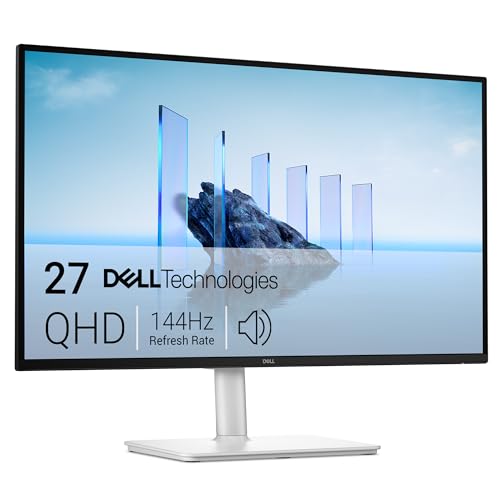
Specs: 27-inch IPS, 2560×1440, 144Hz, 350 nits, 99% sRGB, FreeSync, DisplayPort 1.4, HDMI, USB-C (65W PD), 2× USB-A, 2× 3W speakers, height/tilt/swivel/pivot stand, 3-year warranty with Advanced Exchange.
The S2725DC led our office guide in batch 142, and it is the best one-cable streaming monitor here that is not a KVM: 144Hz, 65W USB-C, a hub, speakers, and a full stand. One cable carries video, audio, and charging, and Dell’s three-year Advanced Exchange warranty is the best under $300.
It is not the top pick for two reasons: at ~$249.99 it costs $90 more than the KVM gaming panel, and it has no KVM — the hub follows the laptop. The price is a range: $229.99 on Amazon, and another listing reads $317.18 — honest budget $250. It is also the narrowest colour here at 99% sRGB with no DCI-P3 claim.
Pros: Only pick with 144Hz, 65W USB-C, a hub, speakers, and a full stand; best warranty here.
Cons: No KVM — the hub follows the laptop; price spread $229.99 to $317.18; narrowest colour here.
Best for: The laptop-first streamer who wants one cable and 144Hz, and streams from one machine.
5. HP OMEN 27qs G2 — ~$240
Specs: 27-inch IPS Black, 2560×1440, 280Hz, 400 nits, 2000:1 contrast, 95% DCI-P3, FreeSync Premium, 2× speakers, height/tilt/swivel/pivot stand, VESA 100×100.
The OMEN 27qs G2 led our apartment guide in batch 146, and it is still the fastest panel in this family: 280Hz on an IPS Black panel with a 2000:1 contrast ratio — double the contrast of a standard IPS screen — so dark game scenes hold detail the other panels crush. It has speakers, a full stand, and the widest non-Quantum-Dot colour here.
The honest flag is the price: the $169.99 deal is over, and the Meta Catalog now reads $240 at an authorized retailer — honest budget $240. There is no USB-C at all, so a laptop needs its own charger and cable, and there is no KVM or hub. One naming flag: the OMEN 27q G2 is the 180Hz panel at $203.99 — a different monitor, so confirm the code reads 27qs.
Pros: Fastest panel here at 280Hz; IPS Black doubles the contrast to 2000:1; speakers and a full stand.
Cons: $169.99 deal over — now ~$240; no USB-C, no KVM, no hub; the 27q G2 twin is a different, slower monitor.
Best for: The streamer whose content is fast competitive games, where 280Hz and black detail matter more than desk features.
What to Avoid
The MSI one-letter trap — now four ways. The MAG 274QF E20 has no USB-C and a tilt-only stand; only the MAG 274QPF E20 has USB-C and a full stand. The MAG 275QF E21 has a tilt-only stand while the MAG 275QPF E21 has the full stand — and the E21 dropped USB-C entirely. The older Optix MAG274QRF-QD and the curved VA MAG 275CQRF QD E2 are different monitors. Confirm the full code, 274QRF QD E2, before you pay.
The 240Hz deal that ended. The ViewSonic XG2736-2K at $199.99 was the deal of this family — Amazon, November 5, 2026 — and it is over: Staples and Target now read $319.99, so it misses by $19.99 and the honest budget is $320. Correction to batches 144–145. “4K” in the listing title on a 1440p monitor: check the resolution in the spec sheet, not the title. The GW2790Q no longer fits (honest $215); the S2722DC is fragile (honest $470). The AOC Q27P4C launched in China on November 17, 2026, with 96W USB-C and a KVM for about $224 — not sold in the United States yet.
Still Doesn’t Fit
The OLED 4K answer. The LG 27GX704A OLED reads ~$349.99 — the cheapest OLED 4K monitor in this family’s guides — and it misses by $49.99. No OLED panel fits $300 — the cheapest QD-OLED 1440p in this family’s guides is $579.99. The webcam monitor: the ViewSonic VG2758V-2K, the first 1440p monitor with a webcam, is $379.99 — it misses by $79.99. No 32-inch monitor under $300 charges a laptop at 65W or more and switches machines. The Dell S2725QC 4K at ~$303.85, once the cheapest 4K panel, now misses by $3.85.
FAQ
Can a 1440p monitor really stream in 4K?
Yes — OBS encodes the stream; the panel is only the preview. On YouTube Live viewers see 4K; on Twitch the cap is 1080p60.
Do I need a 4K monitor to stream in 4K?
No — but one fits now: the ViewSonic VX2730D-4K at $279.99 shows your actual 4K output.
Do I need a KVM, or is a USB hub enough?
A hub is enough for one computer. With a second machine, only a KVM switches everything together.
Does any 1440p monitor under $300 have a built-in webcam?
No — not one, in nineteen guides. The first, the ViewSonic VG2758V-2K, is $379.99.
Why is the top pick’s colour wrong out of the box?
Notebookcheck measured a Delta E of 8 out of the box; calibration brought it to 1.7.
Verdict
For 4K streaming at $300, the monitor that runs the desk wins, and the MSI MAG 274QRF QD E2 at $280 runs it best — 180Hz Quantum Dot colour, a real KVM, 65W USB-C, and the brightest panel here, for $20 under budget. Its catches: calibrate the colour, add $30 for speakers, and confirm the exact model code.
If seeing the real 4K output matters more, buy the ViewSonic VX2730D-4K at $279.99 — the first 4K panel that fits $300, with a 288Hz competitive mode hiding inside it. If the budget is the point, buy the Gigabyte M27Q2 QD at $159.99 while the deal lasts. If the laptop is the computer, buy the Dell S2725DC at ~$249.99. If the content is fast competitive games, buy the HP OMEN 27qs G2 at ~$240. All five prices are November 2026 snapshots.
Suggested Internal Links
- Best 1440p Gaming Monitor for Home Lab Under $300
- Best 1440p Gaming Monitor for Multi-Story Home Under $300
- Best 1440p Gaming Monitor for Dorm Room Under $300
As an Amazon Associate, we earn from qualifying purchases.
More from Amazon
Programs that pair well with the guide above. Offers and eligibility are set by Amazon and may change.
Free shipping on eligible items, Prime Video and more. Eligible new members can start with a free trial.
Start a Prime free trialAudiobooks and podcasts to listen to on the go. Eligible new members can start with a free trial.
Try Audible freeAd-free music streaming. Eligible new subscribers can start with a free trial.
Try Music Unlimited freeA free business account with business pricing and bulk-buying tools for work, shop or home office.
Create a business accountAs an Amazon Associate we earn from qualifying purchases.

Write Your Review
No reviews yet. Be the first to share your experience!