

Our Top Picks
A multi-story home asks a monitor to do something no single-room guide ever tests: move — the desk upstairs is the office by day, the living-room setup downstairs is the gaming station by night. At $300, the pick is a face this family has circled since batch 138: the MSI MAG 274QPF E20 at $189.99 — 27-inch 1440p Rapid IPS at 200Hz, with the widest colour of any 27-inch monitor under $300, for $110.01 under budget.
The honest flag first: the MSI is the best screen for the money and the easiest full-stand monitor here to carry between floors — the panel alone weighs 4.3 kg with the stand off, per MSI’s spec sheet — but it has no speakers and its USB-C port only trickle-charges at 15W. The “one monitor, two floors” story needs a $30 speaker budget and a laptop charger on each desk. The price is a range, too: the Meta Catalog reads $189.99 at one authorized retailer and $240 at another.
Our top picks
Best for: The multi-story home where the monitor moves between floors and the screen matters most
Check price on Amazon
Best for: The laptop-first home that wants one cable on every floor and nothing else on the desk
Check price on Amazon
Best for: The living-room floor that games after hours and wants the fastest one-cable panel with sound
Check price on AmazonBest for: The home where an upstairs desktop and a downstairs laptop share one keyboard, mouse, and screen
Check price on Amazon
Best for: The home that wants the fastest screen that still plays sound, in a colour that matches the room
Check price on AmazonThe Honest Price Ladder
The price is the one that fits at a verified street price; the honest budget is what you should plan to spend.
| Price | Monitor | Honest budget |
|---|---|---|
| $159.99 | Gigabyte M27Q2 QD — real KVM, 200Hz (deal) | $250 |
| $189.99 | MSI MAG 274QPF E20 — 200Hz, 92% Adobe RGB | $190 |
| $199.99 | BenQ EW270Q — 65W USB-C, speakers (deal) | $255 |
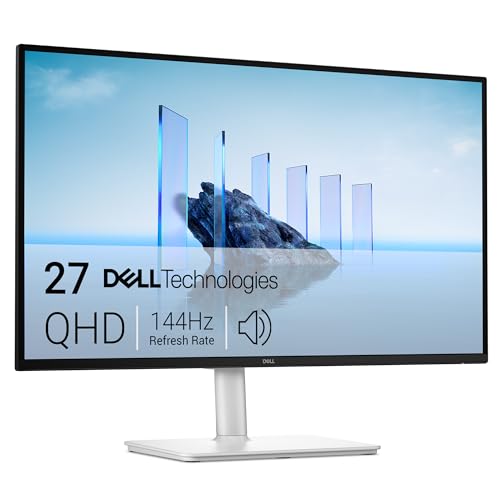
| ~$249.99 | Dell S2725DC — 144Hz, 65W USB-C, hub, speakers | $250 |
| $249.99 | Pixio PX278 Wave — 180Hz, 350 nits, speakers | $250 |
Quick Picks
| Pick | Why it wins | Price |
|---|---|---|
| MSI MAG 274QPF E20 | Best screen for the money, lightest to carry | $189.99 |
| Dell S2725DC | The true one-cable mover between floors | ~$249.99 |
| BenQ EW270Q | Loudest speakers, 65W USB-C | $199.99 |
| Gigabyte M27Q2 QD | Only real KVM under $300 | $159.99 |
| Pixio PX278 Wave | Fastest panel here that still makes a sound | $249.99 |
How to Choose a 1440p Gaming Monitor for Multi-Story Home Under $300
Weight is a moving spec. A 27-inch flat IPS panel weighs about 4.3 kg without its stand, per MSI’s spec sheet. A 32-inch curved VA panel is a two-hand carry that wants a desk at least 24 inches deep. If the monitor moves, buy 27 inches.
Leave a cable on each floor. Never move the cables: one USB-C cable and one power brick upstairs, the same downstairs, and the monitor carries only itself. That only works with a one-cable monitor — 65W USB-C carries video, audio, and charging on one cord.
Speakers are a shared-desk spec. A desk that two people share has no room for external speakers. Three picks here have built-in speakers; the other two need a $30 speaker budget or a headset at each desk.
The stand decides whether the monitor fits two desks. Two desks are never the same height, and a monitor that only tilts forces you to stack books under it on one floor. Three picks here have a full four-way stand, and every pick is VESA 100×100, so a $30 monitor arm is always the fallback.
1. MSI MAG 274QPF E20 — $189.99
Specs: 27-inch Rapid IPS, 2560×1440, 200Hz, 0.5ms GtG, 300 nits, 92% Adobe RGB / 95% DCI-P3, DisplayHDR 400, FreeSync Premium, DisplayPort 1.4a, 2× HDMI 2.0b, USB-C (15W PD), height/tilt/swivel/pivot stand, VESA 100×100, 6.8 kg with stand / 4.3 kg without, 3-year warranty.
The MAG 274QPF E20 is the screen-for-the-money pick this family has circled since batch 138: a 200Hz Rapid IPS panel with the widest colour here — 92% Adobe RGB, the print gamut no other pick covers, plus 95% DCI-P3 — and a full four-way stand, for $189.99.
The honest flags are the ones this family has carried for three guides. The USB-C port carries video but delivers only 15W — a trickle charge, not laptop charging — so the laptop keeps its own charger on each floor. There are no speakers and no USB hub, so calls and games need headphones or a $30 speaker bar. And the price is a range: the Meta Catalog reads $189.99 at one authorized retailer and $240 at another.
Pros: Best screen for the money: 200Hz, 92% Adobe RGB, $189.99; full four-way stand; lightest panel here to carry upstairs.
Cons: 15W USB-C will not charge a laptop; no speakers, no hub; price spread $189.99–$240.
Best for: The multi-story home where the monitor moves between floors and the screen matters most.
2. Dell S2725DC — ~$249.99
Specs: 27-inch IPS, 2560×1440, 144Hz, 1ms MPRT, 350 nits, 1500:1 contrast, 99% sRGB, FreeSync, DisplayPort 1.4, HDMI, USB-C (65W PD), 2× USB-A, 2× 3W speakers, height/tilt/swivel/pivot stand, 3-year warranty with Advanced Exchange.
The S2725DC led our office guide in batch 142, and it is the best multi-story monitor here on paper — 144Hz, a real 65W USB-C port, a USB hub, speakers, and a fully ergonomic stand. One cable carries video, audio, and charging, and Dell’s three-year warranty with Advanced Exchange is the best warranty under $300.
It is not the top pick for two reasons: at ~$249.99 it costs $60 more than the MSI, and the extra $60 buys 144Hz instead of 200Hz, a hub, and speakers. The price is a range: pricehistory.app reads $229.99 on Amazon on November 17, 2026, against an average of $242.65 — honest budget $250, verified at checkout. There is no KVM — the hub follows the laptop.
Pros: Only pick with 144Hz, 65W USB-C, a hub, speakers, and a full stand; brightest panel here; best warranty here.
Cons: Price spread is wide — $229.99 to $317.18 across listings, verify first; no KVM; $60 more than the top pick for a slower panel.
Best for: The laptop-first home that wants one cable on every floor and nothing else on the desk.
3. BenQ EW270Q — $199.99
Specs: 27-inch IPS, 2560×1440, 200Hz, 5ms GtG, 300 nits, 90% DCI-P3, 99% sRGB, USB-C (65W PD), dual 5W speakers, 1× DisplayPort 1.2, 1× HDMI 1.4, VESA 100×100, 3-year warranty.
The EW270Q led our music-production guide in batch 150, and it solves the problem the top pick shares with the KVM pick: neither of them makes a sound. Its dual 5W speakers are the loudest built into any 1440p monitor under $300, and its 65W USB-C port charges most 13–14-inch ultrabooks at full speed over the same cable that carries the video.
The price is the flag: the $199.99 read is a deal from Amazon on November 4, 2026, and the Meta Catalog reads $254.99 from authorized retailers, so the honest budget is $255. The stand is height and tilt only.
Pros: Fastest panel here with 65W USB-C and speakers; loudest speakers in the family.
Cons: $199.99 is a deal, honest $255; height/tilt stand only — no swivel, no pivot.
Best for: The living-room floor that games after hours and wants the fastest one-cable panel with sound.
4. Gigabyte M27Q2 QD — $159.99
Specs: 27-inch SuperSpeed IPS with Quantum Dot, 2560×1440, 200Hz (210Hz OC), 1ms GtG, 350 nits, 99% DCI-P3, 98% sRGB, DisplayHDR 400, built-in KVM, 1× DisplayPort 1.4, 2× HDMI 2.0, 1× USB-C (18W), height/tilt/swivel/pivot stand, VESA 100×100, 3-year warranty.
The M27Q2 QD led our home-lab guide in batch 137, and it is still the only KVM answer under $300: plug the desktop into DisplayPort, the laptop into USB-C, and the keyboard and mouse into the hub — one button moves everything between machines. At $159.99 it is also the cheapest pick here by $30.
Two honest flags. The price is a deal: at list ($249.99) the honest budget is $250, and the $159.99 Amazon price is a 36% early Black Friday cut. The USB-C port delivers 18W — video and a phone trickle charge, not laptop charging — and there are no speakers, so budget $30 for sound. One buying flag: the white M27Q2 QD Ice is a different, pricier variant — confirm the model code reads M27Q2 QD.
Pros: 99% DCI-P3 and the only real KVM under $300; cheapest pick by $30; joint-brightest panel here.
Cons: 18W USB-C will not charge a laptop; no speakers; deal price — at list, honest $250.
Best for: The home where an upstairs desktop and a downstairs laptop share one keyboard, mouse, and screen.
5. Pixio PX278 Wave — $249.99
Specs: 27-inch Fast IPS, 2560×1440, 180Hz, 1ms GtG, 350 nits, 1000:1 contrast, 95.5% DCI-P3, AMD FreeSync, 2× 3W speakers, 1× DisplayPort 1.4, 2× HDMI 2.0, tilt-only stand, 75×75 mm VESA (100×100 with included adapter), 4.74/5 stars from 157 reviews on Pixio’s store.
The PX278 Wave first appeared in our dorm-room guide in batch 156, and it is the fastest panel here that still makes a sound: 180Hz, 350 nits, and dual 3W speakers for $249.99 at Target, against a $289.99 list price on Pixio’s own store. It also comes in white, beige, pink, purple, and yellow: a monitor that matches the room stays on the desk.
Two honest flags: there is no USB-C at all — the USB port is for firmware updates only — so a laptop needs its own charger and cable on each floor, and 180Hz needs DisplayPort, since HDMI 2.0 caps at 144Hz.
Pros: Fastest panel here with built-in speakers; 350 nits, 95.5% DCI-P3; VESA adapter included.
Cons: No USB-C; 180Hz needs DisplayPort, HDMI caps at 144Hz; tilt-only stand; warranty reads two years in one place, three in another.
Best for: The home that wants the fastest screen that still plays sound, in a colour that matches the room.
What to Avoid
The one-letter MSI trap — again. The MAG 274QF E20 has no USB-C and a tilt-only stand, per MSI’s own spec sheet; only the MAG 274QPF E20 has USB-C and a full stand. At 32 inches the same trap exists: the curved MAG 325CQF has USB-C, the flat MAG 325QF E18V does not. One letter is never a typo — and MSI has already refreshed this line with the MAG 275QPF E21 at $189.99 and 210Hz, so check the model number before you pay.
The 32-inch temptation. The Samsung Odyssey G55C at $252.49, the LG 32GS60QC-B at $179.99, and the ViewSonic VX3267U-2K at $229.99 are all 32-inch panels — two-hand carries. A 32-inch monitor is the right buy for one floor, not for a monitor that moves.
The name mazes. The Dell S2725DC (~$249.99, 65W USB-C, hub, speakers) is not the S2725DSM ($189.99, no USB-C) and not the S2722DC ($224.99, 75Hz). The OMEN 27q is the old 165Hz panel; the 27q G2 is the 180Hz panel at $203.99.
Deal prices that have already ended. The XG27ACS at $189 is over — $229.00 now, honest $230 — and the OMEN 27qs G2 at $169.99 is over — $229.99 now, honest $230. The AOC Q27G40XMN is the only real Mini-LED HDR monitor under $300, and its $199.99 new price has never been verified — honest budget $250. The GW2790Q no longer fits (honest $215), and the S2722DC is fragile (honest $470).
The webcam tax. No 1440p monitor under $300 has a webcam or microphone — not one, in eighteen guides. The cheapest webcam monitor is the ASUS BE24EQK, a 24-inch 1080p panel at $129 to $157.
The China-only launch. The AOC Q27P4C launched in China on November 17, 2026, with 96W USB-C and a KVM for about $224 — on paper, the best multi-story monitor in this family. It is not sold in the United States yet.
Still Doesn’t Fit
The webcam monitor — at last, an answer, just not under $300. The ViewSonic VG2758V-2K launched on November 16, 2026, with a 5MP Windows Hello webcam, a microphone, dual 5W speakers, 100W USB-C, and RJ45 Ethernet for $379.99 — the first 1440p monitor in this family with a built-in webcam — and it misses by $79.99.
The 32-inch one-cable dream. No 32-inch monitor under $300 charges a laptop at 65W or more — the BenQ EW270Q and the ASUS ProArt PA278CGRV ($299.00) do it at 27 inches. A 32-inch monitor with 65W USB-C and a KVM is the Q27P4C — not sold in the United States.
The 4K wall. The Dell S2725QC 4K reads ~$303.85 (honest $305); the LG 27GX704A OLED reads ~$349.99 (honest $350).
FAQ
Is 27 inches the right size for a monitor that moves between floors?
Yes — a 27-inch flat IPS panel weighs about 4.3 kg without its stand. A 32-inch curved panel is a two-hand carry.
Is USB-C charging worth paying for on a moving monitor?
Yes, if a laptop is the main computer — a 65W port charges most 13–14-inch ultrabooks over the same cable that carries the video. A 15–16-inch performance laptop needs 90W or more; the only answer under $300 is the ProArt PA278CGRV at $299.00.
Does any 1440p monitor under $300 have a built-in webcam?
No — not one, in eighteen guides. The first, the ViewSonic VG2758V-2K, launched November 16, 2026, at $379.99.
Do I need a KVM, or is a USB hub enough?
A hub follows the laptop; a KVM switches both computers with one button. One computer, a hub is enough; two machines, only the Gigabyte M27Q2 QD has a KVM under $300.
Should I buy one monitor and move it, or two cheap ones?
One good monitor that moves is cheaper than two mediocre ones — the MSI at $189.99 plus a $30 arm on each floor is $250 all-in.
Verdict
For a multi-story home at $300, the monitor that moves wins, and the MSI MAG 274QPF E20 at $189.99 moves best for the money — 200Hz, 92% Adobe RGB, and a 4.3 kg panel that one person carries upstairs. Its catches: no speakers, a 15W USB-C port that will not charge a laptop, and a price that reads $240 at some sellers — verify before you pay.
If the laptop is the computer and one cable is the whole point, buy the Dell S2725DC at ~$249.99. If the living room needs sound more than speed, buy the BenQ EW270Q at $199.99. If an upstairs desktop and a downstairs laptop share one screen, buy the Gigabyte M27Q2 QD at $159.99 while the deal lasts. If the room needs colour and speed together, buy the Pixio PX278 Wave at $249.99. All five prices are November 2026 snapshots.
Suggested Internal Links
- Best 1440p Gaming Monitor for Large Home Under $300
- Best 1440p Gaming Monitor for Apartment Under $300
- Best 1440p Gaming Monitor for Dorm Room Under $300
As an Amazon Associate, we earn from qualifying purchases.
More from Amazon
Programs that pair well with the guide above. Offers and eligibility are set by Amazon and may change.
Free shipping on eligible items, Prime Video and more. Eligible new members can start with a free trial.
Start a Prime free trialAudiobooks and podcasts to listen to on the go. Eligible new members can start with a free trial.
Try Audible freeAd-free music streaming. Eligible new subscribers can start with a free trial.
Try Music Unlimited freeA free business account with business pricing and bulk-buying tools for work, shop or home office.
Create a business accountAs an Amazon Associate we earn from qualifying purchases.

Write Your Review
No reviews yet. Be the first to share your experience!