

Key takeaways
- Best mechanical keyboard under $200 —
/best-mechanical-keyboard-under-200/ - Best wireless gaming headset under $200 —
/best-wireless-gaming-headset-under-200/ - Best USB-C docking station under $200 —
/best-usb-c-docking-station-under-200/
A mechanical keyboard under $100 used to mean a loud, rattly board with thin keycaps. That is no longer true. In 2026, $100 buys hot-swap sockets, PBT keycaps, and per-key RGB — features that cost twice as much a few years ago.
This guide covers five real mechanical keyboards sold on Amazon US in November 2026. Prices are snapshots — check the current price before you buy. We have not bench-tested these units.
Top pick: the Keychron C2 Pro is the best mechanical keyboard under $100 for most buyers, combining a full-size layout, hot-swappable switches, QMK/VIA programming, and an 8,000 Hz polling rate at a street price well under the budget. For wireless, look at the Royal Kludge RK84; for the cheapest way in, the Redragon K617 Fizz costs about a third of the budget.
Quick Picks
| Product | Best for | Key specs | Price note |
|---|---|---|---|
| Keychron C2 Pro | Best overall | Full-size, hot-swap, QMK/VIA, 8,000 Hz, PBT keycaps | Check current price; seen at $64.99 on Amazon in Nov 2026 |
| Logitech G413 TKL SE | Best big-brand pick | TKL, tactile switches, PBT keycaps, aluminum top | Check current price; $68.59 on Amazon on 17 Nov 2026 |
| HyperX Alloy Origins Core | Best premium feel | TKL, HyperX Red linear, aluminum body, RGB | Check current price; seen around $80–$90 on Amazon in Nov 2026 |
| Royal Kludge RK84 | Best wireless hot-swap | 75%, hot-swap, Bluetooth / 2.4 GHz / USB-C, RGB | Check current price; seen around $60–$70 on Amazon in Nov 2026 |
| Redragon K617 Fizz | Best budget 60% | 60%, 61 keys, Red linear switches, RGB, wired | Check current price; seen around $31–$45 on Amazon in Nov 2026 |
How to Choose a Mechanical Keyboard Under $100
Start with the switches, not the lights. Linear switches, like Keychron Super Red, HyperX Red, and Redragon Red, travel straight down with no bump — smooth and fast, the usual choice for gaming. Tactile switches, like Keychron Super Brown, add a small bump as the key registers — popular for typing. Clicky switches add an audible click: satisfying at home, unpopular in shared offices. Unsure? Start with a light linear or tactile switch.
Hot-swap matters more than RGB. A hot-swappable board lets you pull switches out and push new ones in with no soldering, so you can change the feel later for the price of a switch set. Four of the five picks here are hot-swappable; the Logitech G413 TKL SE is the exception, with soldered switches.
Layout decides how much desk you give up. Full-size boards like the Keychron C2 Pro have a number pad, handy for spreadsheets. Tenkeyless (TKL) boards like the G413 TKL SE and Alloy Origins Core drop the numpad and give your mouse more room — the usual choice for gaming. A 75% board like the RK84 keeps the function row and arrows; a 60% board like the K617 Fizz drops them entirely. New to compact layouts? Start with TKL or 75%.
Keycaps: PBT beats ABS. PBT keycaps are denser and more textured, and they resist shine far longer than ABS. The C2 Pro and G413 TKL SE both ship with PBT keycaps, a real quality signal at this price. The Alloy Origins Core uses thicker double-shot ABS — better than cheap thin ABS, but quicker to shine than PBT.
Connectivity: wired is simpler, wireless is freer. A wired board never needs charging, and every pick here works wired. Wireless adds Bluetooth and 2.4 GHz, so one keyboard can switch between a PC, a laptop, and a tablet — the RK84 is the only pick here with all three modes. One computer? Wired saves money. Several devices? Tri-mode wireless is worth paying for.
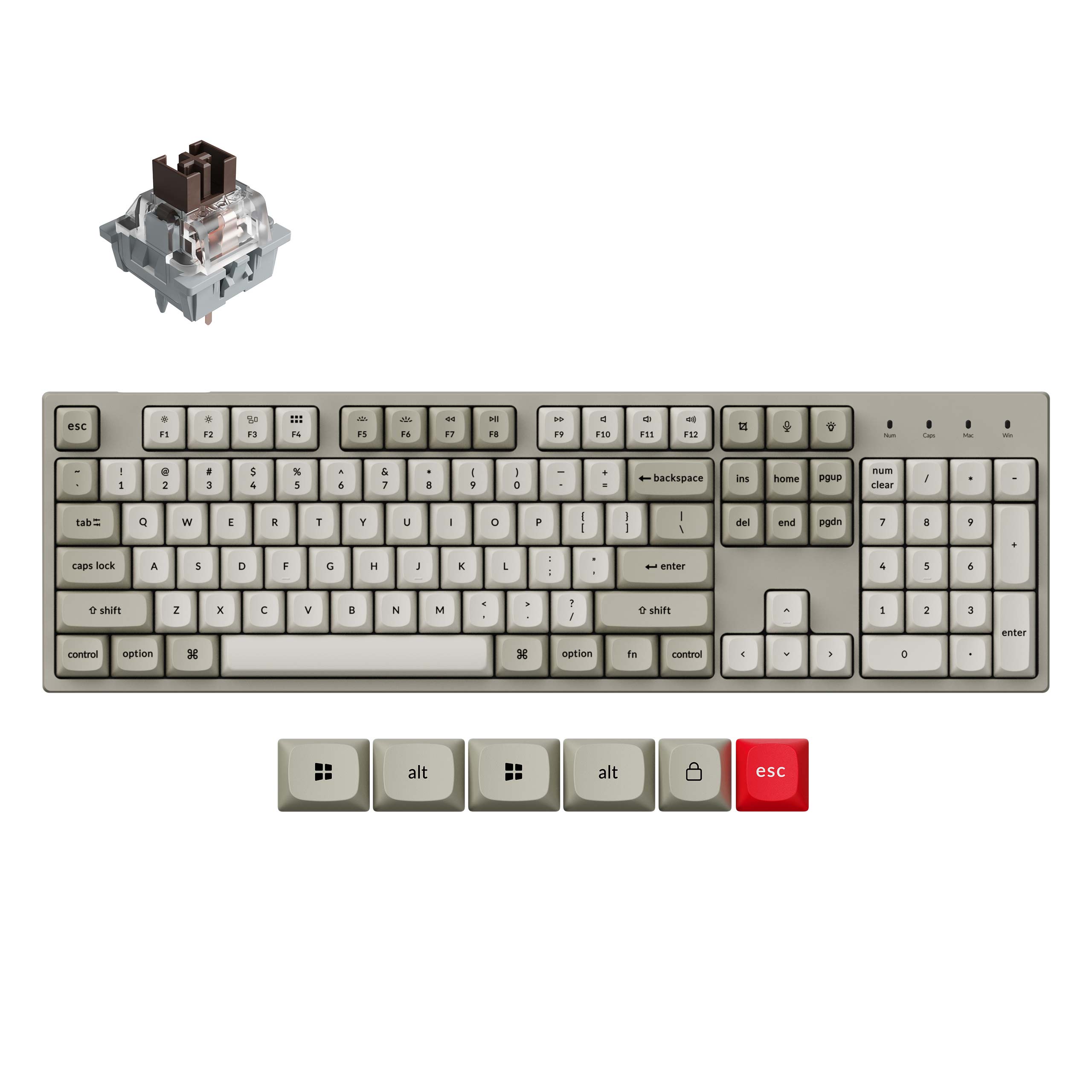
1. Keychron C2 Pro — Best Overall
Best for: Most buyers who want a full-size board they can customize later.
The Keychron C2 Pro is the strongest all-rounder under $100: a full-size board with a number pad, hot-swappable sockets, QMK/VIA support, and an 8,000 Hz polling rate over USB-C. Keycaps are non-shine-through PBT, and Mac keycaps are in the box.
Switches are Keychron Super switches in Red (linear), Brown (tactile), or Banana (sharply tactile), all hot-swappable, and the board accepts most 3-pin and 5-pin MX-style switches. A November 2026 review noted the C2 Pro 8K on Amazon for $64.99.
Specs: Full-size 100% layout; hot-swappable Keychron Super switches (Red, Brown, Banana); QMK/VIA; 8,000 Hz polling; PBT keycaps; south-facing RGB; USB-C wired.
Pros: Full-size with numpad; hot-swap plus QMK/VIA; 8,000 Hz polling; PBT keycaps; around $65.
Cons: Wired only; no volume knob; subtle RGB.
Who it is best for: Typists and gamers who want a full-size board with an upgrade path and no need for wireless.
Check price on Amazon — Keychron C2 Pro
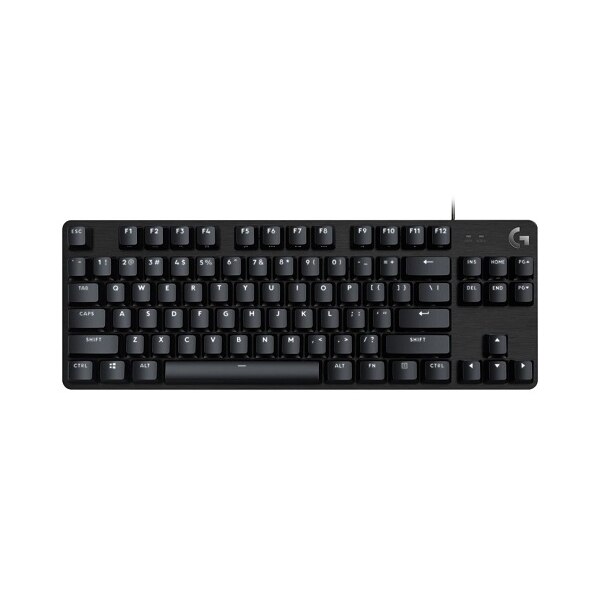
2. Logitech G413 TKL SE — Best Big-Brand Pick
Best for: Buyers who want a proven brand, a solid metal build, and no fuss.
The Logitech G413 TKL SE is the safe choice: a tenkeyless board with Logitech’s tactile switches, PBT keycaps, a brushed aluminum-magnesium top plate, and white LED backlighting. No software to install — plug it in over USB and it works. The tactile switch has a defined bump without a loud click, and the aluminum top gives the board a rigidity plastic budget boards cannot match.
The trade-offs are worth knowing. The switches are soldered, so you cannot swap them later. The backlight is white only, not RGB. There is no USB passthrough port and no dedicated media keys — media functions live on the F-keys behind the FN key. That matters only if you plan to tinker.
On price, this is one of the best-verified picks in the guide. Amazon US price trackers showed the G413 TKL SE at $68.59 on 17 November 2026, against a $79.99 list price, and our catalog search showed $67.99. It has been as low as $39.73, so watch for sales.
Specs: Tenkeyless; Logitech tactile switches (soldered); PBT keycaps; aluminum-magnesium top; white LED backlight; USB wired; 12 FN media shortcuts; anti-ghosting.
Pros: Big-brand build and warranty; aluminum top; PBT keycaps; tactile switches for typing and gaming; under $70.
Cons: Soldered switches; white backlight only; no USB passthrough or media keys; no wireless.
Who it is best for: Buyers who want a set-and-forget Logitech board and do not plan to mod it.
Check price on Amazon — Logitech G413 TKL SE
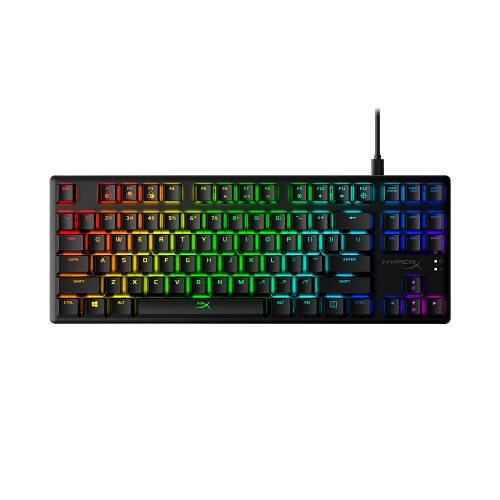
3. HyperX Alloy Origins Core — Best Premium Feel
Best for: Gamers who want an aluminum board with a proven switch.
The HyperX Alloy Origins Core is the most premium-feeling board in this guide. Its entire body is aircraft-grade aluminum, giving it a heft and rigidity plastic boards at this price cannot match. It uses HyperX Red linear switches with a 1.8 mm actuation point and 45 g of force, backed by roughly 15,000 Amazon reviews at around 4.7 stars, the most validated track record of any pick here.
It is tenkeyless, with a detachable USB-C cable, RGB, onboard memory, and three profiles through HyperX’s NGENUITY software. Keycaps are double-shot ABS — thicker than cheap thin ABS, though they shine sooner than PBT. Switches are soldered, so like the Logitech, this is a board you buy for what it is.
Pricing varies by switch type and seller. Amazon US trackers showed the Origins Core at $89.99 on 16 November 2026, and roundups published in October 2026 put it at $70–$90. Our catalog search showed it at $79.99, down from a $104.99 list. The Red linear version is the usual deal; Aqua tactile and Blue clicky versions can cost more.
One warning: HyperX also sells a plain Alloy Core RGB, a membrane keyboard — check the listing says “Alloy Origins Core” and “mechanical”.
Specs: Tenkeyless; HyperX Red linear switches (1.8 mm actuation, 45 g; Aqua and Blue also sold); aluminum body; double-shot ABS keycaps; RGB; detachable USB-C; onboard memory, 3 profiles; N-key rollover.
Pros: Full aluminum body; proven HyperX Red switch; huge review history; detachable USB-C; onboard profiles.
Cons: Soldered switches; ABS keycaps will shine; price varies by switch type; easy to confuse with the membrane Alloy Core RGB.
Who it is best for: Gamers who want a heavy, rigid TKL board with a fast linear switch.
Check price on Amazon — HyperX Alloy Origins Core
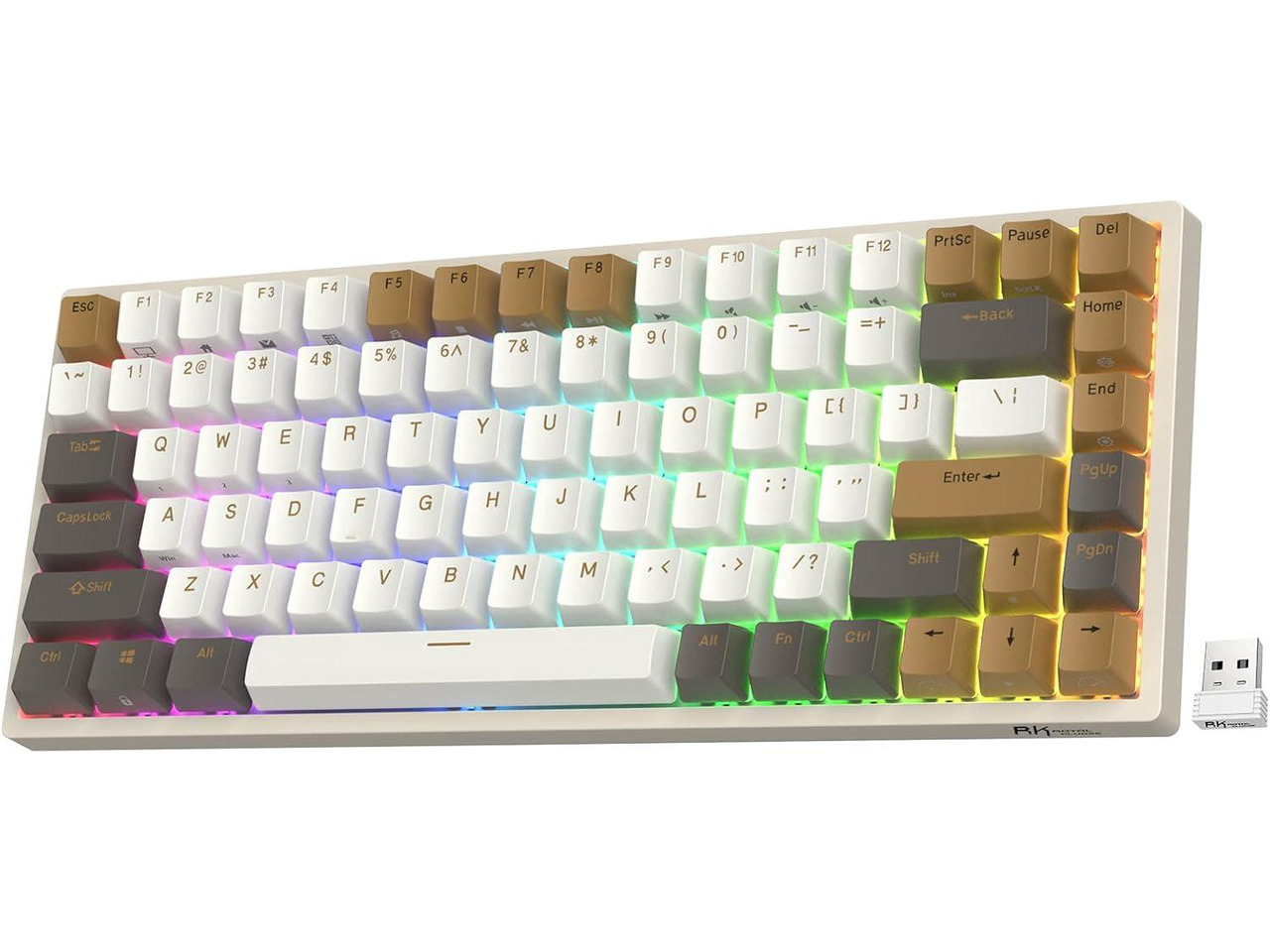
4. Royal Kludge RK84 — Best Wireless Hot-Swap
Best for: Buyers who want wireless, hot-swap, and a compact layout in one board.
The Royal Kludge RK84 is the most flexible board in this guide: a 75% layout with 84 keys that connects three ways — Bluetooth, 2.4 GHz wireless, or wired USB-C. Switches are hot-swappable, backlighting is per-key RGB, and the wireless version’s large battery lasts weeks between charges.
That flexibility is why the RK84 has been a budget favorite for years. Roundups updated in November 2026 put it at around $60–$70 on Amazon US, and an Amazon-fulfilled listing showed it at $59.99. Our catalog search returned the wired RK84 at $97.79, so check the listing is the wireless triple-mode version — price and features differ by variant.
Switch options are RK Red (linear), Brown (tactile), and Blue (clicky), and the hot-swap sockets accept most MX-style switches. Keycaps are ABS, the case is plastic, and the software is basic next to Keychron’s QMK/VIA. Even so, tri-mode wireless and hot-swap for about $60 is a combination no other pick here matches.
Specs: 75%, 84 keys; hot-swappable RK switches (Red, Brown, Blue); Bluetooth, 2.4 GHz, USB-C; per-key RGB; large battery (wireless version); ABS keycaps.
Pros: Tri-mode wireless; hot-swap sockets; compact 75% layout; around $60–$70.
Cons: Plastic case and ABS keycaps; basic software; wired and wireless variants are priced very differently.
Who it is best for: Anyone who wants one keyboard for several devices, or hot-swap and wireless under $70.
Check price on Amazon — Royal Kludge RK84
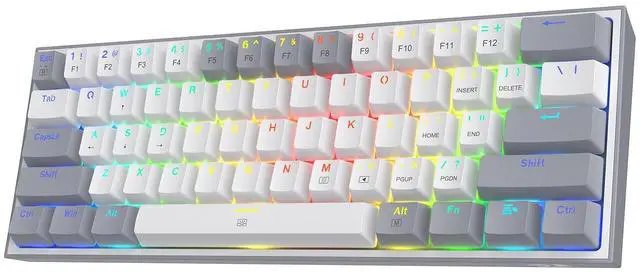
5. Redragon K617 Fizz — Best Budget 60%
Best for: Buyers who want a mechanical keyboard for the least money possible.
The Redragon K617 Fizz is the cheapest real mechanical keyboard in this guide: a 60% board with 61 keys, linear Red switches, RGB, and a wired USB-C connection. It has no numpad, function row, or arrow keys — those live on a function layer — but it takes up barely more desk space than a paperback, and costs about a third of the budget.
Our catalog search showed the K617 Fizz at $31 in one colorway and $44.99 for a hot-swap variant. At this price, expect ABS keycaps, a plastic case, and a lighter, hollower sound than the boards above it — the trade for spending $35 instead of $70.
The K617 family has several variants, including a K617 HE with magnetic Hall-effect switches and adjustable actuation. The standard K617 Fizz is a conventional board with Red linear switches — if a listing mentions rapid trigger, it is the HE version, which costs more. Hot-swap support also varies by variant.
Specs: 60%, 61 keys; Red linear switches; RGB; wired USB-C; ABS keycaps.
Pros: Cheapest pick by far; compact 60% size; RGB included; long-running Amazon seller.
Cons: No function row or arrows; ABS keycaps, plastic case; hot-swap varies by variant.
Who it is best for: Budget buyers, small desks, and first-time mechanical keyboard buyers.
Check price on Amazon — Redragon K617 Fizz
What to Avoid
Do not buy on switch color alone. Red, Brown, and Blue mean different things at different brands. Read the switch description on the listing — linear, tactile, or clicky — rather than trusting the color.
Do not assume every board is hot-swappable. The Logitech and HyperX picks here have soldered switches, and some K617 variants are soldered too. If you want to change switches later, confirm “hot-swappable” on the exact listing you buy.
Do not pay for a layout you will not use. A full-size board is wasted on a small desk, and a 60% board frustrates anyone who uses arrow keys all day.
Do not confuse lookalikes. The HyperX Alloy Core RGB is a membrane keyboard, not the mechanical Alloy Origins Core. The Redragon K617 HE is a magnetic-switch board, not the standard K617 Fizz. The RK84 comes in wired and wireless versions at very different prices. Check the full product name on the listing.
FAQ
What is the best mechanical keyboard under $100?
For most buyers, the Keychron C2 Pro: full-size, hot-swappable, QMK/VIA, 8,000 Hz polling, PBT keycaps, around $64.99 on Amazon in November 2026. For wireless, the Royal Kludge RK84 at around $60–$70.
Are cheap mechanical keyboards actually good?
Yes, up to a point. In 2026, a $60–$70 board like the C2 Pro or RK84 has hot-swap sockets, decent stabilizers, and PBT or thick ABS keycaps — features that were premium-only a few years ago. Against a $150 board you mostly give up case material, sound tuning, and software polish.
Is a hot-swappable keyboard worth it under $100?
Usually yes. Hot-swap lets you change the feel later for the cost of a switch set, and replace a single faulty switch instead of the whole board. The C2 Pro and RK84 are hot-swappable; the G413 TKL SE and Alloy Origins Core are not, so buy those for what they are today.
What switch type should a beginner choose?
A light linear switch like Red, or a tactile switch like Brown. Linear is smooth and fast for gaming; tactile adds a bump that helps typing accuracy. Avoid clicky Blue switches as a first board unless you live alone.
Can I use these keyboards with a Mac?
The Keychron C2 Pro is the most Mac-friendly pick: it ships with Mac keycaps and a Mac/Windows switch, and QMK/VIA works on macOS. The others work on Mac as standard USB keyboards, though their software is Windows-focused.
Verdict
For most buyers, the Keychron C2 Pro is the best mechanical keyboard under $100: full-size, hot-swappable, QMK/VIA, 8,000 Hz polling, and PBT keycaps for around $65.
For a major-brand board with a metal build and no tinkering, choose the Logitech G413 TKL SE at $68.59. For the most premium feel, choose the HyperX Alloy Origins Core. For wireless and hot-swap together, choose the Royal Kludge RK84 at around $60–$70. For the lowest spend, the Redragon K617 Fizz is around $31–$45.
Whichever you choose, check the exact listing — switch type, layout, and hot-swap support — and the current price on Amazon before you buy.
As an Amazon Associate, we earn from qualifying purchases.
Suggested internal links for chartget.com
- Best mechanical keyboard under $200 —
/best-mechanical-keyboard-under-200/ - Best wireless gaming headset under $200 —
/best-wireless-gaming-headset-under-200/ - Best USB-C docking station under $200 —
/best-usb-c-docking-station-under-200/
More from Amazon
Programs that pair well with the guide above. Offers and eligibility are set by Amazon and may change.
Free shipping on eligible items, Prime Video and more. Eligible new members can start with a free trial.
Start a Prime free trialAudiobooks and podcasts to listen to on the go. Eligible new members can start with a free trial.
Try Audible freeAd-free music streaming. Eligible new subscribers can start with a free trial.
Try Music Unlimited freeA free business account with business pricing and bulk-buying tools for work, shop or home office.
Create a business accountAs an Amazon Associate we earn from qualifying purchases.
Write Your Review
No reviews yet. Be the first to share your experience!