

The best camera field monitors for filmmakers depend on whether you need a lightweight exposure monitor, a bright daylight display, or an on-camera recorder: choose the Atomos Ninja V+ for external recording, the Atomos Shinobi II for a compact touchscreen, the SmallHD Cine 5 for professional monitoring tools, and a 7-inch monitor such as the Portkeys BM7 II when viewing distance matters more than weight.
Our top picks
 FEELWORLD S55 V3 6" 500nit 1920×1080 IPS
- 【On Camera Monitor】FEELWORLD S55 V3 is a 6…
- 【Accurate Exposure & Focus】This field monitor features waveform,…
- 【Reliable Monitoring for Indoor Shooting Setup】Designed fo studios…
 NEEWER F700 7" Camera Field Monitor
- 【2000nit Touch Screen & Auto Backlight Control】 The…
- 【4K HDMI Loop In & Out】 Supporting HDMI…
- 【Versatile Monitoring & Custom 3D LUT Upload】 The…
 FEELWORLD F5 Prox 5.5" 1600nit Touch Field
- 【Professional External Camera Monitor】 Designed to replace your…
- 【Accurate Focus & Exposure Tools】Built-in all pro tool,…
- 【1600nits High Brightness for Outdoor Visible Monitoring】 The…
| Product | Key specs | |
|---|---|---|
| FEELWORLD S55 V3 6" 500nit 1920×1080 IPS | 【On Camera Monitor】FEELWORLD S55 V3 is a 6… 【Accurate Exposure & Focus】This field monitor features waveform,… 【Reliable Monitoring for Indoor Shooting Setup】Designed fo studios… | Check price |
| NEEWER F700 7" Camera Field Monitor | 【2000nit Touch Screen & Auto Backlight Control】 The… 【4K HDMI Loop In & Out】 Supporting HDMI… 【Versatile Monitoring & Custom 3D LUT Upload】 The… | Check price |
| FEELWORLD F5 Prox 5.5" 1600nit Touch Field | 【Professional External Camera Monitor】 Designed to replace your… 【Accurate Focus & Exposure Tools】Built-in all pro tool,… 【1600nits High Brightness for Outdoor Visible Monitoring】 The… | Check price |
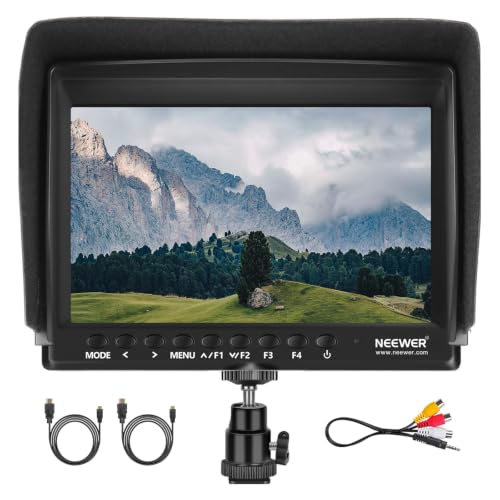 NEEWER F100 7 inch Camera Field Monitor NEEWER F100 7 inch Camera Field Monitor | 【7 Inch External Field Monitor】 The camera monitor… 【Supported Formats】The camera screen monitor supports 1080i (60/59.94/50),… 【Advanced Features】 The field monitor includes monitoring tools… | Check price |
As an Amazon Associate we earn from qualifying purchases at no extra cost to you.
Quick picks by outdoor-shoot situation
- Best for recording and monitoring: Atomos Ninja V+ — a 5-inch 2000-nit HDR monitor-recorder with 4K recording support.
- Best compact daylight monitor: Atomos Shinobi II — a 5.2-inch, 1500-nit monitor with touchscreen controls and no built-in recorder.
- Best for advanced on-set tools: SmallHD Cine 5 — a 5-inch monitor built around SmallHD’s PageOS tool workflow.
- Best for a larger viewing area: Portkeys BM7 II — a 7-inch monitor with high brightness and both HDMI and SDI connectivity.
- Best budget approach: A 5-inch 1000- to 1500-nit HDMI monitor with a supplied sun hood and NP-F battery plate.
What matters most when choosing a camera field monitor
Screen size: mobility versus shared viewing
A 5-inch monitor is usually the best fit for a handheld, gimbal, or small cinema camera. It adds less leverage to the camera rig and can remain visible without extending far beyond the top handle. A 7-inch monitor is easier for a focus puller, director, or second operator to read, but it increases wind resistance, battery consumption, and mounting stress.
For solo shooting, 5 inches is generally sufficient if the display has focus magnification, false color, waveform, and a usable sun hood. For interviews, tripod work, and narrative sets, 7 inches can justify its additional weight because two people can inspect the frame more comfortably.
Brightness: the outdoor specification that changes the experience
Brightness is measured in nits. Around 1000 nits is workable outdoors with a hood and careful positioning. Around 1500 to 2200 nits is more forgiving in direct daylight. A high-nit screen does not eliminate reflections, however: a matte or low-reflection surface, a deep hood, and correct monitor angle still matter.
Do not select a monitor solely because it advertises HDR. HDR support can improve highlight visualization, but exposure tools such as waveform, false color, zebras, and a calibrated LUT are more useful when you are trying to protect skin tones and bright skies.
Resolution and viewing distance
Most useful 5-inch field monitors are 1920 x 1080. That is enough for framing and exposure, while magnification makes it possible to inspect focus. A 7-inch 1920 x 1200 panel provides a little more vertical workspace for scopes and camera menus. A 4K input is useful when the monitor can display or record it, but a 4K input does not automatically mean the panel itself is 4K.
Head-to-head comparison
| Monitor | Screen and brightness | Inputs and recording | Battery and mounting | Best use |
|---|---|---|---|---|
| Atomos Shinobi II | 5.2 inches, 1920 x 1080, about 1500 nits | HDMI monitoring; no internal recorder | NP-F battery options; 1/4-inch mounting points | Compact solo operation and exposure monitoring |
| Atomos Ninja V+ | 5 inches, 1920 x 1080, about 2000 nits | HDMI; records formats including ProRes and DNx, subject to camera and recording media | NP-F batteries; multiple 1/4-inch mounting points | External recording and high-brightness monitoring |
| SmallHD Cine 5 | 5 inches, 1920 x 1080, about 2000 nits | HDMI or SDI versions; monitoring-focused | NP-F battery plate; 1/4-inch mounting points | Professional exposure, focus, and LUT workflows |
| Portkeys BM7 II | 7 inches, 1920 x 1200, about 2200 nits | HDMI and SDI monitoring; no general-purpose internal recorder | NP-F batteries; 1/4-inch mounting points | Bright daylight viewing and small crews |
| Feelworld LUT7 | 7 inches, 1920 x 1200, about 2200 nits | HDMI monitoring with LUT and scope tools | NP-F battery options; 1/4-inch mounting points | Lower-cost large-screen monitoring |
Specifications can vary by regional version, firmware, and input configuration. Confirm the exact connector layout before buying, particularly with monitors sold in separate HDMI and SDI editions.
Recorder or monitor only?
A monitor-recorder such as the Ninja V+ can simplify a camera package by allowing recording to a high-speed solid-state drive rather than relying only on the camera’s internal media. It can also provide a more editable codec, but the complete system costs more: monitor, battery, drive, caddy or mounting solution, and cables are all part of the budget.
A monitor-only model is lighter and has fewer points of failure. It is the better choice when your camera already records the required codec and you only need a larger, brighter display. Removing recording hardware can also reduce menu complexity and power consumption.
Battery planning for a full outdoor day
Most monitors in this class use Sony NP-F or L-series batteries. A nominal 7.4-volt, 6600-mAh NP-F battery contains approximately:
7.4 volts x 6.6 amp-hours = 48.8 watt-hours.
If a monitor draws about 8 watts in normal use, the theoretical runtime is:
48.8 watt-hours / 8 watts = 6.1 hours.
Allowing for conversion loss, screen brightness, cold weather, battery age, and powering accessories, plan on roughly 4 to 5 hours from that battery rather than six. For an eight-hour shoot, carry at least two charged batteries per monitor, or use a larger NP-F battery and a USB-C or D-tap power source where the monitor supports it. Recording monitors may consume more power than monitor-only models, especially while writing to an SSD.
Mounting compatibility and rig balance
Most field monitors use 1/4-inch mounting threads, but the thread alone does not determine whether a setup is secure. A small articulating arm is convenient but can sag under a 7-inch monitor. A locking monitor arm or NATO-based mounting system is safer for movement, especially when the camera is carried over uneven ground.
- Use a short arm for a handheld rig to reduce vibration and leverage.
- Place the monitor above the camera rather than far to one side whenever possible.
- Choose a cage with multiple 1/4-inch or 3/8-inch points so the mounting screw cannot rotate under load.
- Use a cable clamp or strain relief; HDMI ports are more vulnerable than the monitor panel.
- For gimbals, check total payload and balance after adding the battery, cable, hood, and SSD.
Monitor tools worth paying for
Waveform: the most dependable general exposure reference because it shows the brightness distribution across the image.
False color: useful for checking skin exposure and quickly identifying clipped highlights, but learn the monitor’s color legend before relying on it.
Focus peaking and magnification: especially important on a 5-inch 1080p display. Peaking should be adjustable; an overly aggressive setting can make soft edges look sharp.
LUT support: helpful when shooting a flat or log profile. Keep a clean, non-LUT view available so the LUT does not hide clipping or create false confidence about exposure.
Camera control: HDMI or SDI control features are camera-specific. Check compatibility with your exact camera model rather than assuming that any touchscreen monitor can change ISO, shutter, or recording status.
Ownership realities in outdoor work
The first parts likely to cause trouble are usually cables, battery contacts, mounting hardware, and the screen surface—not the LCD panel itself. Keep a short spare HDMI cable, protect unused ports with their covers, and avoid tightening an articulating arm against the monitor’s plastic housing.
Clean dust with a blower or soft brush before wiping. If the manufacturer permits a damp cloth, use it sparingly and keep liquid away from vents, buttons, and connectors. Do not leave a battery attached in a hot, unattended case, and remove batteries during long-term storage.
A sun hood is not an optional cosmetic accessory for a 1000-nit display. It improves contrast, reduces the temptation to run maximum brightness continuously, and can extend practical battery life. For bright locations used frequently, spending more on a 1500- to 2200-nit monitor may be better value than repeatedly fighting reflections with a cheaper screen.
Final buying decision
Choose the Atomos Ninja V+ if external recording is part of the workflow. Choose the Atomos Shinobi II if you want a compact, modern monitor without recorder cost or weight. Choose the SmallHD Cine 5 when precise monitoring tools and repeatable on-set operation matter most. Choose the Portkeys BM7 II or another 7-inch, 2000-nit-class display when the monitor will be shared or viewed in difficult daylight. For occasional outdoor work, a 5-inch monitor with at least 1000 nits, NP-F power, a sun hood, waveform, false color, and a secure 1/4-inch mount covers the essentials without overbuilding the rig.
Write Your Review
No reviews yet. Be the first to share your experience!