

Key takeaways
- Membrane boards labelled “mechanical feel.” If the listing says “mechanical feel” or “mecha-membrane” without naming a switch type, it is a rubber-dome board, not a mechanical keyboard.
- The $29.99 “8K gaming keyboard.” Hall Effect boards start around $90 (the Gamakay TK75HE V2 lists $89.99 on sale); a $30 board claiming 8,000 Hz polling and magnetic switches is a cheap board with a fantasy spec sheet.
- Buying the wrong Azoth. The ROG Azoth ($239.99), Azoth X ($269.99), and Azoth Extreme ($499+) share a name and a look. Check the model number — M701 for the original Azoth — before you pay.
- Hall Effect boards if you love swapping MX switches. Magnetic sockets do not accept standard MX switches. If your drawer is full of Cherry, Gateron, and Akko MX switches, buy the Q3 Max, not a HE board.
- The HHKB Professional Hybrid Type-S at $300. A superb keyboard for a Topre-switch devotee who loves the 60% layout — but it is not hot-swappable, has no number pad or function row, and costs the entire budget for a board that does less than the Q3 Max for most people. Skip it unless you already know you want Topre.
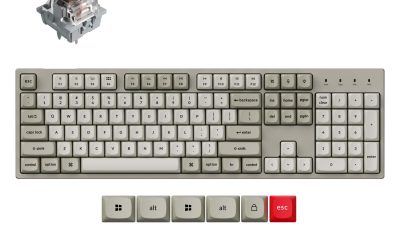
The best mechanical keyboard under $300 for most people is the Keychron Q3 Max: a CNC-machined aluminium TKL with a gasket mount, hot-swappable switches, double-shot PBT keycaps, a programmable knob, and full QMK/VIA support over Bluetooth, 2.4 GHz wireless, and USB-C. If you play competitive shooters, the Wooting 80HE’s magnetic switches and Rapid Trigger are the faster pick. If you want a keyboard that feels like a custom build out of the box, the ASUS ROG Azoth is the premium choice. And if a low, laptop-like profile matters most, the Logitech G915 TKL is still the board to beat.
All five were listed on Amazon US in November 2026. Treat any price here as a November 2026 snapshot and check the current price before you buy.
Quick Picks
| Keyboard | Price (Nov 2026) | Layout | Switches | Hot-Swap | Wireless | Best For |
|---|---|---|---|---|---|---|
| Keychron Q3 Max | $229.99 | TKL (80%) | Gateron Jupiter MX | Yes | Bluetooth + 2.4 GHz + USB-C | Best overall |
| Keychron Q1 HE | $219.99 | 75% | Gateron Magnetic HE | No (HE only) | Bluetooth + 2.4 GHz + USB-C | Hall Effect gaming |
| Wooting 80HE | $199.99 | 80% | Lekker V2 HE | Yes (HE only) | No (wired) | Competitive gaming |
| ASUS ROG Azoth | $239.99 | 75% | ROG NX Snow | Yes | Bluetooth + 2.4 GHz + USB-C | Premium 75% |
| Logitech G915 TKL | $229.99 | TKL (80%) | GL low-profile | No | Lightspeed + Bluetooth | Low-profile wireless |
How to Choose a Mechanical Keyboard Under $300
A $300 budget buys a genuinely premium keyboard in 2026 — but the features that matter are the ones you cannot change.
Switch type
Three switch families matter at this price. Standard MX mechanical switches (Cherry-style) are the flexible choice: you can swap them, lube them, and buy replacements anywhere. Hall Effect (magnetic) switches measure key travel with magnets instead of metal contacts, which enables adjustable actuation and Rapid Trigger. Low-profile switches are shorter and flatter, closer to a laptop keyboard, but they use their own switch ecosystem and are rarely hot-swappable. Pick the family first.
Keycaps
Double-shot PBT keycaps are the durability benchmark: the legends are moulded through the cap, so they never wear off, and PBT resists the shine that makes cheap ABS caps look greasy after a year. At $300, double-shot PBT should be the expectation — check the spec sheet, because some premium-priced boards still ship ABS.
Layout and size
A full-size board keeps the number pad; a TKL (80%) drops it and pulls the mouse closer to your right hand; a 75% board keeps the function row in a tighter footprint. For a desk setup, TKL and 75% are the sweet spot. If you enter numbers all day, do not buy a board without a number pad.
Wireless vs wired
Tri-mode wireless (Bluetooth, 2.4 GHz, USB-C) is standard at this price. Bluetooth pairs with up to three devices and is fine for typing; 2.4 GHz is the low-latency mode for gaming. Note the trade-off: the best competitive Hall Effect boards, including the Wooting 80HE, are wired only, because wireless adds latency.
Hot-swappability
Hot-swap sockets let you pull switches out and push new ones in without soldering. Two warnings: Hall Effect boards only accept Hall Effect switches — standard MX switches will not fit a magnetic socket — and some low-profile boards are not hot-swappable at all.
Build quality
At $300 you should be getting a metal case, a gasket mount, and sound-dampening foam. A plastic case is not automatically bad — the Wooting 80HE’s PCR ABS case is a deliberate weight and cost choice — but a $300 board in a hollow plastic shell with no foam is priced above its build.
RGB and software
RGB backlighting is table stakes; the software behind it is not. QMK/VIA is the open standard: it runs in a browser, works on Windows, Mac, and Linux, and lets you remap any key and build macros without installing a vendor app. Vendor software (Razer Synapse, Logitech G Hub, ASUS Armoury Crate) can do more with that brand’s own hardware, but it usually only runs on Windows.
1. Keychron Q3 Max — Best Overall
Specs: TKL (87-key); CNC-machined aluminium case; gasket mount; Gateron Jupiter switches (Red, Brown, or Banana); hot-swappable for 3-pin and 5-pin MX switches; KSA double-shot PBT keycaps; programmable knob; QMK/VIA; Bluetooth 5.1, 2.4 GHz, USB-C; 4,000 mAh battery, up to 180 hours with backlight off; 1,770 g.
Pros: The most complete board in this guide. The aluminium case and gasket mount give it a deep, solid feel, and the foam layers — IXPE, PET, and latex — are why it sounds good out of the box. QMK/VIA means full remapping in a browser with no vendor software, and tri-mode wireless covers a desktop, a laptop, and a tablet.
Cons: At 1,770 g it is the heaviest board here; it stays on one desk. The 1,000 Hz polling rate is fine for almost everyone but below the 8,000 Hz of Keychron’s own Q3 Ultra 8K.
Best for: Anyone who wants one keyboard for typing all day, gaming at night, and working on Mac and Windows — without a closed ecosystem.
Check price on Amazon — Keychron Q3 Max
2. Keychron Q1 HE — Best Hall Effect Gaming
Specs: 75% (81-key); CNC-machined aluminium case; gasket mount; Gateron Magnetic Hall Effect switches; adjustable actuation 0.2–3.4 mm; Rapid Trigger; multi-action keys; QMK/VIA; Bluetooth 5.1, 2.4 GHz, USB-C; 4,000 mAh battery, up to 100 hours wireless with backlight off; double-shot PBT keycaps; LED screen; 327.5 x 145 mm.
Pros: This is the cheapest way into a full-metal Hall Effect keyboard with QMK and wireless. Adjustable actuation lets you set each key to fire exactly where your finger expects it, and Rapid Trigger resets keys the moment you lift. The aluminium case and gasket mount carry over from the Q Max series, so it types like a premium board.
Cons: Hall Effect only. Standard MX switches will not fit the magnetic sockets, so the hot-swap flexibility of the Q3 Max is gone — you can swap between Gateron HE switches, and that is it. At $219.99 it is only $10 less than the Q3 Max.
Best for: Gamers who want Rapid Trigger and adjustable actuation in a wireless, QMK-programmable board — and will not miss MX switch swapping.
Check price on Amazon — Keychron Q1 HE
3. Wooting 80HE — Best for Competitive Gaming
Specs: 80% (87-key); PCR ABS case (zinc version available); Lekker V2 Hall Effect switches (L45 or L60); adjustable actuation 0.1–4.0 mm; Rapid Trigger; Rappy Snappy; hot-swappable for Lekker and Gateron HE switches; double-shot PBT keycaps; USB-C wired only; 790 g in ABS.
Pros: The 80HE is the competitive standard other Hall Effect boards are measured against. Lekker V2 switches actuate as shallow as 0.1 mm, and Wooting’s software — Wootility — is the most polished configurator in the category, with per-key actuation curves and analogue input. The 80HE+ refresh keeps the same $199.99 price for the ABS prebuilt, and at 790 g it is the lightest board here.
Cons: Wired only — a deliberate choice for latency, but a real limitation if you want one keyboard for a laptop and a desktop. The board is at its best in the hands of someone who enjoys tuning actuation curves; if you want plug-and-play, the Q3 Max is less work.
Best for: Competitive FPS players who will trade wireless and a metal case for the fastest, most adjustable magnetic switches at this price.
Check price on Amazon — Wooting 80HE
4. ASUS ROG Azoth — Best Premium 75%
Specs: 75% (81-key); aluminium top cover; gasket mount; three-layer dampening foam; ROG NX Snow linear switches (pre-lubed); hot-swappable; PBT doubleshot keycaps; 2-inch OLED display; three-way control knob; tri-mode wireless (Bluetooth, 2.4 GHz SpeedNova, USB-C); up to 2,000+ hours with RGB and OLED off; includes switch lubing kit; 1,186 g.
Pros: The Azoth is the closest thing to a custom keyboard you can buy from a major brand. The gasket mount and three layers of foam give it a soft, quiet typing feel, the pre-lubed ROG NX Snow switches are smooth out of the box, and the OLED display shows battery and connection mode without opening software. The included lube kit invites you to mod it. Street prices have fallen below the $249.99 list — Best Buy had it at $239.99 in November 2026.
Cons: The OLED display and knob are driven by ASUS Armoury Crate, which is Windows-only and heavier than QMK/VIA. The ROG NX switch ecosystem is smaller than the MX world, so replacement options are narrower. Do not confuse it with the Azoth Extreme ($499+) or the newer Azoth X ($269.99) — same name family, very different prices, and listings mix them up.
Best for: Gamers and enthusiasts who want a premium, mod-friendly 75% board with a display and a DIY kit in the box, and who game on Windows.
Check price on Amazon — ASUS ROG Azoth
5. Logitech G915 TKL — Best Low-Profile Wireless
Specs: TKL (87-key); brushed aluminium top plate; GL low-profile switches (Tactile, Linear, or Clicky); Lightspeed 2.4 GHz wireless plus Bluetooth; up to 40 hours with RGB on, 135 hours with lighting off; dedicated media keys and volume roller; LIGHTSYNC RGB; G Hub software; USB-C charging; 810 g.
Pros: Nothing else here is this thin. The G915 TKL is a genuinely low-profile mechanical keyboard — short key travel, flat caps, and a slim aluminium body — which makes it the easiest board in this guide to switch to from a laptop keyboard. Lightspeed wireless is the fastest wireless in this guide, and the dedicated media keys and metal volume roller are the best in this price range.
Cons: The GL switches are not hot-swappable, so the switch you buy is the switch you keep — choose between Tactile, Linear, and Clicky carefully. Low-profile keycaps use Logitech’s own mount, so the aftermarket keycap world that serves every other board here barely exists for this one. At $229.99 you are paying a premium for the low profile and the wireless, not for build.
Best for: Typists and gamers coming from a laptop keyboard who want the thinnest, fastest wireless mechanical board available — and are happy with the switch they choose on day one.
Check price on Amazon — Logitech G915 TKL
What to Avoid
- Membrane boards labelled “mechanical feel.” If the listing says “mechanical feel” or “mecha-membrane” without naming a switch type, it is a rubber-dome board, not a mechanical keyboard.
- The $29.99 “8K gaming keyboard.” Hall Effect boards start around $90 (the Gamakay TK75HE V2 lists $89.99 on sale); a $30 board claiming 8,000 Hz polling and magnetic switches is a cheap board with a fantasy spec sheet.
- Buying the wrong Azoth. The ROG Azoth ($239.99), Azoth X ($269.99), and Azoth Extreme ($499+) share a name and a look. Check the model number — M701 for the original Azoth — before you pay.
- Hall Effect boards if you love swapping MX switches. Magnetic sockets do not accept standard MX switches. If your drawer is full of Cherry, Gateron, and Akko MX switches, buy the Q3 Max, not a HE board.
- The HHKB Professional Hybrid Type-S at $300. A superb keyboard for a Topre-switch devotee who loves the 60% layout — but it is not hot-swappable, has no number pad or function row, and costs the entire budget for a board that does less than the Q3 Max for most people. Skip it unless you already know you want Topre.
FAQ
What is the best mechanical keyboard under $300?
For most people, the Keychron Q3 Max at $229.99: aluminium case, gasket mount, hot-swappable MX switches, double-shot PBT keycaps, QMK/VIA, and tri-mode wireless. If you play competitive shooters, the Wooting 80HE at $199.99 is the faster board.
Are Hall Effect keyboards worth it under $300?
Yes, if you play fast-paced games. Adjustable actuation and Rapid Trigger are real advantages in shooters — and in 2026 they fit comfortably under $300 (Keychron Q1 HE $219.99, Wooting 80HE $199.99). If you mostly type, a standard MX board like the Q3 Max gives you more flexibility, because you can swap switches later.
Is a gasket-mount keyboard better?
A gasket mount isolates the plate from the case with rubber gaskets, which softens the bottom-out feel and removes the hollow ping of a hard-mounted board. It is the single biggest reason premium boards feel better than budget ones. At $300 you should expect it.
Do I need wireless, or is wired enough?
For typing, wireless is a quality-of-life win and every board here except the Wooting 80HE has it. For competitive gaming, wired is slightly faster and never needs charging, which is why the 80HE is wired by design. Check the battery claim: “up to 180 hours” on the Q3 Max is with the backlight off, and RGB cuts that sharply on every board.
Can I use these keyboards with a Mac?
Yes, with caveats. The Keychron boards are the most Mac-friendly — they ship with Mac keycaps and a Mac/Windows switch, and QMK/VIA runs in a browser. The ROG Azoth works on Mac as a keyboard, but Armoury Crate is Windows-only. The G915 TKL works on Mac through G Hub.
Verdict
If you buy one keyboard from this list, buy the Keychron Q3 Max. It is the most complete board under $300: premium aluminium build, gasket mount, hot-swappable switches, double-shot PBT keycaps, full QMK/VIA programmability, and wireless that works for work and play. If you play competitive shooters, get the Wooting 80HE instead — its magnetic switches and Rapid Trigger are the fastest input in this guide, and it costs $30 less. If you want Hall Effect with wireless and QMK, the Keychron Q1 HE splits the difference. If you want a premium 75% board with a display and a mod kit in the box, get the ASUS ROG Azoth. And if a low, laptop-like profile matters most, the Logitech G915 TKL is still the board to beat — just choose your GL switch carefully, because you cannot swap it later. Whichever you choose, check the current price on Amazon before you buy — prices here are November 2026 snapshots.
As an Amazon Associate, we earn from qualifying purchases.
Suggested Internal Links for chartget.com
- /best-mechanical-keyboard-under-200/ — step down a price tier to the Keychron Q1 Pro and Logitech G Pro X TKL
- /best-mechanical-keyboard-under-100/ — the budget starting point, led by the Keychron C2 Pro
- /best-usb-c-docking-station-under-200/ — connect a wireless keyboard, monitors, and laptop through one dock
More from Amazon
Programs that pair well with the guide above. Offers and eligibility are set by Amazon and may change.
Free shipping on eligible items, Prime Video and more. Eligible new members can start with a free trial.
Start a Prime free trialAudiobooks and podcasts to listen to on the go. Eligible new members can start with a free trial.
Try Audible freeAd-free music streaming. Eligible new subscribers can start with a free trial.
Try Music Unlimited freeA free business account with business pricing and bulk-buying tools for work, shop or home office.
Create a business accountAs an Amazon Associate we earn from qualifying purchases.
Write Your Review
No reviews yet. Be the first to share your experience!