

Key takeaways
- Compare the best WiFi extenders for a home office, from a budget AC1200 plug to a premium AX6000 unit, with bands, ports and coverage for each pick.
A home office often sits as far from the router as any room in the house, and it shows up as frozen video calls and slow cloud uploads. A WiFi extender is the simplest fix: it plugs into a wall outlet partway between the router and the office, picks up the existing signal and rebroadcasts it into the weak room, all without new cabling or a new router.
The five extenders below span the range a home office shopper faces. There is a budget WiFi 5 plug for a single dead room, three WiFi 6 wall plugs in the AX1800 and AX3000 classes, and a premium desktop unit with AX6000 speed and four wired ports. Every pick works with any router brand and sets up from a phone app or a browser in a few minutes.
As an Amazon Associate, we earn from qualifying purchases.
Quick answer
For most home offices, the TP-Link RE715X is the extender to buy: WiFi 6 AX3000 speeds, a gigabit Ethernet port for a desk machine and OneMesh support for a single network name. The TP-Link RE315 covers one dead room in the budget tier, while the NETGEAR EAX80 suits large homes that need AX6000 speed and several wired ports.
The best WiFi extenders
TP-Link RE715X AX3000 WiFi 6 Range Extender

The RE715X is the main recommendation because it pairs the fastest dual-band WiFi 6 class in a wall plug with the port a desk setup wants. Its AX3000 rating splits into 2,402 Mbps on 5 GHz and 574 Mbps on 2.4 GHz, and TP-Link rates it for up to 2,400 square feet of added coverage and 64 connected devices. Two adjustable external antennas and beamforming help it hold a steady link back to the router.
The single gigabit Ethernet port does double duty: wire in a desktop or dock for a steadier connection, or feed the unit a cable and run it as an access point. With a OneMesh or EasyMesh router it joins one network under one name, and the Tether app walks through placement with a signal indicator. It is the mid-range pick that covers most offices without compromise.
Specs
- WiFi standard: WiFi 6 (802.11ax), dual-band
- Speed class: AX3000 (2,402 Mbps on 5 GHz, 574 Mbps on 2.4 GHz)
- Coverage: up to 2,400 sq ft added
- Device capacity: up to 64 devices
- Ports: 1 x gigabit Ethernet, access point mode supported
- Mesh support: OneMesh and EasyMesh compatible
- Dimensions: 4.21 x 1.58 x 6.3 in
NETGEAR WiFi 6 Mesh Range Extender (EAX15)

The EAX15 is the mid-range pick for anyone who wants the extender to blend into the existing network name. It is an AX1800 dual-band unit with four streams, rated to add up to 1,500 square feet of coverage for more than 20 devices. NETGEAR builds in mesh behavior with any router brand, so phones and laptops roam between router and extender under one network name instead of landing on a separate network with a suffix.
The wall-plug body uses internal antennas and stays discreet in a hallway or office outlet. A gigabit Ethernet port on the side wires in a desktop, a console or a printer at up to a gigabit. WPA3 support is a genuine step up over older extenders, and setup runs through the Nighthawk app. Homes with a WiFi 6 router and one or two weak rooms are its sweet spot.
Specs
- WiFi standard: WiFi 6 (802.11ax), dual-band, 4 streams
- Speed class: AX1800 (1,200 Mbps on 5 GHz, 600 Mbps on 2.4 GHz)
- Coverage: up to 1,500 sq ft added
- Device capacity: 20+ devices
- Ports: 1 x gigabit Ethernet
- Security: WPA3 supported
- Design: wall plug with internal antennas; Nighthawk app setup
Linksys WiFi 6 Range Extender (RE7310)
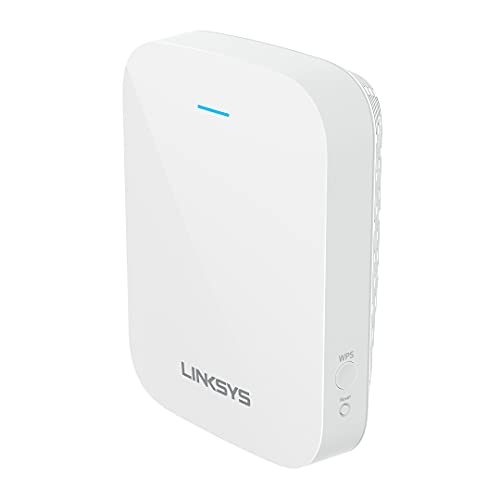
The RE7310 takes a different route from the other plugs: Linksys leans on placement guidance instead of a wired port. It is an AX1800 dual-band WiFi 6 extender rated for up to 2,000 square feet, and its Spot Finder feature reads the link back to the router and tells you whether the outlet you picked is too near, too far or in the right zone. For a first-time extender buyer, that guidance removes the guesswork that decides whether any extender works well.
Setup is push-button pairing or a browser flow on a phone or laptop, with no app account required. The trade-off is clear: there is no Ethernet port, so a desktop in the office connects wirelessly only, and there is no access point mode. In return you get beamforming, MU-MIMO and a clean wall-plug body that leaves the second outlet free. Choose it when placement help matters more than a wired jack.
Specs
- WiFi standard: WiFi 6 (802.11ax), dual-band
- Speed class: AX1800 (up to 1.8 Gbps combined)
- Coverage: up to 2,000 sq ft
- Device capacity: Not stated
- Ports: none, wireless connections only
- Setup: browser-based, with Spot Finder placement guidance and push-button connect
- Design: wall plug
NETGEAR Nighthawk WiFi 6 Mesh Range Extender (EAX80)

The EAX80 is the premium pick and the only desktop unit here. Its AX6000 rating splits into 4.8 Gbps on 5 GHz and 1.2 Gbps on 2.4 GHz across eight streams, and NETGEAR rates it to add up to 2,500 square feet of coverage for more than 30 devices. That headroom suits a large home where the office shares the extender with streaming TVs, consoles and a floor full of phones, and its Smart Roaming keeps one network name across the house.
Wired connections are its clearest advantage: four gigabit Ethernet ports plus a USB 3.0 port turn it into a small hub for a desk, so a work machine, a spare laptop and a network printer can all sit on wired links while the extender handles the wireless hop to the router. The size is the compromise, since it needs shelf or desk space and a power brick rather than a bare outlet.
Specs
- WiFi standard: WiFi 6 (802.11ax), dual-band, 8 streams
- Speed class: AX6000 (4.8 Gbps on 5 GHz, 1.2 Gbps on 2.4 GHz)
- Coverage: up to 2,500 sq ft added
- Device capacity: 30+ devices
- Ports: 4 x gigabit Ethernet, 1 x USB 3.0
- Design: desktop unit with Smart Roaming single network name
TP-Link AC1200 WiFi Extender (RE315)

The RE315 is the budget tier answer for one stubborn room. It is a dual-band WiFi 5 extender in the AC1200 class, with 867 Mbps on 5 GHz and 300 Mbps on 2.4 GHz, rated for up to 1,500 square feet and 30 devices. Two external antennas and a signal indicator light on the front help you land on an outlet where the router signal is still strong enough to repeat well.
Its Ethernet port is a 10/100 port rather than gigabit, which is fine for a printer, a smart TV or a backup wired link for a laptop, but it caps a wired desktop below what the WiFi 6 picks deliver. The useful surprise at this level is mesh support: with a OneMesh or EasyMesh router it joins a single network name, and it can also run as an access point on a wired feed. For an apartment office or a single back bedroom, it does the whole job.
Specs
- WiFi standard: WiFi 5 (802.11ac), dual-band
- Speed class: AC1200 (867 Mbps on 5 GHz, 300 Mbps on 2.4 GHz)
- Coverage: up to 1,500 sq ft
- Device capacity: up to 30 devices
- Ports: 1 x 10/100 Ethernet, access point mode supported
- Mesh support: OneMesh and EasyMesh compatible
- Antennas: 2 external, with a signal indicator light
How to choose
Place the extender halfway, not in the dead room itself. An extender can only repeat the signal it receives, so an outlet where the router signal is still solid, roughly midway to the office, gives the best result. Models with a signal indicator or placement guidance, like the RE315 and the RE7310, make this easy to judge; the other setup apps report link quality as you choose a spot.
Match the WiFi generation to your router. A WiFi 6 extender pairs best with a WiFi 6 router, where features such as OFDMA carry across the link. An extender still works with an older router, but it falls back to the older standard on that hop. The RE315 is the sensible match for older routers and lighter needs.
Decide whether the desk needs a wire. A gigabit port lets a desktop ride a wired link to the extender, which steadies calls and large uploads; the EAX80 goes further with four ports for a whole desk. If every device in the office is wireless anyway, the port-free RE7310 loses nothing. Also weigh network naming: mesh-capable extenders keep one name, while a plain repeater setup may add a second network name that devices must be moved onto by hand.
Who should skip
Skip an extender if your weak coverage spans several rooms or a whole floor. One extender fixes one dead zone well; a string of them compounds the speed loss on each hop. That pattern is the case for a mesh system instead, which is built to coordinate several nodes under one network.
Also skip these picks if the office can simply be wired. A single Ethernet run to the desk, or an access point fed by an existing cable, beats any wireless hop for stability. And if the router itself is the bottleneck, with an old standard or a slow internet plan behind it, an extender only spreads that same limit further; replace the router first.
FAQ
Will a WiFi extender work with my existing router?
Yes. All five extenders here work with any router brand, including the combined modem-router units supplied by internet providers. Setup pairs the extender with your existing network by WPS button or through an app or browser flow, and mesh-capable models can adopt your current network name so devices see one network.
Where should I place an extender for a home office?
Put it at an outlet roughly halfway between the router and the office, in a spot where the router signal is still strong. An extender placed inside the dead zone has too weak a signal to repeat well. Use the signal indicator or placement guidance during setup, then fine-tune by a few feet if calls still drop.
Does an extender slow down my connection?
An extender adds a second wireless hop, and a single-radio dual-band unit shares its bands between receiving and rebroadcasting, so peak speed at the far end is lower than beside the router. For calls, browsing and office work the trade is usually invisible. Wiring the desk machine into the extender port removes one wireless hop for that machine.
Is an extender enough, or do I need a mesh system?
An extender is enough when one room is weak and the rest of the home is fine. Choose mesh when dead zones cover several rooms, when you move between floors during calls, or when you want one coordinated network with nodes you can add over time. The two approaches solve different sizes of the same problem.
Final verdict
The RE715X earns the main recommendation: AX3000 WiFi 6 speed, a gigabit port and OneMesh support cover most home offices in one wall plug. The EAX15 is the mid-range alternative for a single network name with any router, the RE7310 suits buyers who want placement guidance and no app, the EAX80 is the premium desktop choice for big homes and wired desks, and the RE315 handles a single dead room in the budget tier.
Product and ASIN Reference
| Product | ASIN |
|---|---|
| TP-Link RE715X AX3000 WiFi 6 Range Extender | B0B8BVY12V |
| NETGEAR WiFi 6 Mesh Range Extender (EAX15) | B08K2ZX2RY |
| Linksys WiFi 6 Range Extender (RE7310) | B096WHR16K |
| NETGEAR Nighthawk WiFi 6 Mesh Range Extender (EAX80) | B07T89YZWD |
| TP-Link AC1200 WiFi Extender (RE315) | B08RHD97QY |
More from Amazon
Programs that pair well with the guide above. Offers and eligibility are set by Amazon and may change.
Free shipping on eligible items, Prime Video and more. Eligible new members can start with a free trial.
Start a Prime free trialAudiobooks and podcasts to listen to on the go. Eligible new members can start with a free trial.
Try Audible freeAd-free music streaming. Eligible new subscribers can start with a free trial.
Try Music Unlimited freeA free business account with business pricing and bulk-buying tools for work, shop or home office.
Create a business accountAs an Amazon Associate we earn from qualifying purchases.



Write Your Review
No reviews yet. Be the first to share your experience!