

Our Short List of 3
- :
- Board: Raspberry Pi 5, BCM2712, 2.4 GHz quad-core Arm Cortex-A76
- RAM: 8GB LPDDR4X-4267
- Storage: 128GB EVO+ microSD, Raspberry Pi OS 64-bit preloaded

- :
- Board: Raspberry Pi 5, BCM2712, 2.4 GHz quad-core Arm Cortex-A76
- RAM: 8GB LPDDR4X-4267
- Storage: 128GB microSD, Raspberry Pi OS 64-bit preloaded

- :
- Board: Raspberry Pi 5, BCM2712, 2.4 GHz quad-core Arm Cortex-A76
- RAM: 8GB LPDDR4X-4267
- Storage: 128GB microSD, Raspberry Pi OS 64-bit preloaded
All 4 Picks at a Glance
| Product | Specs | Action |
|---|---|---|
| CanaKit Raspberry Pi 5 PRO Kit (8GB) |
| Check price on Amazon |
| Vilros Raspberry Pi 5 MAX Kit (8GB) |
| Check price on Amazon |
| Seeed Studio Raspberry Pi 5 Kit (8GB) |
| Check price on Amazon |
 CanaKit Raspberry Pi 4 PRO Kit (4GB) |
| Check price on Amazon |
Key takeaways
- Compare five complete Raspberry Pi kits with board, case, cooling, power supply and preloaded storage in the box, from Pi 5 flagships to Pi 4 bundles.
A bare Raspberry Pi board cannot do anything on its own. It needs a power supply with the right rating, a case, cooling, a microSD card carrying an operating system and display cables for a monitor. A complete kit gathers all of those pieces in a single box, matched to the board inside, so the machine boots on the first evening instead of waiting on a second delivery.
The five kits below split into two generations. Three bundle the Raspberry Pi 5, with its 2.4 GHz quad-core processor, PCIe expansion and dual 4K display outputs, while two bundle the older Pi 4, still capable for learning, media and home-server duties at a lower tier. Every pick includes the board, a case, cooling, a power supply and storage; the differences that matter are memory size, case and cooling design, and assembly effort.
As an Amazon Associate, we earn from qualifying purchases.
Quick answer
For most people, the CanaKit Raspberry Pi 5 PRO Kit is the one to buy: an 8GB Pi 5, a ventilated case with fan and heatsink, a 128GB preloaded card and a proper USB-C PD supply. The Vilros MAX suits anyone who wants a machined metal case, the Seeed Studio kit uses official parts throughout, and the two Pi 4 kits cover the budget tier.
The best Raspberry Pi kits
CanaKit Raspberry Pi 5 PRO Kit (8GB)
- :
- Board: Raspberry Pi 5, BCM2712, 2.4 GHz quad-core Arm Cortex-A76
- RAM: 8GB LPDDR4X-4267
- Storage: 128GB EVO+ microSD, Raspberry Pi OS 64-bit preloaded
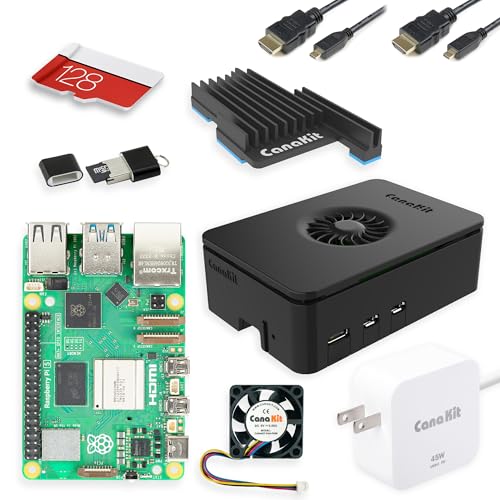
The PRO Kit is the most complete Pi 5 bundle in this group and the easiest to recommend. Inside the box sits an 8GB Raspberry Pi 5, a 128GB EVO+ microSD card preloaded with the 64-bit Raspberry Pi OS, CanaKit’s Turbine Black case with a low-noise PWM fan, a large MEGA heatsink, a 45W USB-C PD supply, two 6-foot micro-HDMI cables, a USB card reader and a GPIO reference card.
Cooling is the detail that matters most on a Pi 5, because the board throttles its processor when it runs hot under sustained load. The fan case and large heatsink keep clocks high during long jobs, and the 8GB of memory gives real headroom for multitasking. This is the premium pick, aimed at buyers who want one box and no follow-up orders.
Vilros Raspberry Pi 5 MAX Kit (8GB)
- :
- Board: Raspberry Pi 5, BCM2712, 2.4 GHz quad-core Arm Cortex-A76
- RAM: 8GB LPDDR4X-4267
- Storage: 128GB microSD, Raspberry Pi OS 64-bit preloaded
The Vilros MAX takes the same 8GB Pi 5 foundation and wraps it in a CNC-machined aluminum alloy case. The metal shell is both the enclosure and a passive heatsink, while a PWM fan adds active airflow for heavy workloads. The result runs cool and quiet and looks at home on a desk.
The rest of the bundle matches the brief of a complete kit. A 128GB microSD card arrives preloaded with the 64-bit Raspberry Pi OS, the power supply is a proper 27W USB-C unit rated at 5 volts and 5 amps, and the box also holds micro-HDMI cables, an SD-to-USB adapter and an RTC battery connector. Assembly takes a little more care than a snap-together plastic case, the one real trade-off against the CanaKit.
Seeed Studio Raspberry Pi 5 Kit (8GB)
- :
- Board: Raspberry Pi 5, BCM2712, 2.4 GHz quad-core Arm Cortex-A76
- RAM: 8GB LPDDR4X-4267
- Storage: 128GB microSD, Raspberry Pi OS 64-bit preloaded
Seeed Studio builds its kit around official Raspberry Pi components wherever possible. The 8GB Pi 5 board is paired with the official case fitted with active cooling, the official 27W USB-C power supply and a 128GB microSD card preloaded with the 64-bit Raspberry Pi OS. Buyers who prefer the board maker’s own accessories over third-party designs get everything first-party here.
That official line-up has practical value beyond neatness. The official supply delivers the full 5-amp current the Pi 5 asks for with several USB peripherals attached, and the official case and cooler fit the board’s exact layout, power button and PCIe connector included. The 8GB configuration handles Docker containers, home automation, media services and programming without strain. It sits in the mid-range tier: fewer extras than the CanaKit, but every part is the reference design.
CanaKit Raspberry Pi 4 PRO Kit (4GB)
- :
- Board: Raspberry Pi 4 Model B, BCM2711, 1.5 GHz quad-core Cortex-A72
- RAM: 4GB LPDDR4
- Storage: 32GB EVO+ microSD, operating system preloaded
The Pi 4 generation still earns its place for learning, retro gaming, network services and lightweight desktop work, and this PRO Kit is its most polished bundle. A 4GB Pi 4 Model B comes with a 32GB EVO+ microSD card preloaded with the operating system, a premium black case with fan mount, a low-noise bearing fan and heatsinks.
Power is a quiet strength here. CanaKit’s 3.5A USB-C supply is built for the Pi 4 with a noise filter and UL listing, sidestepping the low-voltage warnings that underrated phone chargers trigger on this board. The Pi 4 chip is a clear step behind the Pi 5, but for a Pi-hole server, a classroom machine or a first Linux computer, this kit covers the job at a mid-range tier.
RasTech Raspberry Pi 4 Kit (4GB)
The RasTech kit is the budget route into a complete Pi 4 setup, and it earns its place by including the small tools other bundles leave out. Alongside the 4GB Pi 4 board and a 32GB microSD card, the box holds a case, a cooling fan, four copper heatsinks, two micro-HDMI output cables, a card reader and even a screwdriver for assembly.
Its power supply is a 5-volt, 3-amp USB-C unit with an in-line on/off switch, a convenience Pi boards otherwise lack. The case and fan are simpler than the CanaKit’s, so allow a little time to flash Raspberry Pi OS with the included reader if the card arrives blank. For a learner or a gift purchase on a budget tier, those are fair trades.
Specs
- :
- Board: Raspberry Pi 4 Model B, BCM2711, 1.5 GHz quad-core Cortex-A72
- RAM: 4GB LPDDR4
- Storage: 32GB microSD card
- Case: Protective case included
- Cooling: Cooling fan plus 4 copper heatsinks
- Power: 5V 3A USB-C power supply with on/off switch
- Cables: 2 x micro-HDMI output cables, card reader, screwdriver
How to choose
Generation comes first. The Pi 5 is roughly two to three times as quick as the Pi 4 in processor work, adds a PCIe connector for fast NVMe storage through an M.2 HAT, and drives two 4K displays at 60Hz. Pick a Pi 5 kit for desktop use, containers or any project you expect to grow. Pick a Pi 4 kit when the job is fixed and light: a network ad blocker, a media player or a child’s first computer.
Memory is fixed at purchase, because the RAM is soldered to the board. 4GB handles learning, light desktop work and single-purpose servers comfortably. 8GB is the safer long-term choice for multitasking, Docker and browser-heavy sessions.
Check the power supply and cooling before anything else, since they decide whether the board runs at full speed. A Pi 5 wants a 5-amp USB-C supply, and every Pi 5 kit above includes one with the right rating plus active cooling. A Pi 4 wants 3 amps. Kits that skimp on either piece cause throttling and low-voltage warnings, so treat a correctly rated supply as a requirement.
Finally, look at what the box leaves out. None of these kits includes a keyboard, mouse or monitor, and only some preload the operating system onto the card. A preloaded card saves a first-time buyer one flashing step; a blank card plus a reader asks for ten minutes with the free Imager tool.
Who should skip
Skip a kit if you already own a Raspberry Pi board. The case, cooler, supply and card in these bundles are matched to the included board, so an owner adding a second machine is better served by a bare board plus existing accessories.
Skip the Pi 4 kits if your plan involves heavy desktop multitasking, several containers at once or NVMe storage. The older board has no PCIe connector and its processor will feel its age quickly under those loads. Skip the Pi 5 kits, in turn, if the machine will only ever run one light service: a Pi 4 kit does that job for less money.
Skip every microSD-based kit if fast storage is the point of the project. A Pi 5 with an M.2 HAT and an NVMe drive boots and loads programs far quicker than any card, and no bundle here includes that HAT, so builders who put storage speed first should assemble parts separately.
FAQ
How much RAM do you need in a Raspberry Pi kit?
For learning, coding and single-purpose servers, 4GB is enough. For a daily desktop with a browser, an editor and background services open together, 8GB is the comfortable choice. Because the memory is soldered down, unsure buyers should take the larger size now.
Does a Raspberry Pi 5 kit need active cooling?
Yes, for anything beyond brief light use. The Pi 5 raises its clock speeds well beyond the Pi 4 and reduces them again when the chip gets hot, so a fan or a heatsinking metal case keeps performance steady during long jobs. All three Pi 5 kits here include active cooling: a PWM fan, an official cooler unit or a fan paired with an alloy case.
Can a Raspberry Pi kit replace a desktop computer?
A Pi 5 kit with 8GB of memory can handle documents, email, web browsing, video playback and light photo work as an everyday desktop, driving two 4K monitors while doing so. It will not match a full-size PC for heavy video editing, large software builds or modern 3D games, and some commercial software has no Arm version, so treat it as a light desktop rather than a full replacement.
What else do you need besides the kit?
A monitor or television with an HDMI input, a USB keyboard and a mouse. The kits supply the computer itself, its case, cooling, power and storage, plus display cables for the board’s micro-HDMI ports. An Ethernet cable is optional, since both boards carry Wi-Fi and Bluetooth, and a larger card or external drive can be added later.
Final verdict
The CanaKit Raspberry Pi 5 PRO Kit is the default recommendation: the most complete box, strong cooling and an 8GB board that will stay useful for years. The Vilros MAX is the pick for a machined metal case, and the Seeed Studio kit suits buyers who want official parts throughout. On the Pi 4 side, the CanaKit PRO Kit is the refined option, while the RasTech kit is the budget bundle that even remembers the screwdriver. Match the generation to the workload, and take 8GB if the machine will multitask.
Product and ASIN Reference
| Product | ASIN |
|---|---|
| CanaKit Raspberry Pi 5 PRO Kit (8GB) | B0CRSNCJ6Y |
| Vilros Raspberry Pi 5 MAX Kit (8GB) | B0D232HN74 |
| Seeed Studio Raspberry Pi 5 Kit (8GB) | B0DK4L9W6B |
| CanaKit Raspberry Pi 4 PRO Kit (4GB) | B07V5JTMV9 |
| RasTech Raspberry Pi 4 Kit (4GB) | B0C8LV6VNZ |
More from Amazon
Programs that pair well with the guide above. Offers and eligibility are set by Amazon and may change.
Free shipping on eligible items, Prime Video and more. Eligible new members can start with a free trial.
Start a Prime free trialAudiobooks and podcasts to listen to on the go. Eligible new members can start with a free trial.
Try Audible freeAd-free music streaming. Eligible new subscribers can start with a free trial.
Try Music Unlimited freeA free business account with business pricing and bulk-buying tools for work, shop or home office.
Create a business accountAs an Amazon Associate we earn from qualifying purchases.



Write Your Review
No reviews yet. Be the first to share your experience!