

Key takeaways
- Our Amazon Fire TV Stick 4K Plus review covers Dolby Vision, HDR10+, Wi-Fi 6 streaming, the Alexa Voice Remote and who this 4K stick suits best.
The Amazon Fire TV Stick 4K Plus is the middle step in Amazon’s current streaming stick lineup, sitting above the Fire TV Stick 4K Select and below the Fire TV Stick 4K Max. The short verdict: it is the sensible pick for a 4K TV owner who wants the full set of picture formats — Dolby Vision, HDR10+, HLG and HDR10 — plus Dolby Atmos passthrough and Wi-Fi 6, without paying for the faster processor and extra storage of the Max. It runs Fire OS 8 on a quad-core processor with 2GB of memory and 8GB of storage, and it ships with an Alexa Voice Remote that can control TV power and volume.
This review is written for three kinds of buyers: owners of a 4K TV whose built-in smart platform has slowed down, households already invested in Alexa who want voice search that understands natural questions, and anyone adding streaming to a second or third TV. Everything below is based on the product’s Amazon listing and Amazon’s published device specifications for the Fire TV Stick 4K Plus (2025), including the stated video and audio formats, the processor and memory figures, and what is included in the box — not on practical benchmarking.
One naming point matters before anything else. Amazon sells this stick under the exact name “Fire TV Stick 4K Plus,” and the listing confirms it is a distinct model from the 4K Select below it and the 4K Max above it. The Plus hardware carries forward the specification of the previous Fire TV Stick 4K generation — same processor class, same memory and storage — under the new name, so the review below judges it on that stated specification rather than treating it as an all-new design.
Quick Picks
As an Amazon Associate we earn from qualifying purchases.
| Product | Best for | Key spec |
|---|---|---|
| Amazon Fire TV Stick 4K Plus | 4K TV owners who want Dolby Vision and Wi-Fi 6 in a stick | 4K at up to 60 frames per second, Dolby Vision, HDR10+, Wi-Fi 6, 2GB memory, 8GB storage |
How to Choose
A single-product review still involves decisions. These are the checks that decide whether the Fire TV Stick 4K Plus is the right version of Amazon’s stick for a given TV and household.
Check your TV’s picture formats first
The main reason to choose the Plus over the cheaper 4K Select is format coverage. The Plus supports Dolby Vision alongside HDR10, HDR10+ and HLG, while the Select drops Dolby Vision. If a TV supports Dolby Vision — many mid-range and premium sets from LG, Sony, TCL and Hisense do — the Plus can use that format from services that stream in it. On an HDR10-only TV, that advantage disappears and the cheaper stick becomes harder to rule out.
Match the stick to your network
The Plus uses dual-band Wi-Fi 6, which helps on busy home networks where several devices compete for airtime. It does not have a built-in Ethernet port, and it does not support Wi-Fi 6E — that faster band is reserved for the 4K Max. A home with a weak signal at the TV position will still struggle regardless of the Wi-Fi generation, so router placement matters more than the logo on the box. A wired connection is possible only through a separate Ethernet adapter accessory.
Count your apps against the storage
The 8GB of internal storage holds the Fire TV platform plus a typical library of streaming apps comfortably. It is not designed for a large collection of downloaded films or big game installs. Buyers who sideload many apps or play larger cloud and local games should look at the 16GB storage of the 4K Max instead. For a household rotating through the major subscription services, 8GB is rarely the limiting factor.
Decide how you will use voice control
The included Alexa Voice Remote is a push-to-talk remote: voice search happens through the microphone button, and the remote also carries power, volume and mute controls for a compatible TV, soundbar or receiver. The stick itself has no far-field microphones, so hands-free voice control requires linking an Echo speaker. The listing highlights AI-powered Fire TV Search with Alexa+, which lets viewers search by actor, genre, mood or a half-remembered plot detail rather than an exact title.
Confirm what is in the box and what your TV needs
The box contains the stick, the Alexa Voice Remote, batteries for the remote, a power adapter and cable, and an HDMI extender. The stick plugs into an HDMI port and needs power from the included adapter for reliable 4K playback; some TV USB ports do not supply enough current. A 4K television with an available HDMI port is the basic requirement — the stick cannot add 4K resolution to a 1080p panel, though it will run at that panel’s native resolution.
Full Review
Amazon Fire TV Stick 4K Plus

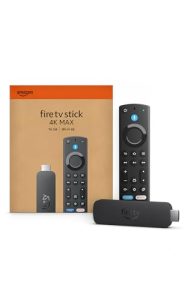
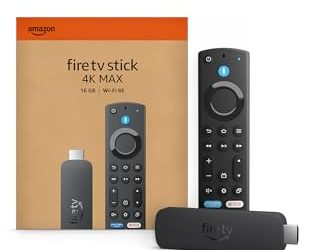
The Fire TV Stick 4K Plus follows the familiar stick format: a compact bar, roughly 99 by 30 by 14 millimeters and about 44 grams, that hides behind the television and connects over HDMI 2.1 with ARC support. There are no buttons on the device itself and nothing to mount. The design goal is invisibility — once it is behind the TV, the remote and the on-screen interface are the entire experience. The included HDMI extender helps in tight installations where the stick cannot sit directly in the port, and it can also improve the Wi-Fi signal position relative to the back of the panel.
Picture quality support is the strongest part of the specification. The stick outputs up to 4K Ultra HD at 60 frames per second and handles every mainstream high dynamic range format: Dolby Vision, HDR10+, HDR10 and HLG. That breadth matters because streaming services are not consistent — one service may master a series in Dolby Vision while another uses HDR10+, and the Plus can follow either. Video codec support includes AV1, H.265 and H.264 decoding, which covers the formats the major services currently deliver. On a capable 4K TV, the stick will not be the component limiting picture quality.
Audio follows the same pattern. The Plus passes Dolby Atmos through to a compatible soundbar or receiver, along with Dolby Digital and Dolby Digital Plus and DTS formats, so the stick can feed an existing home audio setup rather than replacing its decoding. Buyers using TV speakers alone will simply hear standard stereo or surround downmixes, which is a limitation of their speakers, not of the stick.
Performance is defined by the quad-core MediaTek MT8696D processor, with four Cortex-A55 cores running at up to 1.7GHz, paired with 2GB of LPDDR4 memory. On paper this is a mid-range streaming specification: enough for responsive menus, quick app launches and smooth 4K playback, which is exactly the workload a streaming stick faces. It is not the hardware to choose for demanding local gaming, although the listing notes support for cloud gaming services such as Amazon Luna and Xbox Cloud Gaming, where the heavy processing happens on remote servers and the stick mainly handles the stream and controller input.
The software experience is Fire TV with Alexa+ search. The interface gathers films and programmes from the installed services into one home screen, with live and free ad-supported content mixed in. The AI-powered search is the headline software feature: instead of typing a title letter by letter, the viewer presses the remote’s microphone button and asks for, as an example, a thriller with a particular actor or something suitable for a family evening, and the system assembles suggestions across services. This works best for households that browse rather than arriving with a specific title in mind.
Day-to-day control rests on the Alexa Voice Remote. Beyond playback and search, its power, volume and mute buttons can be programmed during setup to run a compatible TV, soundbar or receiver, which removes the second remote from the coffee table for most viewing. The remote connects over Bluetooth, so it does not need line of sight to the stick hidden behind the TV. What it cannot do is listen continuously: there is no always-on microphone in either the stick or the remote, so hands-free requests across the room need a linked Echo device on the same account.
Connectivity is the honest weak point of the design. Dual-band Wi-Fi 6 is current and capable, and it is the right choice for most homes, but there is no Ethernet socket, no Wi-Fi 6E, and no USB port for local media on the stick itself. Viewers with a TV far from the router, or in a building with congested airwaves, should budget for Amazon’s Ethernet adapter accessory or consider the 4K Max for its newer wireless standard. Casting is also limited compared with rival platforms: the stick is built around the Fire TV and Alexa ecosystem, not around Google Cast or AirPlay, so households centred on those systems will feel the mismatch.
Set against its siblings, the Plus occupies a clear position. The 4K Select below it costs less in the range and keeps 4K and HDR10+ but drops Dolby Vision and runs a leaner specification. The 4K Max above it adds a faster processor, double the storage, Wi-Fi 6E and ambient features. The Plus is the model for a buyer whose TV supports Dolby Vision and whose network is Wi-Fi 6 — it captures the picture-quality ceiling of the stick range without paying for headroom that streaming apps do not use.
Specs
- Model: Fire TV Stick 4K Plus (2025), build model AFTMA08C15
- Operating system: Fire OS 8
- Processor: quad-core MediaTek MT8696D, Cortex-A55 cores up to 1.7GHz
- Memory and storage: 2GB LPDDR4 memory, 8GB internal storage
- Video output: up to 4K Ultra HD at 60 frames per second over HDMI 2.1 with ARC support
- HDR formats: Dolby Vision, HDR10+, HDR10 and HLG
- Audio: Dolby Atmos, Dolby Digital and Dolby Digital Plus passthrough, DTS passthrough
- Wireless: dual-band Wi-Fi 6 (2.4GHz and 5GHz), Bluetooth remote connection
- Remote: Alexa Voice Remote with power, volume and mute TV controls
- Dimensions and weight: about 99 x 30 x 14 mm, about 44 g
- In the box: stick, Alexa Voice Remote, batteries, power adapter and cable, HDMI extender
Best for: owners of a Dolby Vision 4K TV who want one stick that covers every HDR format, Alexa households that will use voice search daily, and anyone upgrading a slow built-in TV platform.
Watch out for: the hardware specification is carried over from the previous Fire TV Stick 4K generation under the new Plus name, so existing owners of that stick gain little. Storage is 8GB, there is no Ethernet port or Wi-Fi 6E, and hands-free voice control needs a separate Echo.
Which One Fits Your Situation
- You own a 4K TV with Dolby Vision and a Wi-Fi 6 router. This is the exact buyer the Plus is built for: every picture format your TV supports is covered, and the wireless standard matches your network.
- Your TV is 4K but HDR10 only. The Plus still works well, but its headline advantage is wasted; the 4K Select covers your TV’s formats, and the difference is better spent elsewhere in the setup.
- You want the fastest Fire TV stick for gaming and large app libraries. Look at the Fire TV Stick 4K Max instead, with its stronger processor, 16GB storage and Wi-Fi 6E.
- Your TV position has poor Wi-Fi. Either plan on the Ethernet adapter accessory for the Plus, or fix the network first; no streaming stick performs well on a weak signal.
- Your household lives in Google Cast or Apple AirPlay. A streamer built on those platforms will fit better than any Fire TV stick, including this one.
Common Mistakes
- Powering the stick from a TV USB port. Many TV USB ports cannot supply enough current for stable 4K streaming, which causes restarts and buffering that look like network faults. Use the included power adapter.
- Buying the Plus for a 1080p TV. The stick will run, but it cannot create 4K detail on a panel that does not have it; the HD or Select models suit a 1080p set.
- Confusing the Plus with the Select or the Max. The three current 4K sticks differ in HDR coverage, processor, storage and Wi-Fi generation. Check the model name on the listing against the formats your TV supports.
- Expecting hands-free Alexa from the stick alone. Voice control is push-to-talk through the remote. Hands-free control requires linking an Echo speaker.
- Blaming the stick for a weak network. Buffering at 4K usually traces back to signal strength at the TV. Moving the router, using the HDMI extender to reposition the stick, or adding the Ethernet adapter solves more than swapping streamers.
Frequently Asked Questions
Is the Fire TV Stick 4K Plus the same as the older Fire TV Stick 4K?
In specification, largely yes. Amazon’s current lineup sells the hardware as the Fire TV Stick 4K Plus (2025), with the same quad-core processor class, 2GB of memory, 8GB of storage and Wi-Fi 6 as the previous Fire TV Stick 4K generation. The Plus name separates it from the newer 4K Select below it and the 4K Max above it. Owners of the earlier stick should not expect a performance jump.
Does the Fire TV Stick 4K Plus support Dolby Vision and Dolby Atmos?
Yes to both, per the listing and Amazon’s device specifications. It supports Dolby Vision, HDR10+, HDR10 and HLG for video, and it passes Dolby Atmos through to a compatible soundbar or receiver. The TV itself must support Dolby Vision for that format to be used, and an Atmos-capable audio device is needed to hear Atmos as more than a standard surround mix.
How much storage does the Fire TV Stick 4K Plus have, and is it enough?
It has 8GB of internal storage and 2GB of memory. That is enough for the Fire TV system and a normal rotation of streaming apps. It becomes tight only for users who install many large games or keep big offline libraries; those buyers are better served by the 16GB storage of the Fire TV Stick 4K Max.
Can the Fire TV Stick 4K Plus connect by Ethernet?
Not directly. The stick has no Ethernet port, so the default connection is dual-band Wi-Fi 6. A wired connection is possible with Amazon’s Ethernet adapter accessory for Fire TV devices, which connects through the stick’s power port arrangement. Buyers who know they need a wired connection from day one should factor that accessory into the decision.
Does the remote control the TV as well?
Yes. The included Alexa Voice Remote has dedicated power, volume and mute buttons, and during setup it can be configured to control a compatible television, soundbar or receiver. Most viewers can then use one remote for everyday watching, keeping the TV’s own remote only for deeper picture settings.
Closing
The Amazon Fire TV Stick 4K Plus is an easy recommendation for its intended buyer: a 4K TV owner, ideally with Dolby Vision, who wants every major HDR format, Atmos passthrough and Wi-Fi 6 in a stick that disappears behind the screen. Its limits are equally clear — 8GB of storage, no Ethernet, no Wi-Fi 6E and no hands-free voice without an Echo — and buyers who need those things should step up to the 4K Max. For everyone else, the Plus is the balanced point of the current Fire TV stick range.
More from Amazon
Programs that pair well with the guide above. Offers and eligibility are set by Amazon and may change.
Free shipping on eligible items, Prime Video and more. Eligible new members can start with a free trial.
Start a Prime free trialAudiobooks and podcasts to listen to on the go. Eligible new members can start with a free trial.
Try Audible freeAd-free music streaming. Eligible new subscribers can start with a free trial.
Try Music Unlimited freeA free business account with business pricing and bulk-buying tools for work, shop or home office.
Create a business accountAs an Amazon Associate we earn from qualifying purchases.


Write Your Review
No reviews yet. Be the first to share your experience!