

Key takeaways
- Kindle Scribe: Best for Kindle books, PDF documents, and common Microsoft Word files sent through Amazon’s document tools. It is less convenient for arbitrary EPUB libraries and app-based research.
- reMarkable Paper Pro: Strong for PDF and EPUB reading, handwriting, and exporting notes. It is intentionally not an app tablet, so services such as web browsers, library apps, and cloud storage may require a computer or supported integration.
- BOOX Note Air4 C: The most flexible option. Android apps can handle Kindle, Kobo, Google Drive, Dropbox, web research, and many document formats. Flexibility also means more setup, notifications, and occasional app compatibility issues.
- Supernote Manta: Excellent for notebooks, PDFs, EPUBs, and organized handwritten documents. It is designed around focused work rather than installing a large collection of apps.
- Kobo Elipsa 2E: A good choice if your library is mainly EPUB and Kobo content, with PDF annotation as a secondary task.
The best E Ink tablets for most people are the reMarkable Paper Pro for a premium writing-first experience, the Amazon Kindle Scribe for reading Kindle books and long battery life, the BOOX Note Air4 C for Android apps and broad file support, and the Supernote Manta for distraction-free, durable note-taking.
Our top picks


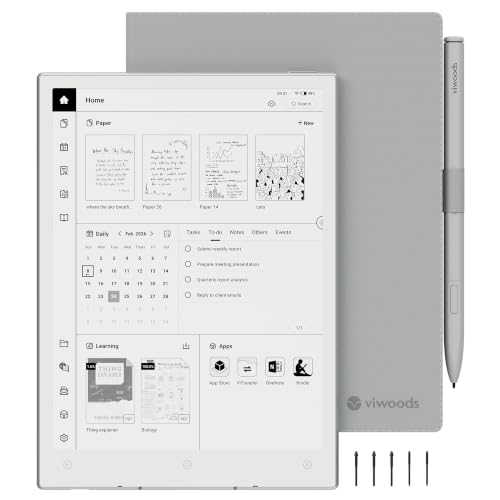

As an Amazon Associate we earn from qualifying purchases at no extra cost to you. Ratings are shown as listed on Amazon.
Quick picks by situation
| Situation | Best fit | Why | Main compromise |
|---|---|---|---|
| Mostly Kindle books and handwritten notes | Kindle Scribe | Sharp 10.2-inch screen, strong reading library, warm front light, long battery life | Less flexible with third-party apps and advanced PDF workflows |
| Best premium paper-like writing experience | reMarkable Paper Pro | Large 11.8-inch color display, low-latency pen, excellent notebook interface | Expensive, and many advanced cloud features require a subscription |
| PDFs, EPUBs, apps, and mixed file types | BOOX Note Air4 C | Android, 10.3-inch color E Ink, front light, split-screen tools, broad format support | More settings and a less focused interface |
| Private, focused note-taking without a front light | Supernote Manta | Comfortable 10.7-inch writing area, replaceable battery design, excellent organization | No front light and weaker as a general-purpose reading tablet |
| Lower-cost reading and annotation | Kobo Elipsa 2E | 10.3-inch display, warm front light, 32GB storage, EPUB support | Writing feel and software are less sophisticated than premium rivals |
What matters when choosing an E Ink tablet
Screen size: portability versus usable page area
A 10.2- to 10.3-inch screen is the practical middle ground. It is large enough for A4-style PDFs, music notation, and handwritten meeting notes, while still fitting into a backpack. The 11.8-inch reMarkable Paper Pro gives more room for documents and diagrams, but its larger body is more noticeable when held one-handed.
Smaller 7- to 8-inch E Ink readers are lighter and better for novels, but they are cramped for handwriting. If you regularly annotate full-page PDFs, choose at least 10 inches. For commuting, a smaller reader plus a separate notebook may be more comfortable than a large writing tablet.
| Model | Screen | Weight | Storage | Front light | Pen included |
|---|---|---|---|---|---|
| Amazon Kindle Scribe | 10.2 in, 300 ppi, monochrome | About 433 g | 16–64 GB, configuration dependent | Yes, adjustable warm light | Yes |
| reMarkable Paper Pro | 11.8 in, color E Ink | About 525 g | 64 GB | Yes, adjustable reading light | Pen sold in bundles or separately |
| BOOX Note Air4 C | 10.3 in, color E Ink | About 435 g | 64 GB | Yes, adjustable front light | Typically included |
| Supernote Manta | 10.7 in, monochrome | About 375 g | 32 GB internal storage plus microSD support | No | Usually sold separately or in a bundle |
| Kobo Elipsa 2E | 10.3 in, 227 ppi, monochrome | About 390 g | 32 GB | Yes, adjustable warm light | Yes |
Writing latency and pen technology
Modern E Ink notebooks generally feel responsive enough for normal handwriting, but they do not behave exactly like an iPad. The delay is most noticeable when drawing fast diagonal lines, erasing large areas, or switching between pen tools.
For the most natural writing, look for a pressure-sensitive active pen with at least 4,096 pressure levels, a textured surface, and a low-latency writing mode. The reMarkable Paper Pro and Supernote devices are particularly focused on handwriting. The BOOX Note Air4 C offers more pen and display settings, while the Kindle Scribe keeps the experience simpler.
Pen compatibility is not universal. A Wacom EMR stylus may work across several BOOX, Kobo, and Supernote models, but button functions, erasers, pressure response, and calibration can differ. Before buying a replacement pen, check the exact tablet model rather than assuming any “universal” stylus will work.
Front lights: useful, but not free
A front light makes an E Ink tablet usable in bed, on a plane, or in a dim office. Adjustable warm light is more comfortable for evening reading than a fixed cool-white light. The trade-off is slightly higher power consumption and, on color E Ink screens, a potentially less paper-like appearance because the display layer is already darker than monochrome E Ink.
If you always read under a desk lamp and prioritize a light, paper-like screen, the Supernote Manta is worth considering. If the tablet must work in changing environments, choose the Kindle Scribe, Kobo Elipsa 2E, BOOX Note Air4 C, or reMarkable Paper Pro.
Head-to-head: which tablet handles your files?
- Kindle Scribe: Best for Kindle books, PDF documents, and common Microsoft Word files sent through Amazon’s document tools. It is less convenient for arbitrary EPUB libraries and app-based research.
- reMarkable Paper Pro: Strong for PDF and EPUB reading, handwriting, and exporting notes. It is intentionally not an app tablet, so services such as web browsers, library apps, and cloud storage may require a computer or supported integration.
- BOOX Note Air4 C: The most flexible option. Android apps can handle Kindle, Kobo, Google Drive, Dropbox, web research, and many document formats. Flexibility also means more setup, notifications, and occasional app compatibility issues.
- Supernote Manta: Excellent for notebooks, PDFs, EPUBs, and organized handwritten documents. It is designed around focused work rather than installing a large collection of apps.
- Kobo Elipsa 2E: A good choice if your library is mainly EPUB and Kobo content, with PDF annotation as a secondary task.
Battery life and the cost of frequent charging
Battery estimates vary with front-light brightness, Wi-Fi, Bluetooth, screen refresh mode, and how often the pen is used. For most people, a realistic expectation is several weeks of reading or roughly one to three weeks of frequent writing between charges. Color displays and Android multitasking usually reduce runtime compared with a monochrome reading-focused tablet.
As a simple planning calculation, assume a writing tablet lasts 14 days under your usage and you write on it five days per week. That is approximately 10 active writing days per charge, or about 36 charges per year. A tablet lasting 28 days under the same conditions would need roughly 18 charges annually. The difference is not only convenience: frequent charging also makes cable and connector wear more likely over several years.
Ownership realities: what wears first
The replaceable item is usually the pen nib, not the screen. A rough nib lifespan is one to six months for daily writers, depending on pressure and surface texture. Keep spare nibs in the case, but do not press harder when the writing feels faint; first check the nib, pen setting, and screen calibration.
Use a dry microfiber cloth for the display. Avoid household glass cleaner, abrasive wipes, and moisture around buttons or charging ports. Do not place keys or a pen under a folio cover, since pressure damage to an E Ink panel can be permanent even when the outer glass looks intact.
Cases protect against scratches but add weight. A 150–250 gram folio can turn a 375 gram tablet into a noticeably heavier daily carry. If portability matters, compare the total weight of the tablet, pen, and case rather than the tablet alone.
Bottom line
Choose the Kindle Scribe if reading is the priority and note-taking is important but uncomplicated. Choose the reMarkable Paper Pro for the most polished dedicated writing experience and a large color canvas. Choose the BOOX Note Air4 C when file compatibility and Android apps matter more than simplicity. Choose the Supernote Manta for lightweight, focused notebooks and long-term repairability. The Kobo Elipsa 2E remains a sensible middle-priced option for EPUB readers who also annotate documents.





Write Your Review
No reviews yet. Be the first to share your experience!