

Key takeaways
- Fire TV Stick 4K Max (2nd Gen) review: Wi-Fi 6E, 16GB storage, Dolby Vision and the Alexa Voice Remote Enhanced — who it suits and what to check first.
The real decision with the Fire TV Stick 4K Max is not whether it streams well — it is whether your TV, router, and viewing habits can actually use what separates it from Amazon’s cheaper sticks. This is the current 2nd Gen model with 16GB of storage, Wi-Fi 6E, and support for Dolby Vision and HDR10+, so it only earns its place if at least some of that hardware around it matches. Buyers with a basic HD set or an older router may be paying for headroom they never touch.
This review is for three kinds of readers: owners of a 4K HDR television who want the strongest stick Amazon sells, households on congested home networks where streams compete for bandwidth, and anyone replacing an aging streaming device who wants one purchase to last. Every specification below comes from the Amazon product page for this exact model, and the checks in each section are there to help you confirm the listing matches before you order.
Quick Picks
As an Amazon Associate we earn from qualifying purchases
| Product | Best for | Key spec from title |
|---|---|---|
| Amazon Fire TV Stick 4K Max (2nd Gen) | 4K HDR TVs on busy home networks | Wi-Fi 6E with 16GB storage |
There is only one product in this review, so the table above is a summary rather than a comparison. The sections that follow explain where this stick is strong, where its advantages disappear, and which details on the listing page separate the current model from the older 4K Max and the plainer 4K and HD sticks that sit next to it in search results.
How to Choose
Check your TV’s resolution and HDR support first
The 4K Max outputs 2160p, 1080p, and 720p at up to 60 frames per second, and its format list includes Dolby Vision, HDR10, HDR10+, and HLG. None of that matters unless the television can display it: a 1080p set will simply receive a 1080p signal, and Dolby Vision only appears when the TV itself supports that format and the content was mastered in it. Look at your TV’s spec sheet for its HDR formats before paying for the Max tier, because a panel limited to basic HDR10 leaves the stick’s headline formats unused, and no streaming device can upgrade the panel behind the glass.
Match the Wi-Fi band to your router
This stick supports Wi-Fi 6E tri-band networking across 2.4GHz, 5GHz, and 6GHz, and the 6GHz band is the genuinely new part. Amazon’s own listing states plainly that a Wi-Fi 6E router is needed for Wi-Fi 6E support, so households running an older Wi-Fi 5 or Wi-Fi 6 router will connect on the familiar bands and see no benefit from the extra radio. Where a 6E router is present, the less crowded 6GHz band can help in apartments and busy homes, although 6GHz range is shorter, so a stick tucked behind a TV far from the router may still prefer 5GHz.
Look closely at what the remote can control
The box includes the Alexa Voice Remote Enhanced, which works over Bluetooth and infrared. The infrared side matters more than it first appears: the remote can control power and volume on a wide range of compatible IR-enabled televisions, soundbars, and A/V receivers, which is what lets one remote replace the pile on the coffee table. Voice support also runs through the free Fire TV app on a phone. Check that your soundbar or receiver is a mainstream IR-controlled model, because a setup built around HDMI-CEC quirks or proprietary control can leave some buttons doing nothing.
Count your apps before judging the storage
Storage is where this generation quietly doubled: the listing gives the 2nd Gen 4K Max 16GB, twice the 8GB found in the standard Fire TV Stick 4K models and in the first 4K Max. Streaming apps are small, but their caches grow, and households that install games, rotate many services, or download content for offline viewing feel an 8GB ceiling far sooner than single-service viewers do. If your current device regularly warns that space is low, the extra room is a practical upgrade rather than a spec-sheet decoration; if you run three apps and nothing else, it will likely never be noticed.
The Best Option
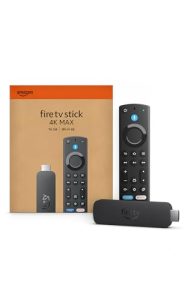
Amazon Fire TV Stick 4K Max (2nd Gen)

The 4K Max is the stick to pick when the rest of the setup is ready for it: a 4K television with Dolby Vision or HDR10+, a sound system that can pass Dolby Atmos, and ideally a Wi-Fi 6E router feeding it. Its quad-core 2.0GHz processor and 850MHz GPU are the fastest pairing in Amazon’s stick line, aimed at quick app starts and fluid menu navigation, and the Fire TV Ambient Experience turns an idle screen into a display of artwork and widgets. For a main living-room TV, this is the most complete version of the Fire TV idea in stick form.
Specs
- Output resolution: 2160p, 1080p, and 720p up to 60 fps
- Video formats: Dolby Vision, HDR 10, HDR10+, HLG, H.265, H.264, VP9, AV1
- Audio support: Dolby Atmos, 7.1 surround sound, 2-channel stereo, HDMI audio pass through up to 5.1
- Processor: Quad-core 2.0GHz
- GPU: 850MHz
- Storage: 16GB
- Wi-Fi: Wi-Fi 6E tri-band, 802.11 a/b/g/n/ac/ax (2.4GHz, 5GHz, and 6GHz)
- Bluetooth: Bluetooth 5.2 + BLE
- Ports: HDMI 2.1 output with ARC input support, micro USB
- Size: 99 mm x 30 mm x 14 mm (housing only)
- Weight: 43.5 g
- Remote included: Alexa Voice Remote Enhanced (Bluetooth and infrared, 2 AAA batteries included)
- In the box: Fire TV Stick 4K Max, Alexa Voice Remote Enhanced, power cable and power adapter, HDMI extender cable, 2 AAA batteries, Quick Start Guide
Best for: The main television in a home with a 4K HDR panel, a Wi-Fi 6E router, and a household that installs plenty of apps and games.
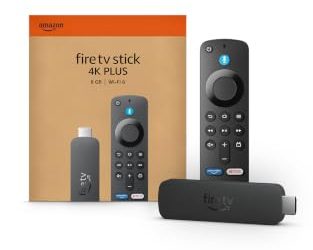
Watch out for: Listings are easy to confuse — the first-generation 4K Max has 8GB of storage and Wi-Fi 6 rather than 6E, and the standard 4K stick is a different product again. Confirm the listing says 2nd Gen with 16GB and Wi-Fi 6E, and use the included power adapter rather than a TV USB port.
Which One Fits Your Situation
Your living-room TV supports Dolby Vision and you stream every night
This is the setup the 4K Max was built for. Dolby Vision and HDR10+ support, Dolby Atmos pass-through, and the fastest processor in the stick range all get used daily rather than sitting as unused spec lines. The Ambient Experience also gives the idle screen something better to do than a black rectangle, which frequent viewers notice more than they expect.
Your apartment Wi-Fi is crowded and streams stutter at peak hours
If your router is a Wi-Fi 6E model, the 6GHz band gives the stick a clearer channel than the congested 2.4GHz and 5GHz bands your neighbours are all sharing. Keep expectations measured: the stick cannot fix slow broadband or a router in a distant room, and 6GHz fades faster through walls, but in a dense building it removes one common bottleneck.
You are upgrading from an older stick that keeps running out of space
The jump to 16GB is the most tangible day-to-day change for upgraders, because app caches, game installs, and downloaded episodes stop competing for a small pool of memory. The quad-core 2.0GHz processor also makes menus and app starts feel noticeably snappier than on the first-generation Max, whose 1.8GHz chip and 8GB of storage date it more than its picture quality does.
You want a capable stick for a second TV or a spare room
The 4K Max works perfectly well here, but its advantages shrink: a bedroom set is often 1080p, used for one or two services, and close to the router. Nothing about the stick prevents that use, and the strong remote still helps, yet buyers in this position should at least recognise they are paying for HDR formats, wireless headroom, and storage that a secondary screen may rarely exercise.
Common Mistakes
- Ordering the first-generation 4K Max by accident: it carries 8GB of storage and Wi-Fi 6, so check that the listing states 2nd Gen, 16GB, and Wi-Fi 6E before checkout.
- Expecting Wi-Fi 6E speeds from an older router: Amazon’s listing notes a Wi-Fi 6E router is required for 6E support, and without one the stick simply uses the older bands.
- Powering the stick from the TV’s USB port: televisions often cut USB power when they sleep and may not supply enough current, so use the power adapter included in the box.
- Assuming a 4K stick upgrades an HD television: the output is limited by the panel, and a 1080p TV will still show a 1080p picture no matter which stick feeds it.
- Judging the purchase on streaming quality alone while ignoring the remote: the Enhanced remote’s infrared control of TV and soundbar power and volume is a daily convenience that cheaper sticks in the range do not always match.
Frequently Asked Questions
Does the Fire TV Stick 4K Max need a Wi-Fi 6E router to work?
No. The stick works with earlier Wi-Fi routers and connects over the 2.4GHz and 5GHz bands those routers provide. A Wi-Fi 6E router is only required to unlock the additional 6GHz band, which mainly helps in homes where the older bands are crowded with neighbouring networks and many connected devices competing at the same time.
How is the 2nd Gen 4K Max different from the first 4K Max?
The current model doubles storage from 8GB to 16GB, moves from Wi-Fi 6 to Wi-Fi 6E tri-band, and raises the processor to a quad-core 2.0GHz chip with an 850MHz GPU. It also ships with the Alexa Voice Remote Enhanced and adds the Fire TV Ambient Experience, which the earlier model does not offer in the same form.
Can the Fire TV Stick 4K Max play Dolby Atmos audio?
Yes, the listing includes Dolby Atmos support alongside 7.1 surround sound, stereo, and HDMI audio pass through up to 5.1. Hearing the difference depends on the rest of the chain: the content must carry an Atmos track, and the television, soundbar, or receiver it passes through must be able to decode or play that format.
Will the remote control my TV and soundbar as well?
In many setups, yes. The included Alexa Voice Remote Enhanced uses infrared to control power and volume on a wide range of compatible IR-enabled TVs, soundbars, and A/V receivers, alongside its Bluetooth connection to the stick itself. Unusual or very old equipment can be hit or miss, so it is worth confirming your gear responds to standard infrared control.
More from Amazon
Programs that pair well with the guide above. Offers and eligibility are set by Amazon and may change.
Free shipping on eligible items, Prime Video and more. Eligible new members can start with a free trial.
Start a Prime free trialAudiobooks and podcasts to listen to on the go. Eligible new members can start with a free trial.
Try Audible freeAd-free music streaming. Eligible new subscribers can start with a free trial.
Try Music Unlimited freeA free business account with business pricing and bulk-buying tools for work, shop or home office.
Create a business accountAs an Amazon Associate we earn from qualifying purchases.


Write Your Review
No reviews yet. Be the first to share your experience!