

Key takeaways
- Choose the UPLIFT L-Shaped Standing Desk if you want the largest choice of desktop sizes, finishes, cable accessories, keyboard trays, monitor arms, and left- or right-hand layouts. It is the strongest choice for a permanent workstation with several screens and equipment.
- Choose the FlexiSpot E7L if you want an L-shaped electric desk without moving into the highest general market price range. Its approximately 330-pound capacity is enough for multiple monitors, a desktop computer, speakers, and ordinary office equipment.
- Choose two separate electric desks if you live in an apartment, have narrow stairs, expect to move, or want one surface for work and another for paperwork. The corner gap is less seamless, but each top and frame is easier to carry and replace.
- Choose a large, custom-frame L-shaped desk if one side will hold unusually heavy equipment such as a tower PC, audio hardware, or multiple monitor mounts. Prioritize frame geometry and leg placement rather than choosing solely by the advertised weight limit.
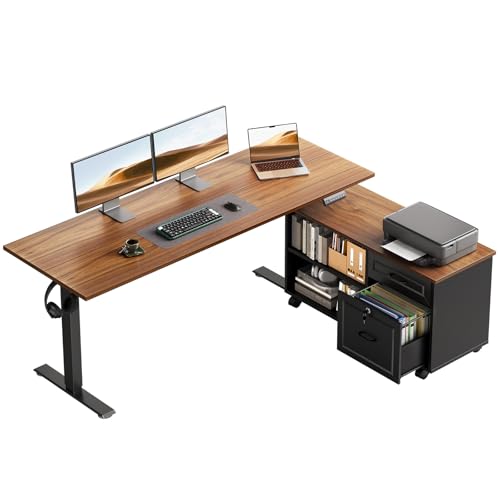
The best L shaped standing desks for home offices are the UPLIFT L-Shaped Standing Desk for the widest customization, the FlexiSpot E7L for a strong value-oriented dual-motor setup, and a two-desk configuration when you need easier delivery, replacement, or rearrangement.
Our top picks



As an Amazon Associate we earn from qualifying purchases at no extra cost to you. Ratings are shown as listed on Amazon.
Best L shaped standing desks at a glance
| Desk | Desktop dimensions | Height range | Lifting capacity | Best for |
|---|---|---|---|---|
| UPLIFT L-Shaped Standing Desk | Common configurations include 60 × 60, 72 × 72, and 80 × 80 inches | Approximately 25.3–50.9 inches, depending on frame and casters | Up to about 535 lb for the frame | Maximum configuration and accessory choice |
| FlexiSpot E7L | Typically supports L-shaped tops around 55–71 inches per side | Approximately 25–50.8 inches, depending on configuration | Up to about 330 lb | Heavy monitors and a practical home-office budget |
| Two matching electric standing desks | Often 48–60 inches wide per desk | Usually about 28–48 inches | Roughly 150–300 lb per desk | Stair access, moving, and future flexibility |
Specifications vary with desktop thickness, frame version, control box, and whether the manufacturer quotes dynamic or static capacity. Treat the figures above as selection ranges, then confirm the exact configuration before ordering.
Our picks by situation
- Choose the UPLIFT L-Shaped Standing Desk if you want the largest choice of desktop sizes, finishes, cable accessories, keyboard trays, monitor arms, and left- or right-hand layouts. It is the strongest choice for a permanent workstation with several screens and equipment.
- Choose the FlexiSpot E7L if you want an L-shaped electric desk without moving into the highest general market price range. Its approximately 330-pound capacity is enough for multiple monitors, a desktop computer, speakers, and ordinary office equipment.
- Choose two separate electric desks if you live in an apartment, have narrow stairs, expect to move, or want one surface for work and another for paperwork. The corner gap is less seamless, but each top and frame is easier to carry and replace.
- Choose a large, custom-frame L-shaped desk if one side will hold unusually heavy equipment such as a tower PC, audio hardware, or multiple monitor mounts. Prioritize frame geometry and leg placement rather than choosing solely by the advertised weight limit.
Desktop size: measure the room, not just the wall
L-shaped desks are described by the length of each wing, but the outer dimensions do not tell you how much usable work area remains after the corner is occupied. A 60 × 60-inch desk has a substantial footprint, yet a deep monitor stand, speakers, and a corner-mounted arm can consume much of the central area.
For most home offices, a 55–60-inch main side and a 48–55-inch return is a useful starting point. This leaves one side for monitors and keyboard work and the other for writing, a laptop, or storage. An at least 30-inch depth is preferable for monitor viewing distance and arm movement; 24 inches can work in a tight room but leaves less space behind a monitor stand.
Before buying, mark the proposed outline on the floor with painter’s tape. Add at least 30 inches for the chair’s working clearance and more if the chair must pass behind you. Also mark door swings, drawers, radiators, window trim, and the wall outlet. A desk that fits mathematically may still be frustrating if the chair cannot turn into the corner.
Left-hand or right-hand configuration?
Stand in front of the desk as if you were using it. A left-hand return extends to your left; a right-hand return extends to your right. Some frames are reversible, while others require different desktop pieces or a specific leg arrangement.
Use the return for lower-frequency tasks: paperwork, charging devices, a printer, or a secondary computer. Place your primary display and keyboard on the longer side. If the desk will sit against two walls, check which wall contains the outlet and whether the return blocks a door or window. Reversible frames are worth paying for when a move is likely, because an apparently inexpensive fixed orientation can become unusable in a new room.
Height range and lifting capacity matter together
A desk’s lowest height should suit the shortest person who will use it while seated. Measure from the floor to the top of the keyboard surface, including the desktop thickness. The highest setting should let the tallest user work with relaxed shoulders and approximately level forearms. A quoted frame range is not always the final working range: a 1-inch desktop, casters, or a thick keyboard tray can add several inches.
For shared use, an approximately 25–50-inch range is more versatile than a frame that starts near 29 inches. Taller users should check the maximum height with the desktop installed rather than relying on a product photograph.
Capacity also has two meanings:
- Static capacity is the load the frame can support while stationary.
- Dynamic capacity is the more useful figure while the motors are raising or lowering the desk.
Add the weight of the desktop, monitor arms, monitors, computer, speakers, microphone, lighting, and anything stored underneath. If the total is 220 pounds, a desk with a 330-pound dynamic limit has a more comfortable margin than one rated at 250 pounds. Avoid leaning heavily on a raised desk while it is moving; that creates a load pattern different from evenly distributed equipment.
Head-to-head: UPLIFT versus FlexiSpot E7L
UPLIFT L-Shaped Standing Desk
The UPLIFT is the better pick when customization is part of the requirement. Its L-shaped options are available in several lengths and finishes, and its accessory ecosystem makes it easier to build a workstation around monitor arms, cable trays, CPU holders, power management, and under-desk storage. The high quoted frame capacity is useful for equipment-heavy setups.
The trade-off is cost and complexity. A large top, multiple accessories, and professional delivery can push the total into the higher general market range. Larger configurations also need more assembly space and are difficult to rotate once assembled. Plan the orientation before tightening the frame and leave the top upside down until cable hardware that must be mounted underneath is installed.
FlexiSpot E7L
The E7L is a sensible choice for a conventional dual-monitor or home-office setup. Its roughly 330-pound capacity leaves room for a substantial desktop and ordinary computer equipment, while the dual-motor design is more appropriate for an L-shaped load than a low-cost single-motor frame.
Check the exact top dimensions carefully: an L-shaped desk assembled from separate pieces can have a different usable corner than a one-piece surface. The E7L is also less compelling if you need a very large 72 × 72-inch configuration, unusually thick solid wood, or a fully reversible layout not offered by the selected version.
Cable management: the hidden difference between good and annoying
An L-shaped desk can require more cable length than a rectangular desk because devices are spread across two wings. Measure from each device to the outlet or power strip with the desk at its highest position, then add approximately 12 inches of slack for movement and routing. Do not bundle the lifting columns’ cables so tightly that they pull when the frame rises.
Prioritize a full-width under-desk tray, a rear cable channel, adhesive cable clips, and a power strip that can be firmly attached beneath the top. Keep the power strip accessible rather than burying it behind the corner. If the desk has a central control box, leave its ventilation area unobstructed and secure excess cable away from moving legs.
Assembly space and a safer setup sequence
A large L-shaped desk usually needs more floor area during assembly than its final footprint suggests. For a 60 × 60-inch model, allow roughly 8 × 8 feet of clear floor; a 72 × 72-inch model may need about 10 × 10 feet. You need room to place the top upside down, attach the frame, and turn the completed desk without striking a wall.
- Inventory the hardware first. Separate frame bolts from desktop screws. Missing or mixed fasteners are common sources of stripped holes.
- Build on a blanket or rigid moving pads. This protects laminate edges and makes the finished desk easier to slide.
- Attach the frame loosely. Keep enough play to align both wings and the corner before final tightening.
- Install cable accessories while the top is inverted. This avoids working overhead later.
- Turn the desk with two or more adults. Never lift a large assembled top by its control panel or cable tray.
- Perform a no-load cycle. Raise and lower the desk fully once, checking for rubbing, cable tension, and uneven movement before adding equipment.
- Load the heaviest items near supported frame areas. Avoid concentrating a computer or amplifier on an unsupported overhang.
Durability and ownership realities
The lifting columns, control box, handset, and cable connectors are the components most likely to need attention before the desktop itself. Dust around the column openings can contribute to rough movement, so clean with a dry or lightly damp microfiber cloth rather than spraying cleaner into the frame. Recheck frame bolts after several weeks, then periodically if the desk is frequently raised.
Use the desk’s anti-collision feature as a safeguard, not as permission to keep objects in its path. Desk mats protect laminate from chair arms and writing pressure, while coasters and prompt spill cleanup reduce edge swelling. Do not exceed the manufacturer’s duty cycle by repeatedly cycling the desk for entertainment; motors may need a cooling period after several consecutive adjustments.
Bottom line
For a feature-rich permanent office, the UPLIFT L-Shaped Standing Desk is the most adaptable choice. For a more restrained equipment list and stronger value focus, the FlexiSpot E7L is the better fit. If access, moving, or future room changes are major concerns, two separate standing desks are often the smartest alternative—even if a single L-shaped top looks cleaner on paper.


Write Your Review
No reviews yet. Be the first to share your experience!