

Key takeaways
- Seat angle adjustable to approximately 20–30 degrees.
- Knee pads at least 3 inches thick, with dense foam and replaceable covers.
- Enough height range for your desk, especially if the desktop is above 29 inches.
- A base that is wide and stable, with a clearly stated weight capacity.
- Foot support that does not force your ankles or knees into an awkward position.
- Dimensions that allow the frame to clear your desk drawers and side panels.
- A return policy or adjustment period, since comfort depends heavily on individual proportions.
The best kneeling chairs are the ones that let your hips sit slightly higher than your knees, keep your spine comfortably upright, and remain stable without forcing you to kneel in one fixed position all day.
Our top picks

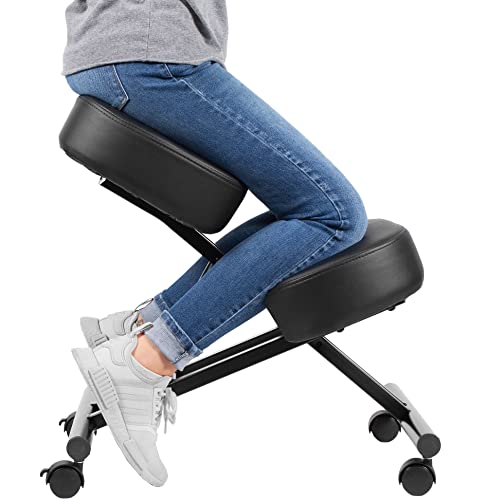

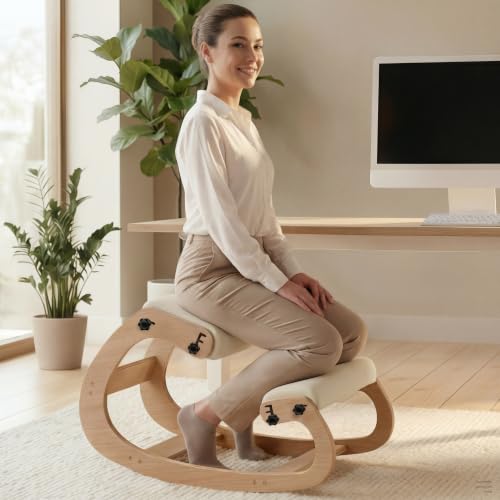
As an Amazon Associate we earn from qualifying purchases at no extra cost to you.
Best kneeling chairs by situation
| Situation | Best choice | Specifications to prioritize | Typical 2026 price range |
|---|---|---|---|
| Trying a kneeling chair for the first time | Adjustable rocking or static ergonomic model | Seat angle of 20–25 degrees, 2–4 inch height adjustment, 3 inch knee pads | $80–$180 |
| Daily home-office use | Height-adjustable frame with thick replaceable cushions | Seat height of 19–25 inches, 4–6 inch foam, weight rating of at least 250 pounds | $150–$350 |
| Small desk or limited floor space | Compact folding or armless kneeling chair | Folded depth under 12 inches, footprint under 24 by 26 inches | $70–$160 |
| Shared workspace or different users | Highly adjustable model with movable knee supports | At least 3 seat heights, 2 knee-pad positions, 250–300 pound capacity | $180–$400 |
| Frequent movement while working | Rocking or wheeled kneeling design with a broad base | Controlled tilt, locking casters or wide runners, non-slip feet | $130–$300 |
What makes a kneeling chair comfortable?
A kneeling chair changes the usual sitting arrangement by placing part of your body weight on padded supports below the knees. The goal is not to put all your weight on your shins. A well-adjusted chair distributes pressure between the seat, thighs, knees, and feet while keeping your pelvis in a more open position than a conventional 90-degree office chair.
Seat angle: the most important adjustment
Look for a seat angle between roughly 20 and 30 degrees from horizontal. A shallower angle may feel like a normal stool and provide little change in posture. A very steep angle can slide your pelvis forward and concentrate pressure on your knees.
For a first setup, begin around 20–22 degrees. If your hips slide forward, reduce the angle or raise the knee support slightly. If you feel cramped at the hips or your thighs press sharply against the front edge, try a somewhat steeper seat or lower the knee pad. Adjustable angle matters more than an attractive fixed design because desk height, leg length, and cushion compression all affect the final position.
Knee-pad cushioning and shape
Knee pads should support the upper shin and the area below the kneecap rather than press directly into the kneecap. At least 3 inches of dense foam is a useful starting point; 4–6 inches is preferable for several hours of use. Soft foam feels comfortable at first but may compress quickly, allowing the frame underneath to create pressure points.
Compare the pad’s usable width, not just its total width. A pad measuring 18 inches across may have only 14–15 inches of comfortable support once its curved edges are excluded. Contoured pads can help keep your legs centered, while flatter pads make it easier to change position. Removable covers are valuable because knee pads receive more sweat and friction than a typical chair seat.
Height range and desk compatibility
Your knees should not be forced sharply upward, and your forearms should rest on the desk without your shoulders lifting. Many fixed kneeling chairs work best with desks around 27–29 inches high. If your desk is 30 inches or higher, a chair with a seat height of at least 21–25 inches is more likely to work. A height-adjustable desk is the easiest way to solve compatibility problems.
Measure your current desk before buying. If the underside of the desktop is 26.5 inches from the floor, a chair that places your seat at 24 inches may leave too little room for your thighs and knees. Also check the desk’s side panels, keyboard tray, and drawer clearance. A kneeling chair may fit under the desktop while its knee frame cannot slide beneath it.
Frame stability: rocking is useful, wobbling is not
Rocking runners allow small posture changes and can reduce the temptation to remain rigid. However, the movement should be controlled, with a broad contact area and a predictable stopping point. Narrow runners, undersized casters, or a tall frame can make the chair feel unstable when you reach for a monitor, stand up, or shift your weight.
For a stable daily-work model, look for a steel or hardwood frame, a base at least 20–24 inches wide, and rubber feet or locking casters. Check the manufacturer’s stated capacity rather than assuming that a thick frame has a high rating. Leave a margin: a person weighing 220 pounds may reasonably prefer a chair rated for 300 pounds, especially when leaning forward.
Static frames are usually the better choice for drawing, typing, or focused work where you do not want movement. Rocking frames suit people who change position often, but they should not roll away when you mount the chair. A locking mechanism or firm resistance adjustment is useful on smooth floors.
Head-to-head: fixed, rocking, and saddle-style kneeling chairs
Fixed-frame kneeling chairs
These are generally the least expensive and simplest to adjust. They are suitable if one person will use the chair at one desk and the proportions are already close to correct. Their drawback is limited flexibility: if the seat angle or knee-pad height is wrong, extra cushioning cannot fully correct the geometry.
Rocking kneeling chairs
Rocking models provide movement without requiring wheels. They are often more comfortable for alternating between upright typing and a slight forward lean. Choose a broad runner and check that the rocking arc is modest. Excessive movement can make precise mouse work tiring and may cause the chair to drift on hard floors.
Convertible saddle-kneeling designs
These use a saddle-like seat or allow the user to switch between kneeling and perching positions. They can be a good compromise for people who dislike continuous pressure on the shins. The trade-off is a larger footprint and a higher price. Confirm that the alternate position still places the keyboard and monitor at suitable heights.
How to set up a kneeling chair in five steps
-
Set the desk first. Place the keyboard so your elbows can remain close to your sides. If your shoulders rise, lower the desk or raise the chair.
-
Start with a moderate angle. Use approximately 20–22 degrees rather than the steepest setting. This gives you a neutral baseline.
-
Position the knee pad under the upper shins. Your kneecaps should not carry your full weight, and your ankles should remain relaxed.
-
Keep both feet supported. Feet can rest on the floor or a footrest. Avoid dangling them, which can increase pressure on the knee pads.
-
Alternate positions. Begin with 15–30 minute periods, then stand or use another chair. Increase duration only if the position remains comfortable.
Place the monitor so its top is near eye level and roughly an arm’s length away. A kneeling chair cannot compensate for a monitor that is too low or a keyboard that is too far forward. If you experience persistent pain, numbness, swelling, or tingling, stop using the chair and seek advice from a qualified healthcare professional.
Durability and ownership costs
The first parts to wear are usually the knee-pad cover, foam edges, rubber feet, and caster components. A washable zippered cover is easier to maintain than permanently stapled upholstery. Inspect bolts every few months, particularly on folding or rocking models, because repeated movement can loosen hardware.
Vacuum fabric pads and clean them with a lightly damp cloth rather than saturating the foam. Avoid placing a kneeling chair on a thick rug unless its base is designed for it; soft carpet can make a rocking frame feel unstable. On hard floors, use a low-friction mat only if the chair’s feet remain secure.
Consider cost per use before choosing the cheapest model. Suppose a $100 chair lasts one year at four uses per week: 4 × 52 equals 208 sessions, or about $0.48 per session. A $280 chair lasting four years at the same frequency provides 832 sessions, or about $0.34 per session. The more expensive option is worthwhile only if its frame, cushions, and adjustment range actually last longer.
Final buying checklist
- Seat angle adjustable to approximately 20–30 degrees.
- Knee pads at least 3 inches thick, with dense foam and replaceable covers.
- Enough height range for your desk, especially if the desktop is above 29 inches.
- A base that is wide and stable, with a clearly stated weight capacity.
- Foot support that does not force your ankles or knees into an awkward position.
- Dimensions that allow the frame to clear your desk drawers and side panels.
- A return policy or adjustment period, since comfort depends heavily on individual proportions.
For most home offices, the best kneeling chairs are adjustable models with dense, replaceable knee pads and a stable frame rather than the cheapest fixed design. Prioritize correct seat angle and desk height first; cushioning and extra features matter only after the basic geometry fits your body and workspace.

Write Your Review
No reviews yet. Be the first to share your experience!