

Key takeaways
- Compare five 3D printing pens from MYNT3D, SCRIB3D and 3Doodler on temperature control, displays, filament, speed settings and what each kit includes.
A 3D pen melts plastic filament and lays it down by hand, so you draw objects in the air instead of sending a file to a printer. Artists use them for sculpture and decoration, makers use them to weld and patch printed parts, and teachers use them for geometry and design lessons. The five pens below cover the main approaches, from a budget slider-control model to a premium pen with a full temperature display.
The differences that matter are the temperature range, how finely you can control feed speed, which filament diameter the pen accepts, and what arrives in the box. Pens built around standard 1.75 mm filament share refills with desktop printers, while the 3Doodler Flow uses maker spools in the same diameter. Every figure here comes from published maker and listing specifications.
As an Amazon Associate, we earn from qualifying purchases.
Quick answer
The MYNT3D Professional is the easiest pen to recommend, with an OLED display, a wide adjustable temperature range and standard 1.75 mm filament. The 3Doodler Flow suits anyone who wants a temperature readout and a generous bundle of included spools, the SCRIB3D Advanced adds eight speed settings, and the MYNT3D Super and SCRIB3D P1 cover the budget tier.
Contents
- MYNT3D Professional Printing 3D Pen with OLED Display
- 3Doodler Flow 3D Printing Pen
- SCRIB3D Advanced 3D Printing Pen
- MYNT3D Super 3D Pen
- SCRIB3D P1 3D Printing Pen
- How to choose
- Who should skip
- FAQ
- Final verdict
How we ordered this list
Temperature control comes first, because it decides how many materials a pen can run and how cleanly each one flows. Display and feed control come next, followed by filament compatibility and the contents of the kit. All figures below come from each maker’s published specification tables and listing details.
MYNT3D Professional Printing 3D Pen with OLED Display
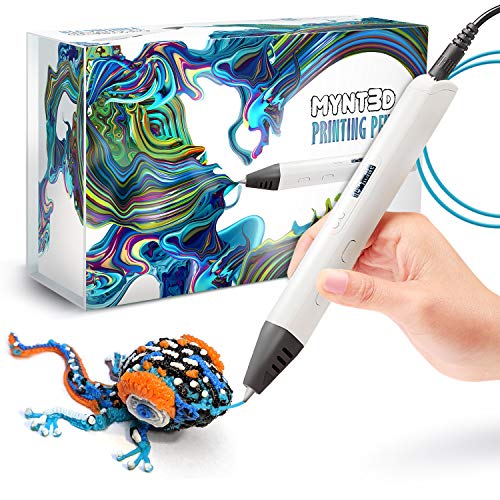
The Professional is the premium pick and the most adjustable pen in this group. Its OLED screen shows the nozzle temperature as you work, and the temperature adjusts across a 130 to 230 degree Celsius range, which covers the melting points of common 1.75 mm plastics. A stepless feed control lets you slow the flow for detail or push it faster for filling larger areas, and the nozzle unscrews for clearing and replacement. Because it accepts standard 1.75 mm filament, owners of desktop printers can share spools between machines. The slim body suits long drawing sessions, and the pen runs from its included power adapter.
Specs
- :
- Display: OLED temperature display
- Temperature range: 130 to 230 degrees Celsius, adjustable
- Filament: 1.75 mm
- Materials: ABS, PLA and other plastics melting within the rated range
- Feed control: stepless adjustable speed
- Nozzle: removable for clearing and replacement
- Model: MP012-WH
- Power: AC adapter
3Doodler Flow 3D Printing Pen

The Flow is the premium kit pick, aimed at teens and adults who want a readout and plenty of material in the box. An LCD shows the temperature setting, and the pen takes standard 1.75 mm spooled plastic, including PLA, ABS and wood-filled filament, so refills are easy to find. The set bundles eight spools totalling 80 feet of filament, a stencil book and an activity guide, which is more included material than any other pen here. The power cable is attached to the pen and runs from the included AC adapter, so there is no battery to charge and no mid-project cut-off. At a listed 15.8 ounces for the set it is the heaviest option here, and the maker rates it for ages 14 and up.
Specs
- :
- Display: LCD temperature display
- Filament: 1.75 mm spooled plastic
- Materials: PLA, ABS and wood-filled filament
- Included filament: 8 spools, 80 feet total
- Kit contents: pen, stencil book, activity guide, AC adapter
- Power: attached cable with AC adapter
- Age guidance: 14 and up
- Model: 3DFLOW-US
SCRIB3D Advanced 3D Printing Pen

The Advanced is the mid-range control pick. A large LCD screen shows temperature, and buttons set the heat for the material loaded, while eight speed settings give more repeatable feed steps than a plain slider. The kit includes 20 feet of PLA filament, a stencil book and a project guide, so a new owner can draw on the first day. The body is shaped for a pencil-style grip, and loading and unloading run from dedicated buttons rather than a manual push. For makers who like to note the exact settings that worked on a project and dial them back in later, the stepped controls are the draw here.
Specs
- :
- Display: LCD screen
- Speed settings: 8 feed speeds
- Temperature: adjustable, set by buttons
- Filament: 1.75 mm PLA
- Included filament: 20 feet
- Kit contents: pen, stencil book, project guide, power adapter
- Model: SCRIB_PEN_ADV
- Age guidance: 14 and up
MYNT3D Super 3D Pen

The Super is the simple mid-range option from MYNT3D, built around a stepless speed slider on the barrel. Slide it forward to fill outlines quickly, pull it back for corners and lettering, with no menus to manage. It accepts 1.75 mm ABS and PLA, so it shares filament with most desktop printers and with the Professional above. Power comes over USB at 5 volts and 2 amps with a 10 watt output, which means a wall adapter, a computer port or a power bank can all run it. There is no temperature display, so material changes rely on the preset heat for each plastic type. For a first pen that stays simple, this is the one to pick.
Specs
- :
- Display: none
- Speed control: stepless slider
- Filament: 1.75 mm
- Materials: ABS and PLA
- Power: USB, 5 V DC at 2 A
- Output: 10 watts
- Model: Super 3D Pen (MP030-BK)
SCRIB3D P1 3D Printing Pen
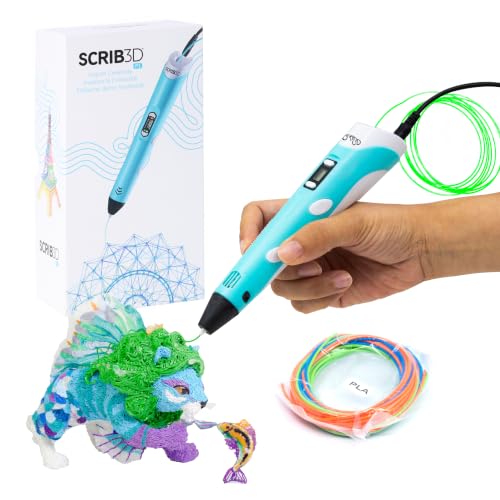
The P1 is the budget pick and the lightest commitment in this group. A display on the spine shows the working temperature, the feed is stepless for smooth changes while drawing, and a ceramic nozzle resists the clogging that ends sessions on lesser models. The box includes three PLA colors, a stencil book, a project guide and a power adapter, which is a complete first kit. It runs 1.75 mm filament, and the maker lists FCC, CE and RoHS certification for the design. Temperature adjusts to match the material loaded, with published ranges of 160 to 210 degrees Celsius for PLA and 200 to 230 degrees for ABS. Supervised younger teens can manage it, but the hot nozzle rules it out for small children.
Specs
- :
- Display: temperature display on the spine
- Speed control: stepless
- Filament: 1.75 mm
- Materials: PLA and ABS
- Temperature: 160 to 210 degrees Celsius for PLA, 200 to 230 for ABS
- Nozzle: ceramic
- Included filament: 3 PLA colors
- Kit contents: pen, stencil book, project guide, power adapter
- Certification: FCC, CE, RoHS
How to choose
Begin with filament. Pens that accept standard 1.75 mm filament share the huge refill market built for desktop printers, which keeps colors cheap to replace and easy to find. All five pens here use that diameter. The Flow takes spooled plastic only, while the others also accept cut lengths, so check the format before ordering refills.
Next, decide how much temperature control you need. PLA flows at lower heat and suits most drawing, while ABS and wood-filled filaments need higher settings. A pen with an adjustable range and a display, like the MYNT3D Professional or the 3Doodler Flow, handles material swaps without guesswork. Fixed-preset pens like the MYNT3D Super keep things simple but narrow the material list.
Then think about feed control. Stepless sliders change speed mid-line, which helps when one piece mixes outlines and fill. Stepped settings, like the eight speeds on the SCRIB3D Advanced, repeat exactly, which helps when you return to a project days later and want the same flow.
Finally, weigh the kit. Included filament, stencils and guides decide how much drawing you can do before the next order. The Flow bundles the most material, the SCRIB3D pens include project books, and the MYNT3D pens arrive leaner, aimed at owners who already hold filament.
Who should skip
Skip this category if you need repeatable parts with tight dimensions, because a desktop 3D printer holds tolerances a hand-guided pen cannot match. Skip hot-nozzle pens for young children, since every model here is rated for teens or needs close adult supervision. Skip a pen with no display if you plan to swap between PLA and ABS often, because judging heat by feel wastes filament. And skip the whole idea if you only want to repair one broken clip, since a tube of plastic epoxy does that single job with less setup.
FAQ
What filament does a 3D pen use?
Most pens in this group use 1.75 mm filament, the same diameter as most desktop printers, in PLA for everyday drawing and ABS for stronger, heat-tolerant parts. The 3Doodler Flow takes spooled 1.75 mm plastic, including wood-filled blends. Always match the filament to the temperature range the pen can reach.
Are 3D pens safe for children?
The pens here heat their nozzles well past the boiling point of water, so makers rate them for ages 14 and up, or for use under direct adult supervision. The plastic itself cools within seconds of leaving the nozzle. For younger children, look for the separate low-temperature pen class that uses special cool-melting plastic instead.
Can a 3D pen repair a broken plastic part?
Yes, within limits. A pen can weld a cracked housing, rebuild a snapped tab or add material to a worn edge, and the repair is strongest when the pen runs the same plastic family as the part. Repairs stay cosmetic and light-duty, so load-bearing and safety parts still need a proper replacement.
How do you keep a 3D pen from clogging?
Retract the filament when you finish drawing, keep the nozzle clear of hardened plastic, and run the heat setting that matches the material loaded. Pens with removable nozzles, like the MYNT3D Professional, are easier to clear when a clog does form. Letting a hot pen sit idle with filament loaded is the most common cause.
Final verdict
Pick the MYNT3D Professional for the widest temperature range and an OLED readout on standard filament. Pick the 3Doodler Flow for the biggest included bundle and an LCD, and the SCRIB3D Advanced when stepped speed settings matter. Pick the MYNT3D Super for simple USB-powered drawing, and the SCRIB3D P1 for a complete first kit at a budget tier.
Product and ASIN Reference
| Product name | ASIN |
|---|---|
| MYNT3D Professional Printing 3D Pen with OLED Display | B01BLQ24IW |
| 3Doodler Flow 3D Printing Pen | B0C2L54Q9H |
| SCRIB3D Advanced 3D Printing Pen | B08HM3X3D3 |
| MYNT3D Super 3D Pen | B081C946ZJ |
| SCRIB3D P1 3D Printing Pen | B08HM4133L |
More from Amazon
Programs that pair well with the guide above. Offers and eligibility are set by Amazon and may change.
Free shipping on eligible items, Prime Video and more. Eligible new members can start with a free trial.
Start a Prime free trialAudiobooks and podcasts to listen to on the go. Eligible new members can start with a free trial.
Try Audible freeAd-free music streaming. Eligible new subscribers can start with a free trial.
Try Music Unlimited freeA free business account with business pricing and bulk-buying tools for work, shop or home office.
Create a business accountAs an Amazon Associate we earn from qualifying purchases.
Write Your Review
No reviews yet. Be the first to share your experience!