

Key takeaways
- Stack two screens and save desk width: compare five vertical dual monitor stands on VESA fit, load rating, pole height, base style and adjustment range.
- Top Pick: VIVO Dual Monitor Desk Stand (STAND-V002L)
- Runner-up: Mount-It! Dual Monitor Stand (MI-758)
- Also consider: VIVO Dual Vertically Stacked Desk Mount (STAND-V002T)
A vertical dual monitor stand stacks one screen above the other instead of spreading two displays across the desk, the right layout when desk width is the limiting factor or when a main screen pairs with a secondary display for chat, code or reference material. The five stands below all hold two monitors in a stacked array, but they split into two camps: freestanding models that sit on the desk with no clamp and no drilling, and clamp-mounted models that bolt to the desk edge for a smaller footprint. The VIVO STAND-V002L is the straightforward freestanding pick for screens up to 34 inches, the Mount-It! MI-758 covers smaller screens on a V-shaped steel base, the VIVO STAND-V002T is the extra-tall clamp option for ultrawide pairs, the MOUNTUP stand raises the per-screen load rating for heavier panels, and the HUANUO stand adds stepped height settings and the highest published load figure of the group. Each pick lists its published specifications so the VESA pattern, load rating and size range can be checked against the monitors already on the desk.
As an Amazon Associate, we earn from qualifying purchases.
Table of Contents
- VIVO Dual Monitor Desk Stand (STAND-V002L)
- Mount-It! Dual Monitor Stand (MI-758)
- VIVO Dual Vertically Stacked Desk Mount (STAND-V002T)
- MOUNTUP Vertical Dual Monitor Stand
- HUANUO Dual Monitor Stand (HNDMA61B)
- How to Choose
- FAQ
- Conclusion
VIVO Dual Monitor Desk Stand (STAND-V002L)

The STAND-V002L is a freestanding stand built around a single center pole and a flat base, so it stacks two screens vertically without clamping to the desk edge or drilling a grommet hole. That makes it the natural starting point for rented desks, glass desktops and any surface that should not be clamped. VIVO rates the stand for two screens from 13 to 34 inches, which covers the common pairing of a 27 inch main monitor with a second panel of the same size, and the ultrawide-plus-secondary layouts the stacked format is usually bought for. Each screen can weigh up to 22 pounds, a limit that suits most flat panels in that size range. Both plates accept VESA 75x75mm and 100x100mm patterns, and each monitor can be tilted, swiveled and rotated between landscape and portrait. Height is set by sliding each mount along the pole, so the gap between the displays can be closed up or opened out. As a budget-tier pick, the trade-offs are manual adjustment throughout and a base that takes up a modest footprint of desk depth.
Specs:
- Screen fit: two screens, 13 to 34 inches, stacked vertically
- Load rating: up to 22 lbs per screen
- VESA patterns: 75x75mm and 100x100mm
- Mounting style: freestanding base, no clamp or drilling
- Adjustment: tilt, swivel and 360 degree rotation; height set along the pole
- Model: STAND-V002L
Mount-It! Dual Monitor Stand (MI-758)

The MI-758 is the compact option in this group, a freestanding vertical stand for two screens up to 27 inches. Its V-shaped base is made from alloy steel and keeps the footprint narrow, which suits shallow desks where a wide rectangular base would crowd the keyboard area. Mount-It! publishes a total load capacity of 33 pounds across the stand, so it is aimed at pairs of mainstream 24 and 27 inch monitors rather than heavy panels. Height adjusts over a 13.4 inch range, giving enough travel to set the lower screen at desk level and the upper screen directly above it without a visible gap. Each monitor tilts up to 30 degrees up or down, which matters in a stacked layout because the upper display usually needs a downward tilt toward the viewer. Both screens also rotate a full 360 degrees, so either one can be turned to portrait for long documents or code while the other stays in landscape. This budget-tier stand uses a fixed pole design rather than articulating arms, so positioning is set by loosening and sliding the mounts, a fair trade for smaller dual setups that rarely change once dialed in.
Specs:
- Screen fit: two screens up to 27 inches, stacked vertically
- Load rating: 33 lbs total across the stand
- VESA patterns: 75x75mm and 100x100mm
- Mounting style: freestanding V-shaped base, alloy steel
- Tilt: up to 30 degrees up or down per screen
- Height adjustment: 13.4 inch range
- Rotation: 360 degrees, landscape or portrait
- Model: MI-758
VIVO Dual Vertically Stacked Desk Mount (STAND-V002T)
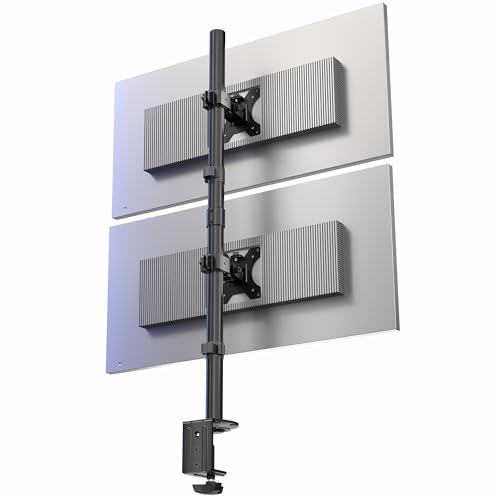
The STAND-V002T takes the opposite approach to the freestanding picks: it clamps to the back of the desk with a C-clamp, with a grommet option for desks that have a cable hole, so nothing sits on the desktop at all. The pole is extra tall, with published product dimensions of 6 x 6 x 28.5 inches, and that height allows two ultrawide screens from 13 to 34 inches to stack with room to spare. Each screen can weigh up to 22 pounds, matching the freestanding V002L, and the plates accept the same VESA 75x75mm and 100x100mm patterns. Tilt runs from +15 to -15 degrees, swivel and rotation both run a full 360 degrees, and each monitor’s height is set independently along the pole, so an ultrawide main screen can sit low with a smaller secondary display above it. Detachable cable clips route both monitors’ leads down the pole. The mount weighs 8.5 pounds and carries a 3-year manufacturer warranty. As a mid-range pick, it suits desks that can accept a clamp and users who want the cleaner desktop a clamped pole delivers, provided the desk edge is solid enough to grip.
Specs:
- Screen fit: two ultrawide screens, 13 to 34 inches, stacked vertically
- Load rating: up to 22 lbs per screen
- VESA patterns: 75x75mm and 100x100mm
- Mounting style: C-clamp or grommet desk mount
- Pole height: 28.5 inch product height, extra-tall pole
- Tilt: +15 to -15 degrees; swivel 360 degrees; rotation 360 degrees
- Cable management: detachable cable clips
- Item weight: 8.5 lbs
- Warranty: 3-year manufacturer warranty
- Model: STAND-V002T
MOUNTUP Vertical Dual Monitor Stand

The MOUNTUP Vertical Dual Monitor Stand is a freestanding stacked mount rated for two screens up to 32 inches and up to 33 pounds per monitor, the highest per-screen figure among the freestanding picks here. That extra capacity is the reason to shortlist it: heavier 32 inch panels and older, thicker monitors that would exceed a 22 pound limit sit within this stand’s published rating. The stand keeps the simple pole-and-base layout, so both screens mount on VESA 75x75mm or 100x100mm plates, slide to height along the pole, and can be swiveled and tilted to square the stack to the seating position. Because the base is freestanding, the stand can be repositioned as one unit when a desk is rearranged, and it works on surfaces that rule out clamps, including glass tops. The 32 inch ceiling is lower than the 34 inch limit of the VIVO and HUANUO picks, so ultrawide pairs are better served elsewhere in this list. Within its size range, this mid-range stand pairs the strongest freestanding load rating with the standard stacked layout, making it the pick for two heavier mainstream monitors on a desk that cannot be drilled or clamped.
Specs:
- Screen fit: two screens up to 32 inches, stacked vertically
- Load rating: up to 33 lbs per monitor
- VESA patterns: 75x75mm and 100x100mm
- Mounting style: freestanding base, no clamp or drilling
- Adjustment: swivel, tilt and height adjustment along the pole
HUANUO Dual Monitor Stand (HNDMA61B)

The HUANUO stand is the premium pick in this group, a freestanding vertical mount for two screens from 13 to 34 inches with a published maximum load of 44 pounds across the stand. Its distinguishing feature is stepped height control: the mount offers 13 height settings, so each screen locks into a repeatable position instead of relying on a friction slide alone. That suits shared desks and sit-stand converters where the stack is raised and lowered often and needs to return to the same marks. Both monitors can swivel, tilt and rotate between landscape and portrait, and the plates support VESA patterns up to 100x100mm, including the 75x75mm pattern used by smaller panels. The stand weighs 9.13 pounds and has published dimensions of 17.44 x 12.52 x 3.11 inches, reflecting a wide base plate sized to keep a tall stack steady. The 44 pound maximum load is a total across both screens rather than a per-screen rating, so two unusually heavy displays should be weighed first. For buyers who want the freestanding format with the most structured height adjustment and the largest total load figure here, this is the stand to choose.
Specs:
- Screen fit: two screens, 13 to 34 inches, stacked vertically
- Load rating: 44 lbs maximum load across the stand
- VESA patterns: 75x75mm and up to 100x100mm
- Mounting style: freestanding base, no clamp or drilling
- Height adjustment: 13 height settings
- Adjustment: swivel, tilt and rotation between landscape and portrait
- Item weight: 9.13 lbs
- Dimensions: 17.44 x 12.52 x 3.11 inches
- Model: HNDMA61B
How to Choose
Start with the two measurements that rule most stands out: screen size and screen weight. Stacked stands here top out at 34 inches for the VIVO and HUANUO models and 32 inches for the MOUNTUP, while the Mount-It! MI-758 is sized for screens up to 27 inches. Weight limits are published two different ways: per screen on the VIVO and MOUNTUP stands, and as a total across both screens on the Mount-It! and HUANUO. Weigh each monitor without its factory stand and compare it against the correct figure before ordering.
Next, confirm the VESA pattern. All five stands accept 75x75mm and 100x100mm mounting holes, which covers the large majority of flat panels. Monitors with recessed VESA wells or curved backs may need spacers or an adapter plate, and monitors with no VESA holes at all cannot be mounted on any stand in this list without a separate adapter bracket.
Then choose the mounting style. Freestanding stands like the V002L, MI-758, MOUNTUP and HUANUO sit on the desk and can be repositioned freely, suiting glass desks and rented workspaces. A clamp mount like the STAND-V002T leaves the desktop completely clear and is the steadier option for tall stacks, but it needs a solid desk edge or a grommet hole.
Finally, think about pole height and tilt. A stacked pair needs enough pole above the lower mount for the upper screen to clear it, and the extra-tall pole on the STAND-V002T exists for exactly that reason. The upper monitor in any stack sits above natural eye level, so a firm tilt joint keeps the top screen angled toward the viewer instead of facing the ceiling.
FAQ
Is a vertical dual monitor stand better than a side-by-side stand?
Neither layout is universally better; they solve different problems. A vertical stack uses the width of a single monitor, so it fits narrow desks and pairs well with a main screen plus a secondary display for chat or reference material. A side-by-side layout keeps both screens near eye level and suits two equal working displays. Choose the stack when desk width is scarce or the second screen plays a supporting role.
Will a vertical stand work with an ultrawide monitor?
Yes, within the published size and weight limits. The VIVO STAND-V002L and STAND-V002T are both rated for ultrawide screens up to 34 inches at up to 22 pounds per screen, and the HUANUO stand covers the same 34 inch ceiling. Most ultrawides use a 100x100mm VESA pattern, which all five stands accept. Heavier ultrawides should be weighed against the load rating before mounting.
Do freestanding vertical stands wobble with two screens stacked?
A stacked pair raises the center of gravity, so base design matters. The freestanding stands here use wide or V-shaped bases sized for the load, and staying inside the published weight rating keeps the stack stable on a level desk. Mounting displays heavier than the rating or placing the stand on an uneven surface increases movement. A clamp-mounted stand such as the STAND-V002T removes the base from the equation entirely.
Can one screen in the stack be used in portrait orientation?
On these stands, yes. Each mount rotates, so either screen can be turned to portrait while the other stays in landscape, a popular setup for code, documents and chat columns. Check the panel’s diagonal and pole spacing first, because a tall portrait display needs vertical clearance from the desk and from the second monitor.
Conclusion
For most stacked setups, the VIVO STAND-V002L is the simplest answer: freestanding, rated for two screens up to 34 inches, and adjustable in tilt, swivel and rotation. Smaller monitor pairs are well served by the Mount-It! MI-758 and its compact V-shaped base. Desks that can take a clamp gain a clear desktop and an extra-tall pole from the VIVO STAND-V002T, the strongest choice for stacked ultrawides. Heavier panels point to the MOUNTUP stand and its 33 pound per-screen rating, while the HUANUO stand closes the list with 13 height settings and a 44 pound maximum load. Match the size range, load rating and mounting style to the desk, and any of the five will hold a stack securely.
More from Amazon
Programs that pair well with the guide above. Offers and eligibility are set by Amazon and may change.
Free shipping on eligible items, Prime Video and more. Eligible new members can start with a free trial.
Start a Prime free trialAudiobooks and podcasts to listen to on the go. Eligible new members can start with a free trial.
Try Audible freeAd-free music streaming. Eligible new subscribers can start with a free trial.
Try Music Unlimited freeA free business account with business pricing and bulk-buying tools for work, shop or home office.
Create a business accountAs an Amazon Associate we earn from qualifying purchases.





Write Your Review
No reviews yet. Be the first to share your experience!