

Key takeaways
- Compare the best monitor light bars for curved and ultrawide monitors by curvature fit, glare control, brightness, mount design, and control style.
- Top Pick: BenQ ScreenBar Pro
- Runner-up: BenQ ScreenBar Halo 2
- Also consider: Quntis 1000R Curved Monitor Light Bar
If you own a curved or ultrawide monitor, the best monitor light bar is one that is actually rated for your screen’s curvature: the BenQ ScreenBar Pro for a premium single-bar setup, the BenQ ScreenBar Halo 2 if you also want rear bias lighting, and the Quntis 1000R Curved Monitor Light Bar if your display has an aggressive 1000R bend. A standard straight bar can leave the outer edges of a curved screen underlit and can throw reflections onto the angled sides of the panel, so curvature rating, mount design, and beam width matter more here than raw brightness alone. Below, we compare five bars that fit curved and ultrawide displays, explain how curvature ratings work, and finish with the checks to run before you order.
As an Amazon Associate, we earn from qualifying purchases.
Table of Contents
- Why Curved Screens Need a Different Light Bar
- BenQ ScreenBar Pro
- BenQ ScreenBar Halo 2
- Quntis 1000R Curved Monitor Light Bar
- Quntis Monitor Light Bar with Remote
- MELIFO Monitor Light Bar with Remote Control
- How to Choose a Light Bar for a Curved Monitor
- FAQ
- Conclusion
- Product and ASIN Reference
Why Curved Screens Need a Different Light Bar
A light bar works by aiming its beam down at the desk while keeping light off the screen itself. On a flat monitor that geometry is simple: the panel is one plane, and an asymmetric lens can keep the beam clear of it. A curved monitor wraps the left and right edges of the panel toward you, so a straight bar mounted at the center can spill light onto those angled edges, producing bright reflections exactly where your peripheral vision picks them up. The mount is the second problem. Many bars grip the top bezel or balance on a counterweight, and a curved back shell gives both designs less flat surface to work with.
Manufacturers describe fit using the curvature rating you will also see on the monitor itself, such as 1000R, 1500R, or 1800R. A lower number means a tighter curve. Before buying, match three things: the bar’s stated curvature range, the thickness range of its mount, and the bar’s length against your screen width. A 34-inch ultrawide needs a wider pool of light than a 27-inch curved display, and dual-bar or extended designs cover that width more evenly.
BenQ ScreenBar Pro

The ScreenBar Pro is BenQ’s premium pick for ultrawide and curved setups, and it earns that spot with the widest, most even front lighting in this roundup. BenQ rates the Pro for curved monitors as well as flat ones, and its third-generation asymmetric optics are designed to light the desk surface without reflecting off the screen. Published output reaches up to 1,000 lux at the center of the desk, which is strong enough for paperwork beside the keyboard, not just the keyboard itself.
A built-in motion sensor turns the bar on when you sit down and off when you leave, and an ambient sensor handles auto-dimming, so the bar adjusts as room light changes through the day. Controls are touch-based on the bar itself, color temperature runs from warm to daylight, and power comes over USB-C, which suits modern monitors and docking stations. This is the bar to choose if your curved monitor is the centerpiece of a work desk and you want the most refined front light of the five.
Specs:
- Light source: LED with asymmetric optical design
- Brightness: up to 1,000 lux center illuminance (published)
- Color temperature: 2700K to 6500K, adjustable
- Color rendering: Ra95 class LED array
- Sensors: motion sensor for auto on/off, ambient sensor for auto-dimming
- Power: USB-C
- Fit: flat and curved monitors, including ultrawide displays
- Controls: touch controls on the bar
- Tier: premium
BenQ ScreenBar Halo 2

The ScreenBar Halo 2 adds something the Pro does not: a rear backlight that washes the wall behind your monitor. On a big curved display in a dark room, that halo of bias light softens the contrast between the bright screen and the dark wall, which many people find easier on the eyes during evening sessions. The front light uses the same glare-free asymmetric approach as the rest of the ScreenBar line, and BenQ lists the Halo 2 as fitting curved monitors.
Control is the other headline feature. The included wireless controller sits on your desk and handles brightness and color temperature without reaching up to the bar, which matters when a 34-inch or 49-inch screen puts the bar well out of comfortable reach. A motion sensor is built in, the package includes a webcam accessory for the top of the bar, and power comes from the included adapter. Choose the Halo 2 over the Pro if your curved monitor sits in a dim room and you want ambient light behind the screen as well as task light in front of it.
Specs:
- Light sources: front task light plus rear backlight
- Color temperature: 2700K to 6500K, adjustable
- Controls: wireless desktop controller, plus motion sensor
- Included components: light bar, wireless controller, adapter, webcam accessory
- Power: adapter powered (included)
- Fit: flat and curved monitors
- Auto features: auto-dimming with ambient sensing
- Tier: premium
Quntis 1000R Curved Monitor Light Bar
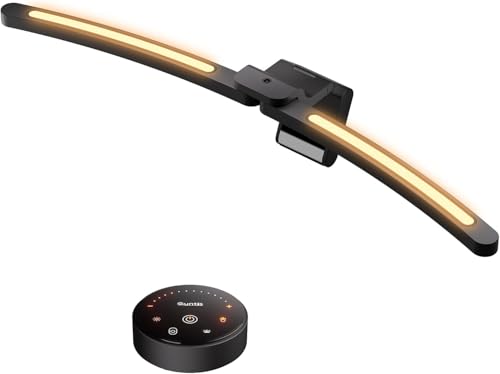
Most bars adapt a straight design to curved screens; this Quntis model is built curved from the start. It uses two arc-shaped LED bars that rotate independently, so you can angle each half of the light to follow the bend of a 1000R to 3000R screen instead of fighting it. That makes it the most direct answer in this roundup for aggressively curved 34-inch gaming monitors, where a single straight bar leaves the corners noticeably dimmer.
The two sections can be aimed separately, which also helps on very wide flat screens: angle the outer sections slightly outward and the desk coverage widens. A remote control handles brightness and color temperature from your chair, and the bar runs on USB power like most of its class. Build and optics are a step below the BenQ models, and there is no rear backlight, but for a tight 1000R curve this dual-arc layout solves a fit problem the premium straight bars only work around. It sits in the mid-range tier.
Specs:
- Design: dual arc-shaped LED bars, independently rotatable
- Curvature fit: 1000R to 3000R curved screens and large flat screens
- Screen size focus: 34-inch curved and ultrawide monitors
- Controls: remote control included
- Dimming: stepless brightness and color temperature adjustment
- Power: USB
- Backlight: none
- Tier: mid-range
Quntis Monitor Light Bar with Remote
This Quntis bar is the straightforward mid-range option for curved gaming monitors with milder bends, such as 1500R and 1800R displays. It is a 15.7-inch bar with a backlight for a soft glow behind the screen, stepless dimming, and adjustable color temperature, all handled by a small remote so you never touch the bar once it is mounted.
The mounting system is worth a mention: Quntis uses a sliding weighted clip that pulls forward to grip thin bezels and curved backs, which is the part of the design that makes it workable on curved panels where simple counterweight mounts can slip. The white finish also suits light-colored desk setups that the mostly black competition ignores. It gives up the Pro’s motion sensor and the 1000R model’s dual-arc coverage, and 15.7 inches of bar will not fully cover a 49-inch super ultrawide, but for a single 27-inch to 34-inch curved monitor it covers the essentials at a mid-range tier.
Specs:
- Bar length: 15.7 inches
- Model: Li-Hy-0214-Wt
- Lighting: front light plus backlight
- Dimming: stepless brightness adjustment
- Color temperature: adjustable
- Controls: remote control included
- Mount: sliding weighted clip for thin bezels and curved backs
- Power: USB
- Tier: mid-range
MELIFO Monitor Light Bar with Remote Control
The MELIFO is the budget pick, and its spec sheet is stronger than the tier suggests. You get an ambient light sensor for automatic dimming, stepless brightness and color temperature adjustment, and a memory function that restores your last settings when the bar powers back on. A wireless remote with a magnetic base is included, which is rare at this level, and the bar itself also carries mechanical controls on top as a backup.
At 17.3 inches long, it is wide enough for 27-inch and 32-inch curved monitors, and its counterweight mount with an adjustable angle accommodates a range of monitor thicknesses, so it can sit on moderately curved backs without a clamp. It is powered over USB-C at 5V, drawing 5 watts. The trade-offs are a plastic-and-aluminum build instead of the BenQ models’ mostly metal construction and no published curvature rating, so owners of tight 1000R screens should pick the Quntis 1000R model above instead. For a 1500R or 1800R curve on a budget, this is the sensible buy.
Specs:
- Bar length: 17.3 inches
- Model: Hytb-012
- Materials: ABS and aluminum
- Brightness control: stepless dimming with memory function
- Auto-dimming: built-in ambient light sensor
- Controls: mechanical switches on the bar and wireless remote (magnetic base)
- Power: USB-C, 5V/1A, 5 watts
- Mount: counterweight mount, adjustable angle, fits various monitor thicknesses
- Tier: budget
How to Choose a Light Bar for a Curved Monitor
Start with your monitor’s curvature rating, which is printed in its specifications as a number followed by R. Match it against the bar’s stated range. A bar rated for 1000R to 3000R covers nearly everything; a straight premium bar like the ScreenBar Pro or Halo 2 is rated for curved fit by its maker but follows the screen less closely than a purpose-built arc design. If your curve is 1500R or gentler, almost every pick here will sit and aim correctly.
Next, measure the top of your monitor. Note the bezel thickness and the depth of the back shell where a counterweight or clip will rest, and compare both against the mount’s published thickness range. Curved monitors often taper at the edges, so a mount that grips at the center is more secure than one that spans the full width.
Then decide on light coverage. Bars around 15 to 18 inches suit 27-inch to 34-inch screens. For 38-inch and 49-inch ultrawides, look for a longer or dual-bar design, or accept dimmer desk edges. Finally, weigh the extras: a rear backlight helps in dark rooms, a wireless controller helps when the bar is out of reach, a motion sensor removes daily switching, and USB-C power keeps cabling simple with modern docks.
FAQ
Will a straight light bar work on a curved monitor?
Often, yes, provided the maker rates it for curved fit and your screen’s curve is mild, around 1500R or gentler. The BenQ ScreenBar Pro and Halo 2 are both listed as fitting curved monitors. On a tight 1000R screen, a straight bar can reflect off the angled edges and leave the corners dim, so a curved or dual-arc design like the Quntis 1000R is the safer match.
What does the R number in 1000R or 1800R mean?
It describes the radius of the circle the screen’s curve follows, in millimeters. A 1000R screen curves as if it were part of a circle with a 1,000 mm radius, so lower numbers mean a tighter, more aggressive curve. Light bars use the same scale when they publish a curvature fit range, which makes matching the two straightforward.
Do monitor light bars damage curved screens?
Bars that rest on the top bezel with a counterweight or padded clip put very little force on the panel itself, and none of the picks here require adhesive or screws. The real check is fit: confirm the mount’s thickness range covers your monitor’s top edge and that the bar sits stably before you let go of it, especially on curved backs that taper.
Is a backlight behind the monitor worth it?
It helps most in dark rooms. A rear glow, like the one on the BenQ ScreenBar Halo 2 or the Quntis bar with remote, reduces the contrast between a bright screen and a dark wall, which can make long evening sessions feel less harsh. In a bright office it adds little, and a front-only bar such as the ScreenBar Pro is the better spend there.
Conclusion
For most curved and ultrawide owners, the BenQ ScreenBar Pro is the best single purchase: wide, even, glare-free light, motion and ambient sensors, and a mount rated for curved screens. Pick the BenQ ScreenBar Halo 2 instead if your setup lives in a dark room and you want bias lighting behind the panel plus a wireless controller. Owners of aggressively curved 1000R displays should look at the Quntis 1000R Curved Monitor Light Bar, whose dual rotating arcs follow the bend directly, while the Quntis Monitor Light Bar with Remote covers milder curves in the mid-range. On a budget, the MELIFO pairs auto-dimming and a remote with a mount that handles moderately curved backs. Whichever you choose, confirm the curvature range and mount thickness against your monitor first, and the light will land on the desk, not the screen.


More from Amazon
Programs that pair well with the guide above. Offers and eligibility are set by Amazon and may change.
Free shipping on eligible items, Prime Video and more. Eligible new members can start with a free trial.
Start a Prime free trialAudiobooks and podcasts to listen to on the go. Eligible new members can start with a free trial.
Try Audible freeAd-free music streaming. Eligible new subscribers can start with a free trial.
Try Music Unlimited freeA free business account with business pricing and bulk-buying tools for work, shop or home office.
Create a business accountAs an Amazon Associate we earn from qualifying purchases.






Write Your Review
No reviews yet. Be the first to share your experience!