

The best tank printer for most homes and small offices is an Epson EcoTank all-in-one such as the ET-2850 for light use or the EcoTank Pro ET-5850 for offices, while Canon MegaTank models like the G3270 are strong rivals on running costs. Tank printers cost more up front than cartridge models but print pages for a fraction of a cent to a couple of cents, so they pay off if you print regularly.
Our top picks
 Epson EcoTank ET-4800 Wireless Color All-in-One Supertank
- Innovative Cartridge-Free Printing ― High-capacity ink tanks mean…
- Impressive Print Quality ― Unique Micro Piezo Heat-Free…
- Zero Cartridge Waste
 Epson EcoTank ET-2800 Wireless Color All-in-One Supertank
- No more dealing with lots of tiny ink…
- Replacement ink bottles don't have to be changed…
- Up to 2 years of ink in the…
| Product | Key specs | |
|---|---|---|
| Epson EcoTank ET-4800 Wireless Color All-in-One Supertank | Innovative Cartridge-Free Printing ― High-capacity ink tanks mean… Impressive Print Quality ― Unique Micro Piezo Heat-Free… Zero Cartridge Waste | Check price |
 Epson EcoTank ET-2903 Wireless All-in-One Color Supertank Epson EcoTank ET-2903 Wireless All-in-One Color Supertank | Check price | |
| Epson EcoTank ET-2800 Wireless Color All-in-One Supertank | No more dealing with lots of tiny ink… Replacement ink bottles don't have to be changed… Up to 2 years of ink in the… | Check price |
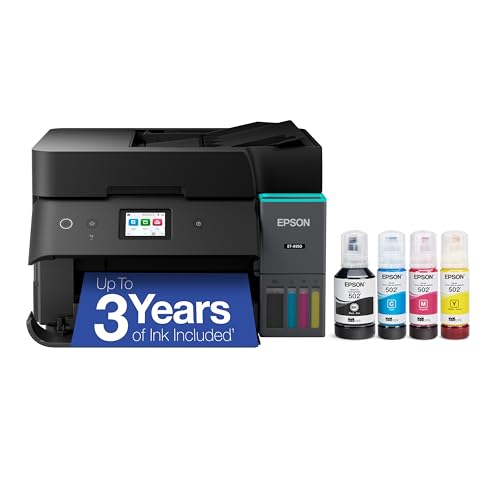 Epson EcoTank ET-4950 Wireless Duplex All-in-One Cartridge-Free Epson EcoTank ET-4950 Wireless Duplex All-in-One Cartridge-Free | Check price |
As an Amazon Associate we earn from qualifying purchases at no extra cost to you.
Quick comparison of the best tank printers
| Pick | Best for | Key specs | Price range |
|---|---|---|---|
| Epson EcoTank ET-2850 | Budget home printing | Print, scan, copy; refillable tanks; compact body | Budget to mid |
| Canon MegaTank G3270 | Low cost per page at home | Wireless all-in-one; about 6,000 black and 7,700 color pages per ink set (as reported) | Mid-range |
| Epson EcoTank Pro ET-5850 | Small office | Document feeder, duplex, high-capacity tanks | Upper-mid |
| HP Smart Tank 7301 | High-volume color and photos | 35-page document feeder, auto duplex, refill bottles in the box | Mid to upper-mid |
| Epson EcoTank ET-8550 | Photos and wide format | Six-color photo ink, wide-format capability | Premium |
Page yields come from manufacturer spec sheets and roundups and vary with coverage and print mode. Treat them as estimates, not guarantees.
Best overall for home: Epson EcoTank ET-2850
The ET-2850 is a small all-in-one that prints, scans and copies without cartridges. You fill tanks from bottles, and the included ink lasts for thousands of pages. It is a sensible first tank printer for students and families who print homework, forms and the occasional photo.
The trade-off is the lack of an automatic document feeder, so it is slower for scanning stacks of paper. Step up to an office-class EcoTank if that matters.
Best for low running costs: Canon MegaTank G3270
The G3270 is regularly named among the best-value tank printers because of its big ink yield and wireless printing. With roughly 6,000 black and 7,700 color pages per ink set as reported, the ink cost per page is very low. It is not the fastest printer and has fewer office features, so it suits home users more than busy offices.
Best for small offices: Epson EcoTank Pro ET-5850
RTINGS has named the ET-5850 the best inkjet it has tested for small and home offices. It adds an automatic document feeder, two-sided printing and larger capacity than entry EcoTanks. It costs more up front and takes more desk space, but heavy printing makes that back quickly.
Best for color and photos: HP Smart Tank 7301
The Smart Tank 7301 combines tanks with a 35-page feeder and automatic duplexing, and HP rates its starter ink at several thousand pages. Reviewers also like it for photos. The caution is HP’s firmware: the company has used updates that reject non-HP ink on some models, so read the current policy first.
Best for photographers: Epson EcoTank ET-8550
The ET-8550 is a wide-format photo-focused tank printer with a six-color ink set. It is built for borderless prints and larger sizes, and it is the most expensive pick here. If you print documents more than photos, you are paying for features you will not use.
How to choose a tank printer
Estimate your annual pages
Count how many pages you print in a typical month and multiply by 12. A household printing 100 pages a month uses 1,200 pages a year, so one full ink set in a mid-yield printer can last several years. That is why tank printers suit moderate to heavy users, and why light users may be fine with a cheaper cartridge model.
Worked example
Take a home office printing 300 pages a month, or 3,600 a year. If a cartridge printer costs about 4 cents per mixed page and a tank printer about 1 cent, the yearly ink spend is roughly 144 versus 36 currency units, a difference of 108. If the tank printer costs about 150 units more to buy, it pays for itself in around a year and a half. Print half as much and it takes about three years.
| Monthly pages | Annual pages | Best fit |
|---|---|---|
| Under 50 | Under 600 | Cheap cartridge inkjet |
| 100-300 | 1,200-3,600 | Entry tank printer |
| 400-1,000 | 4,800-12,000 | Office-class tank with feeder and duplex |
Check the extras
Look for an automatic document feeder, automatic duplex, Ethernet if you share the printer, and whether replacement ink bottles are widely available. These matter more than minor speed differences.
Ownership realities
- Fill tanks only with the bottles made for your model, and fill them slowly so ink does not spill.
- Print a small color page every week or two so printheads do not dry out.
- Keep the printer level and away from direct sunlight.
- The maintenance box that collects waste ink is a consumable on some Epson models; check how it is replaced.
Frequently Asked Questions
Are tank printers worth it?
They are worth it if you print regularly, because ink costs far less per page than cartridges. If you print only a few pages a month, a cheap cartridge model may cost less overall.
What is the difference between EcoTank and MegaTank?
EcoTank is Epson’s name for its refillable tank printers, and MegaTank is Canon’s. Both use bottles of ink and offer very low cost per page, but their models differ in features, speed and design.
Do tank printers clog if I do not use them?
Any inkjet can clog after long idle periods. Printing a short test page every week or two and powering the printer off with its own button helps prevent it.
Is a laser printer cheaper than a tank printer?
For black-and-white text, a laser can be equally cheap per page and never clogs. For color and photos, a tank printer usually costs less and gives better photo output.
Can I use third-party ink in a tank printer?
Many tank printers accept third-party bottles, but some brands restrict them by firmware or warranty terms. Check the manufacturer’s policy for your model before switching.





Write Your Review
No reviews yet. Be the first to share your experience!