

Key takeaways
- Compare five active stylus pens for iPad, Surface and Windows tablets by pressure, tilt, protocol, battery life and charging, for every tier.
An active stylus pen talks to the screen. A powered tip, a digitizer layer in the display and a shared protocol let the tablet read pressure, tilt and palm position, which is why an active pen draws a line that thickens as you press and a passive rubber-tip pen cannot. The catch is that protocols are not interchangeable: iPad pens speak Apple’s system, most Windows 2-in-1s use Microsoft Pen Protocol or Wacom AES, and a pen built for one family stays silent on the others.
This roundup covers active pens only, across the two biggest families. Three picks are made for iPad, from Apple’s own flagship down to a budget magnetic pen, and two serve Windows pen-enabled tablets and 2-in-1s. Every figure comes from published listing and maker specifications, grouped by tier. Passive capacitive pens, pen displays and drawing tablets belong to other guides on this site.
As an Amazon Associate, we earn from qualifying purchases.
Quick answer
For iPad owners who draw, the Apple Pencil Pro is the complete package, with pressure, tilt, haptics and magnetic charging. The Surface Pen leads on Surface hardware, the Wacom Bamboo Ink Plus covers the widest range of Windows devices, the Logitech Crayon suits classrooms, and the Metapen Pencil A8 is the budget iPad pick.
Contents
- The five stylus pens
- How to choose
- Who should skip
- Frequently asked questions
- Final verdict
The five stylus pens
Apple Pencil Pro
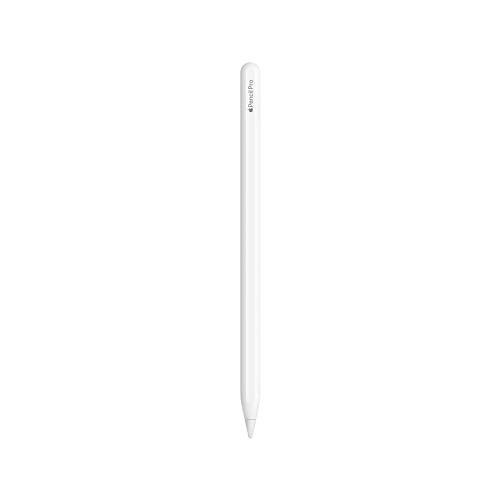
The Pencil Pro is the premium pick and the only pen here that reads pressure on an iPad, because Apple reserves that channel for its own hardware. It adds tilt sensing, a gyroscope that enables barrel roll for shaped brushes, squeeze and double-tap gestures for tool palettes and switching, and haptic feedback that pulses when a gesture registers. It attaches magnetically to the side of a compatible iPad, where it pairs and charges, and it supports hover on supported models plus Find My tracking if it goes missing.
Compatibility is the narrow part. The Pencil Pro works only with the iPad Pro 13-inch and 11-inch (M4 and M5), the iPad Air 11-inch and 13-inch (M2 and M3) and the iPad mini (A17 Pro). Older iPads need a different Apple Pencil generation, so check the model list first. The pen is 166 mm long, 8.9 mm across and weighs 19.15 g, close to a wooden pencil in the hand.
Specs
- :
- Pressure sensitivity: Yes, level count not published by Apple
- Tilt support: Yes, plus barrel roll via gyroscope
- Gestures: Squeeze, double-tap, haptic feedback
- Charging: Magnetic attach, pair and charge on the iPad
- Hover: Supported on compatible iPad models
- Find My: Supported
- Size: 166 x 8.9 mm
- Weight: 19.15 g
- Model: MX2D3AM/A
- Compatibility: iPad Pro (M4, M5), iPad Air (M2, M3), iPad mini (A17 Pro)
Microsoft Surface Pen (Platinum, EYU-00009)
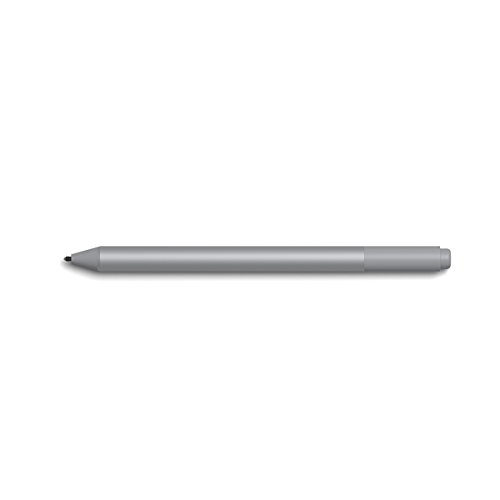
Microsoft’s own pen remains the reference pick for Surface hardware. It reads 4,096 pressure levels, supports tilt for shading on supported Surface models, and pairs over Bluetooth 4.0 so the tail button can open apps and the rubber eraser end can rub out ink like a pencil eraser. A barrel button handles right-click and selection. Power comes from a single AAAA battery, which keeps the pen ready without any charging routine.
The pen is 5.75 inches long, 0.38 inches across and weighs 0.64 ounces. Microsoft lists compatibility across the Surface Pro line from the Pro 3 onward, plus Surface Book, Surface Laptop, Surface Go and Surface Studio models. Because it follows Microsoft Pen Protocol, it also writes on many pen-enabled Windows devices from other brands, though button and tilt behaviour vary.
Specs
- :
- Pressure sensitivity: 4,096 levels
- Tilt support: Yes, on supported Surface models
- Connection: Bluetooth 4.0
- Battery: 1 AAAA, included
- Controls: Tail eraser, barrel button
- Size: 5.75 x 0.38 x 0.38 in
- Weight: 0.64 oz
- Model: EYU-00009
- Compatibility: Surface Pro 3 and later, Surface Book, Laptop, Go and Studio lines
Wacom Bamboo Ink Plus
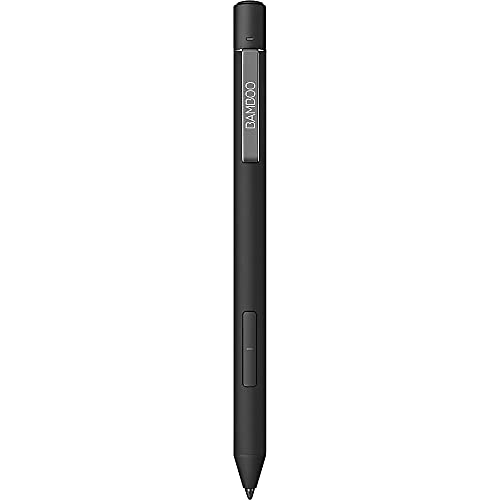
The Bamboo Ink Plus solves a problem the other Windows pick cannot: protocol variety. Windows pen devices split between Wacom AES and Microsoft Pen Protocol, and this pen speaks both, in their 1.0, 1.5 and 2.0 revisions, so one pen can move between a Lenovo, a Dell and a Surface without giving up pressure. It reads up to 4,096 pressure levels, recognises tilt on supporting devices, and connects over Bluetooth for its shortcut buttons.
In place of a replaceable cell, a rechargeable Li-polymer battery charges over USB-C in up to three hours, and Wacom rates it at about ten days of typical use at two hours a day. The triangular barrel is 153 mm long, 10 mm across and weighs 16.5 g. Three nibs come in the box, in soft, firm and blue finishes, so the writing feel can be tuned to the screen.
Specs
- :
- Pressure sensitivity: Up to 4,096 levels
- Protocols: Wacom AES 1.0 and 2.0, MPP 1.5 and 2.0
- Tilt support: Yes, on compatible devices
- Battery: Rechargeable Li-polymer, USB-C charging
- Battery life: About 10 days at 2 hours per day, per Wacom
- Charging time: Up to 3 hours
- Nibs: 3 included (soft, firm, blue)
- Size: 153 x 10 mm
- Weight: 16.5 g
- Model: CS322AK0A
Logitech Crayon (USB-C)

The Crayon is the mid-range iPad pick, built for classrooms, shared devices and anyone who finds the Apple Pencil slippery. It uses Apple Pencil technology, so it connects the moment it touches a compatible iPad with no pairing step, and the iPad handles palm rejection while you write. There is no pressure channel; instead, the smart tip reads tilt and adjusts line weight by angle, which covers note-taking, markups and simple sketching. The flat aluminium body cannot roll off a desk and survives drops of up to 4 feet.
Charging is over USB-C, with up to seven hours of writing per charge and an automatic shut-off after 30 minutes idle. A power indicator shows battery level. The pen is 159 mm long, 12 mm wide, 8 mm deep and weighs 20 g. Compatibility covers iPad models from 2018 onward, running iPadOS 12.2 or later.
Specs
- :
- Pressure sensitivity: No, tilt-based line weight instead
- Tilt support: Yes, smart tip adjusts line weight by angle
- Pairing: None required, connects on contact
- Charging: USB-C, up to 7 hours of writing per charge
- Auto-off: After 30 minutes idle
- Drop protection: Up to 4 ft (1.2 m)
- Size: 159 x 12 x 8 mm
- Weight: 20 g
- Model: 914-000070
- Compatibility: iPad models from 2018 onward, iPadOS 12.2 or later
Metapen Pencil A8

The Pencil A8 is the budget pick, and it is honest about what it leaves out: like every third-party iPad pen, it has no pressure sensitivity, which the listing states plainly. What it does have is tilt sensitivity for shading and line variation, palm rejection, a fine polymer tip and two spare tips in the box. Dual magnets hold it to the side of a compatible iPad for storage, though charging is wired only.
Charging is the headline figure. A full charge over USB-C takes 30 minutes and returns up to 10 hours of writing, and a one-minute top-up gives about 50 minutes of use. The pen switches off after five minutes idle, and a double-tap on the end turns it on or off, with no Bluetooth pairing or app needed. It measures 6.54 by 0.35 by 0.35 inches and weighs 0.53 ounces. Compatibility spans iPad models from 2018 onward, including the iPad 6th to 11th generations, iPad Pro 11-inch and 12.9-inch, iPad Air 3 and later, and iPad mini 5 and 6.
Specs
- :
- Pressure sensitivity: No, tilt sensitivity instead
- Tilt support: Yes
- Palm rejection: Yes
- Charging: USB-C, full charge in 30 minutes, up to 10 hours of use
- Quick charge: 1 minute gives about 50 minutes of use
- Auto-off: After 5 minutes idle
- Attachment: Dual magnets, no wireless charging
- Tips: 2 spare tips included
- Size: 6.54 x 0.35 x 0.35 in
- Weight: 0.53 oz
- Model: ME-APP152
How to choose
Match the protocol to the tablet before anything else. iPad pens work only on iPads that support Apple Pencil, and each Apple Pencil generation fits a different model list, so confirm your exact iPad model against the pen’s compatibility list. On Windows, find out whether your device uses Microsoft Pen Protocol or Wacom AES; a dual-protocol pen like the Bamboo Ink Plus removes the guesswork when mixed hardware shares a desk.
Decide whether you need true pressure sensitivity. Pressure turns a stroke into a tapered, ink-like line, and it matters for drawing and calligraphy. On iPad, only Apple’s own pens read pressure; third-party pens such as the Crayon and the Pencil A8 read tilt instead, which is enough for handwriting, annotation and diagrams. On Windows, 4,096 levels is the common figure across both picks here.
Then weigh charging and handling. Magnetic charging pens disappear into a routine, USB-C pens charge from the same cable as the tablet, and the Surface Pen’s replaceable AAAA cell trades charging for months of readiness. Barrel shape, weight and nib choice decide comfort over long sessions, so favour pens with spare nibs if you write for hours.
Who should skip
Skip this whole category if your screen has no active digitizer. A phone, a plain touch laptop or an older tablet without pen support cannot read any of these pens beyond basic touch, and a passive capacitive pen is the only kind that works there. Chromebook owners should also look elsewhere: USI is the Chromebook pen standard, and none of the five picks here speaks it.
Skip the premium tiers if you only annotate PDFs and sign forms, where a budget tilt pen does the same job. And if you own a pen display or drawing tablet with a bundled pen, that pen is matched to its digitizer and a second pen adds little.
Frequently asked questions
Will one of these pens work on any touchscreen?
No. Each pen needs a matching active digitizer and protocol in the screen, so an iPad pen will not write on a Surface and a Windows pen will not write on an iPad. Check the compatibility list for your exact model first.
Do third-party iPad pens support pressure sensitivity?
No. Apple keeps the pressure channel for its own Pencil line, so third-party iPad pens such as the Crayon and the Pencil A8 vary line weight by tilt instead. That suits notes and markups well, but drawing apps that rely on pressure need an Apple Pencil.
Can a Windows pen cover both AES and MPP devices?
Yes, a dual-protocol pen can. The Wacom Bamboo Ink Plus supports both Wacom AES and Microsoft Pen Protocol across revisions, so it keeps its 4,096 pressure levels across a wider mix of Windows tablets and 2-in-1s than a single-protocol pen.
How long do these pens run between charges?
It varies by power source. The Metapen Pencil A8 runs up to 10 hours and refills in 30 minutes, the Logitech Crayon runs up to 7 hours, and the Wacom Bamboo Ink Plus is rated at about 10 days of lighter daily use. The Surface Pen sidesteps charging with a replaceable AAAA battery, while the Pencil Pro charges whenever it sits on the iPad.
Final verdict
Pick by ecosystem first and tier second. iPad owners who draw should take the Apple Pencil Pro, note-takers and classrooms are well served by the Logitech Crayon, and the Metapen Pencil A8 covers everyday iPad writing on a budget. On Windows, the Surface Pen is the natural fit for Surface hardware, while the Bamboo Ink Plus is the safer buy when several brands share one desk.
Product and ASIN Reference
| Pen | ASIN |
|---|---|
| Apple Pencil Pro | B0D3J71RM7 |
| Microsoft Surface Pen (Platinum) | B072K5TXGT |
| Wacom Bamboo Ink Plus | B07V7G5PCL |
| Logitech Crayon (USB-C) | B0BJYS9M4R |
| Metapen Pencil A8 | B0C4L9J3GK |
More from Amazon
Programs that pair well with the guide above. Offers and eligibility are set by Amazon and may change.
Free shipping on eligible items, Prime Video and more. Eligible new members can start with a free trial.
Start a Prime free trialAudiobooks and podcasts to listen to on the go. Eligible new members can start with a free trial.
Try Audible freeAd-free music streaming. Eligible new subscribers can start with a free trial.
Try Music Unlimited freeA free business account with business pricing and bulk-buying tools for work, shop or home office.
Create a business accountAs an Amazon Associate we earn from qualifying purchases.
Write Your Review
No reviews yet. Be the first to share your experience!