

Key takeaways
- Compare the best cable management spines for standing desks, from the quad-channel VIVO kit to the 53-inch Kontrol Haus bundle, with lengths and mounts.
- Top Pick: Kontrol Haus 53-Inch Under-Desk Cable Management Spine Kit
- Runner-up: FLEXISPOT Deluxe Cable Spine
- Also consider: VALU Cable Management Spine
A height-adjustable desk breaks ordinary cable routing. Trays, raceways and sleeves all assume the desktop stays in one place, but on a sit-stand desk the gap between the desktop and the floor changes every time you press the height switch, and loose cords either dangle in a loop or pull tight against their plugs. A cable management spine solves that one run: a chain of interlocking vertebrae links guides the cords from the underside of the desk down to the floor, flexing as the desk rises and settling into a gentle curve as it lowers.
The five spines below are all the same form factor, an articulated desk-to-floor column, but they differ in the details that decide whether one suits your setup: total length, how the top attaches, whether the links split into separate channels, and how heavy the floor base is. Each pick is judged on published specifications only.
As an Amazon Associate, we earn from qualifying purchases.
Quick answer
For most standing desks, the VIVO Vertebrae kit is the safe buy: four channels, a weighted steel base and links you add or remove to match your desk height. Pick the Kontrol Haus for the longest run and the biggest accessory bundle, the VALU for its magnetic leg link, and the Mimoke as the budget option.
The picks
1. VIVO Vertebrae Cable Management Kit (DESK-AC01C)
The VIVO kit is the reference design for this category and the mid-range pick most standing desks end up with. Its interlocking blocks form a four-foot column, and each block is divided into four channels with entry points on all four sides, so power cords run in one quadrant and display or data cables in another. Links pull apart and snap back together, so you can shorten the column for a low desk. The top fixes to the underside of the desktop with a screw-in hook, and the bottom ends in a steel base plate, five inches across, that keeps the column planted on the floor while the desk moves. VIVO sells the kit in black and white and publishes full block dimensions, so you can check plug clearance before ordering. If you want one spine that fits the widest range of desks without fuss, this is the default choice.
Specs
- Model: DESK-AC01C
- Vertebrae length: 4 ft
- Channels: 4-way quad entry, one channel per side
- Block dimensions: 2.6 x 1.4 in each
- Base: steel base plate, 5 in diameter
- Material: steel and plastic
- Mounting: screw-in hook under the desktop
- Colors: black, white
- Warranty: 3 years
2. Kontrol Haus 53-Inch Under-Desk Cable Management Spine Kit

The Kontrol Haus is the premium pick for long runs and heavy cable counts. At 53 inches it is the longest spine in this roundup, which suits tall desks, treadmill desks and setups where the outlet sits well away from the desk leg. The links are wide and adjustable, so several thick cords can share the column without forcing the gates. It mounts two ways, with screws for a permanent fit or magnets for a no-drill fit against a steel leg, and the weighted base holds the bottom of the run in place. The bundle separates it from simpler kits: 101 pieces in total, including clips, ties, straps, a sleeve and mounting hardware, so one box handles the vertical drop and the loose leads at either end. Choose this one when a bare spine alone would leave half the job undone.
Specs
- Length: 53 in
- Included pieces: 101, including clips, ties, straps, a sleeve and mounting hardware
- Mounting: magnetic or screw-in
- Base: weighted floor base
- Links: wide, adjustable
- Color: black
- Use: indoor
3. FLEXISPOT Deluxe Cable Spine

FlexiSpot builds standing desks, and its Deluxe Cable Spine is the desk-maker option in this group, a premium pick tuned for its own frames but compatible with height-adjustable desks generally. The spine runs 128 cm, roughly 50 inches, and combines ABS links with steel hardware, so the column feels rigid in the hand while still articulating through the desk’s full travel. It screws into the underside of the desktop, which gives a fixed, rattle-free top joint, and the wide 17.8 cm profile swallows a generous bundle of cords. The published dimensions line up cleanly with common frame heights, and the black finish matches the black frames most buyers own. Pick it when you already run one of the brand’s desks, or want an established desk name behind the accessory.
Specs
- Length: 128 cm (about 50 in)
- Dimensions: 127 x 17.8 cm
- Material: ABS and steel
- Mounting: screw-in
- Color: black
4. VALU Cable Management Spine

The VALU spine is a mid-range alternative with one idea the others lack: a magnetic chain link partway down the column that clips to the desk foot. That link stops the spine from drifting or swinging as the desk moves, which is the main annoyance with lighter spines on smooth floors. The 49-inch column is built from metal and plastic, screws into the underside of the desktop at the top, and ends in a steel base with non-slip pads that grip hard floors and low carpet. At 600 grams the whole unit is light, so it suits renters and anyone who rearranges a room often. VALU publishes a two-year manufacturer guarantee and sells the spine in black and white, with the white version carrying its own model number. Choose the VALU if your desk leg is steel and you want the spine held against it rather than hanging free.
Specs
- Model: V-02-010 (black)
- Length: 49 in (125 cm)
- Material: metal and plastic
- Mounting: screw-in, plus a magnetic link that attaches to the desk foot
- Base: steel base with non-slip pads
- Item weight: 600 g
- Colors: black, white
- Warranty: 2-year manufacturer guarantee
5. Mimoke Quad Entry Vertebrae Cable Management Spine Kit
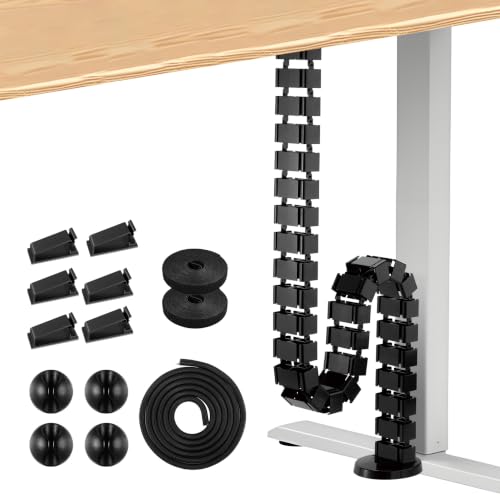
The Mimoke kit is the budget pick, and its published numbers are stronger than the tier suggests. The spine is built from 30 removable vertebrae and runs 128.5 cm fully assembled, matching the premium FlexiSpot for length. Each link is divided into four sections, so power and signal cords can travel in separate quadrants the whole way down, and links lift out one at a time when you want a shorter column. It fixes to the desk with two screws, weighs about 0.78 kg, and publishes exact dimensions, 107 by 129 by 1285 mm, for checking clearance behind a desk leg. The trade-off for the tier is a lighter build and a plainer finish than the desk-brand options. For a first standing desk, or a second workstation in a spare room, it covers the job without paying for a bundle of extras.
Specs
- Model: MMK-CC10
- Length: 128.5 cm (about 50.6 in)
- Vertebrae: 30 removable links, each divided into four sections
- Dimensions: 107 x 129 x 1285 mm
- Weight: about 0.78 kg
- Mounting: screw-in, two screws
- Color: black
How to choose
Measure the run first. Note your desktop height at its highest setting, then add a little slack: a spine that is exactly floor-to-desk length at full rise will pull taut and lean, so a few spare links sitting in a curve at the base is the healthy setup. Most spines here run between four feet and 53 inches; very tall and treadmill desks should look at the longest options.
Decide how the top attaches. Screw-in hooks and plates give the firmest joint and suit a desk you own and rarely move. Magnetic and clamp fittings suit rented desks and glass or thin desktops that should not be drilled, but check the clamp range or leg material before relying on them.
Count your channels. A single open column is fine for two or three cords. If you run a power strip lead, two monitor cables, a laptop dock cable and Ethernet down the same drop, a quad-channel design keeps power and signal runs apart, and one cord can be lifted out without disturbing the rest.
Weigh the base against your floor. A heavy steel plate holds a column steady on hard floors and low-pile carpet. On deep carpet, any flat base can rock, so give the column more slack and let it settle rather than forcing it upright.
Who should skip
Skip a spine if your desk never moves. On a fixed desk, a tray or raceway hides more cable for the same effort, and a spine adds a visible column you do not need. Skip one if every cord already drops behind a desk that sits flush against a wall with the outlet directly below, because there is no exposed run to protect. Skip the longest kits if your desk is a compact laptop station with a low maximum height, since a pile of spare links at the base looks worse than a short sleeve. And skip the whole category if your cables need to travel horizontally along a wall or across a room: a spine only handles the vertical drop, and raceways or floor covers are the right tool for the rest.
FAQ
Do cable spines work with any standing desk?
Most do, as long as the desktop underside gives you a place to fix the top hook or plate and the spine length covers your desk at full height. Check the published length against your frame’s maximum height, and confirm the mounting style suits your desktop material before ordering.
How many cables fit inside a cable spine?
It depends on the column width and the thickness of your cords. Slim charging leads pack in easily, while thick power bricks and braided display cables take far more room. Quad-channel models help because each run gets its own quadrant, and the wider links in this roundup handle several cords per channel.
Can I shorten a cable spine that is too long?
Yes. Every spine here is modular, so links unclip one at a time until the column matches your desk. Keep the spares, because a taller desk or a new room layout may need them later.
Is a cable spine better than a cable sleeve for a standing desk?
For a desk that changes height, usually yes. A sleeve is a soft tube that hangs in a loop and can snag on drawers or chair arms as the desk moves, while a spine is a guided column with a floor base, so the cable path stays in one place through the full range of motion.
Final verdict
For most sit-stand desks, the VIVO Vertebrae kit is the buy: four channels, a steel floor plate and a length you tune link by link. Step up to the Kontrol Haus when the run is long or the cable count is high, and take the FlexiSpot if you want the desk-maker build. The VALU earns its place with the magnetic leg link, and the Mimoke covers the same ground on a budget. Whichever you choose, route every cord into the spine at sitting height, then raise the desk slowly and confirm nothing pulls tight at full extension.
More from Amazon
Programs that pair well with the guide above. Offers and eligibility are set by Amazon and may change.
Free shipping on eligible items, Prime Video and more. Eligible new members can start with a free trial.
Start a Prime free trialAudiobooks and podcasts to listen to on the go. Eligible new members can start with a free trial.
Try Audible freeAd-free music streaming. Eligible new subscribers can start with a free trial.
Try Music Unlimited freeA free business account with business pricing and bulk-buying tools for work, shop or home office.
Create a business accountAs an Amazon Associate we earn from qualifying purchases.






Write Your Review
No reviews yet. Be the first to share your experience!