

Key takeaways
- Compare the best bias lighting for monitors, from true-white USB strips to color-syncing backlights that soften screen contrast and ease eye strain.
- Top Pick: Power Practical Luminoodle True White Bias Lighting
- Runner-up: Maylit LED TV Backlight 8.2 ft
- Also consider: Hamlite RGBW TV LED Backlight
Table of Contents
- Why Bias Lighting Helps a Monitor Setup
- Power Practical Luminoodle True White Bias Lighting
- Maylit LED TV Backlight 8.2 ft
- Hamlite RGBW TV LED Backlight
- Govee Gaming Light Strip G1
- Philips Hue Play Gradient Lightstrip for PC
- How to Choose Bias Lighting for a Monitor
- FAQ
- Conclusion
- Product and ASIN Reference
Introduction
The best bias lighting for a monitor is a dimmable strip that mounts behind the screen and washes the wall with soft light, and the right pick depends on one decision: accurate white or reactive color. For color-critical desk work, a 6500K true-white strip such as the Power Practical Luminoodle keeps on-screen colors honest while it softens the contrast between a bright display and a dark room. For gaming and media, a color-matching kit such as the Govee Gaming Light Strip G1 or the Philips Hue Play Gradient Lightstrip mirrors what is on screen instead.
Bias lighting works because your eyes judge brightness relative to the surroundings. A bright monitor in a dark room forces your pupils to work against a hard edge of contrast for hours, a common recipe for tired, dry eyes by the end of a session. A gentle halo behind the screen raises the ambient level enough to narrow that gap, and it makes blacks on the panel look deeper. The five kits below cover both approaches, from simple USB-powered white strips to smart backlights that sync with your games, each described strictly from its published specifications.
As an Amazon Associate, we earn from qualifying purchases.
Why Bias Lighting Helps a Monitor Setup
A bias light does not light your desk; it lights the wall behind your display. That indirect glow changes how the screen itself looks and feels. With the room side of the panel no longer pitch black, the contrast your eyes have to bridge shrinks, so long sessions feel less fatiguing. Video professionals have used reference bias lights in grading suites for years for a second reason: a neutral 6500K surround keeps your perception of color and contrast stable, so the image you judge on screen is the image you actually get.
There are two families of products. True-white strips emit a fixed daylight-balanced glow and disappear into the background, which suits work desks and anyone who edits photos or video. Color and syncing strips chase immersion instead, shifting hue with the content or the room. Neither is objectively better; the sections below flag which job each kit is built for, and the buying guide at the end walks through sizing, power, and controls.
Power Practical Luminoodle True White Bias Lighting
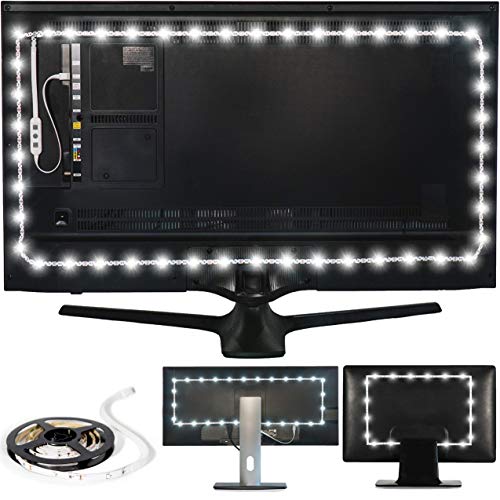
The Luminoodle True White is the classic bias light and still the easiest recommendation for a work-first desk. It is a single strip of true-white LEDs tuned to 6500K, the daylight reference point used for bias lighting in editing suites, so the halo behind your monitor stays neutral and does not tint your perception of on-screen color. It is sized for screens from 24 to 29 inches in this version, which covers the single-monitor setups most desks run, and the line includes larger sizes if you ever move to a bigger display.
Power comes from a USB port, so the strip can draw from the monitor or a spare port on the computer and switch with your setup. Installation is a peel-and-stick run of 3M adhesive along the back of the panel. There is no app, no color wheel, and no sync feature, and that restraint is the point: you set it up once and it quietly does the one job a reference bias light should do. It sits in the budget tier and remains the benchmark that fancier kits are measured against for plain eye comfort.
Specs:
- Color temperature: 6500K true white
- Fit: sized for 24 to 29 inch screens
- Power source: USB powered
- Included components: 78 inch LED light strip, 3M adhesive, USB cable
- Model number: LUMTV
- Brand: Power Practical
Maylit LED TV Backlight 8.2 ft

The Maylit backlight is the budget route to a color halo. Its 8.2-foot strip is sold for 40 to 60 inch televisions, which makes it long enough to wrap the back of a large monitor or a dual-screen arrangement with cable to spare, and it can be trimmed to fit smaller panels. The strip produces RGB color rather than calibrated white, so it belongs on entertainment and gaming desks rather than color-critical workstations.
Everything runs from a 5-volt USB connection at a modest 2.5 watts, and the included remote handles color changes and brightness without any software. Because it draws so little power, a monitor or TV USB port is enough to run it, and the light can follow the screen’s power state on many displays. Adhesive backing keeps installation to a few minutes. If you want to test whether bias lighting suits your setup before spending more, this is the low-commitment way to find out, and it anchors the budget tier of this roundup alongside the Luminoodle.
Specs:
- Strip length: 8.2 feet
- Fit: 40 to 60 inch TVs and large monitors
- Power source: USB, 5 volts, 2.5 watts
- Light color: RGB, remote controlled
- Controller type: Remote control
- Model number: usb tv biaslight for 40-60
Hamlite RGBW TV LED Backlight

Color strips fake white by mixing red, green, and blue, which can look tinted. The Hamlite RGBW design adds a dedicated white LED channel, so alongside its 17 color options it can produce a genuine 6500K true white for the nights when you want a neutral bias glow instead of a mood color. That dual personality makes it the most flexible mid-range pick here: reference-style white for work, color for play, from one strip.
The 14.8-foot length is built for 60 to 65 inch televisions, so on a desk it suits ultrawide monitors, triple-screen arrays, or a large display. Control comes from an RF remote, which works without line of sight to the receiver, and the strip offers 10 dynamic lighting modes with dimming. It needs a 5-volt, 1-amp USB source, so check that your display’s port can supply a full amp or use a wall adapter. For buyers who cannot decide between the white and color camps, this is the hedge that covers both.
Specs:
- Strip length: 14.8 feet
- Fit: 60 to 65 inch TVs and large displays
- Light output: RGBW with dedicated 6500K true white
- Modes: 10 dynamic modes, 17 color options, dimmable
- Power source: USB, 5 volts, 1 amp required
- Control: RF remote
- Model number: RGBW-45M
Govee Gaming Light Strip G1

The Govee G1 is built specifically for PC monitors rather than adapted from a TV kit. It fits 27 to 34 inch displays, including curved panels, and uses a double row of RGBIC light beads so colors stay smooth as they shift. Its headline feature is color matching: Govee’s software reads what is on your screen and extends those colors onto the wall behind it, so a sunset in a game spills past the bezels and a dark scene keeps the halo low.
Beyond sync, the strip offers 123 scene modes through the Govee app, covering static colors, gradients, and reactive effects for anyone who wants the glow without the mirroring. The kit includes the strip, a control box, and a power adapter, so it runs from the wall rather than leaning on a USB port’s limited output. That adapter power is part of why it can push brighter, more saturated color than USB strips. It sits in the premium tier and is the pick for gamers who want their backlight to participate in the game.
Specs:
- Fit: 27 to 34 inch PC monitors, including curved screens
- Technology: RGBIC with software color matching
- Scene modes: 123
- Design: double strip light beads
- Included components: control box, LED strip light, power adapter, user manual
- Model number: H6609
Philips Hue Play Gradient Lightstrip for PC

The Hue Play Gradient Lightstrip is the premium ecosystem pick. It is shaped for PC monitors in sizes for single 24 to 27 inch and 32 to 34 inch screens, plus a version that spans a triple-monitor setup, and it attaches with included mounts that hold the strip at the angle Philips designed for an even wall wash. Along its length it blends multiple colors at once in a smooth gradient, which cheaper addressable strips often render as visible steps.
Paired with the Hue Sync desktop app, the strip mirrors screen content for games and video; paired with the Hue app, it becomes part of a whole-room lighting scene with schedules and voice control. The catch is that it requires a Hue Bridge, sold separately, so it makes the most sense for desks already invested in Hue or planning to be. Set to a plain 6500K white it can play the reference role too, though you are paying for the gradient and the ecosystem. It tops the premium tier here.
Specs:
- Fit: single 24 to 27 inch or 32 to 34 inch monitors, plus a triple-monitor size
- Light type: multi-zone gradient color, blends several colors at once
- Control: Hue app and Hue Sync desktop app
- Requirement: Hue Bridge, sold separately
- Mounting: included mounts for the back of the monitor
- Brand: Philips Hue
How to Choose Bias Lighting for a Monitor
Start with the job. If you edit photos or video, or you simply want eye comfort without any color cast, choose a true-white strip at 6500K such as the Luminoodle, and treat color features as a distraction. If the monitor is mainly for games and media, a color or syncing kit such as the Govee G1 or the Hue Gradient turns the wall into part of the scene. The Hamlite RGBW sits between the camps because its dedicated white channel does honest white and color from one strip.
Size the strip to the screen. A 24 to 29 inch monitor needs only a short run across the back; a 27 to 34 inch or ultrawide panel needs a longer strip or a kit shaped for it, and multi-monitor desks should look at the longest lengths or triple-screen versions. Check the stated fit range rather than guessing from length alone, since kits are designed around how the strip corners a panel.Power and control decide daily convenience. USB strips can switch with many monitors and need no spare outlet, but confirm the port can supply the current a long strip asks for; the Hamlite, for example, specifies a full 1 amp. Adapter-powered kits are brighter but add a cable and a separate on-off step. Finally, pick controls you will actually use: a simple remote for set-and-forget white, an app for scenes and sync, or a full smart ecosystem if the desk is part of a larger Hue setup.
FAQ
Does bias lighting really reduce eye strain?
It addresses one common cause: the contrast gap between a bright screen and a dark room. Raising the light level behind the monitor narrows that gap, so your eyes adjust less as they move between the screen and its surroundings. It will not fix strain caused by viewing distance or marathon sessions without breaks, but as an environmental fix it is inexpensive and immediate.
Is 6500K white or colored light better behind a desk monitor?
For work, 6500K white is the safer choice because it matches the daylight reference your display is calibrated around and does not shift how colors look. Colored and syncing light is an entertainment feature: it adds immersion for games and video but can bias color judgment. If you do both, pick a kit with a dedicated white channel or a white mode you trust.
Can I power a bias light from my monitor’s USB port?
Usually, yes, and it is the neatest option because the light can turn on and off with the screen. Two checks matter: some monitor USB ports cut power in standby or only wake with a hub connection, and longer strips may need more current than a basic port provides. If your strip lists a 1-amp requirement, use a port rated for it or a small wall adapter.
How long a strip do I need for a 27-inch monitor?
A kit sized for 24 to 29 inch screens, or about two meters of strip, covers the top and sides of a 27-inch panel comfortably, which is where most of the visible halo comes from. Full four-sided coverage needs more length. Kits sold by screen size take the guesswork out; with a cut-to-fit strip, measure the back of your panel and leave slack for corners.
Conclusion
Bias lighting is the rare desk upgrade that improves both comfort and picture perception for very little effort. Choose the Luminoodle True White for a neutral, set-and-forget glow on a work desk, the Maylit for an inexpensive splash of color, the Hamlite RGBW for honest white and color in one strip, the Govee G1 for screen-matching immersion, or the Philips Hue Play Gradient if your desk already lives in the Hue ecosystem. Match the strip to your screen and power source, and the halo takes care of the rest.
More from Amazon
Programs that pair well with the guide above. Offers and eligibility are set by Amazon and may change.
Free shipping on eligible items, Prime Video and more. Eligible new members can start with a free trial.
Start a Prime free trialAudiobooks and podcasts to listen to on the go. Eligible new members can start with a free trial.
Try Audible freeAd-free music streaming. Eligible new subscribers can start with a free trial.
Try Music Unlimited freeA free business account with business pricing and bulk-buying tools for work, shop or home office.
Create a business accountAs an Amazon Associate we earn from qualifying purchases.




Write Your Review
No reviews yet. Be the first to share your experience!