

Our Top Picks
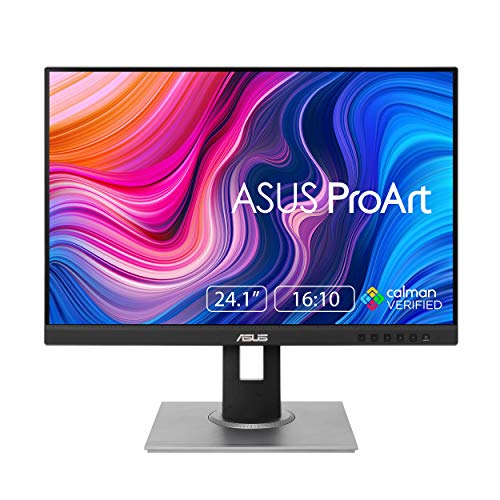 ASUS ProArt PA248QV 24 Inch WUXGA 16:10 Professional24 inches22.55 x 18.66 x 7.56 Inches13.45 poundsCheck on Amazon
 ASUS ProArt PA279CRV 27 Inch 4K UHD USB-C27 Inch24.1 x 8.46 x 16.07 inches18.25 PoundsCheck on Amazon
For most work desks, a 27 inch monitor is the better buy: at 1440p or 4K resolution it fits two documents side by side without shrinking text, and it leaves room for heavier multitasking. A 24 inch monitor still wins on smaller desks, in dual-screen setups, and for anyone whose work is mostly one document, one browser window, or one spreadsheet at a time. The deciding factor is not the diagonal itself but the pairing of size and resolution: a 24 inch screen at 1080p and a 27 inch screen at 1440p or 4K deliver very different amounts of usable workspace. This comparison explains the trade-offs first, then recommends five monitors split across both sizes.
As an Amazon Associate, we earn from qualifying purchases.
Table of Contents
- Quick Picks
- 24 vs 27 Inch: The Trade-Offs Explained
- Best 24 Inch All-Rounder: Dell P2422H
- Best 24 Inch for Documents: ASUS ProArt PA248QV
- Best 27 Inch Overall: Dell UltraSharp U2723QE
- Best 27 Inch for Color Work: ASUS ProArt PA279CRV
- Best 27 Inch Mid-Range USB-C Pick: Dell S2722QC
- How to Choose Between 24 and 27 Inches
- FAQ
- Conclusion
Quick Picks
- Best 24 inch all-rounder: Dell P2422H — a 23.8 inch 1080p IPS panel with a full ergonomic stand and a USB hub.
- Best 24 inch for documents: ASUS ProArt Display PA248QV — a 24.1 inch 1920 x 1200 panel in a taller 16:10 format that shows more lines of text per screen.
- Best 27 inch overall: Dell UltraSharp U2723QE — a 27 inch 4K IPS Black monitor with a USB-C hub, Ethernet, and KVM switching.
- Best 27 inch for color work: ASUS ProArt Display PA279CRV — a 27 inch 4K panel with wide color coverage and factory calibration.
- Best 27 inch mid-range USB-C pick: Dell S2722QC — a 27 inch 4K monitor with single-cable USB-C connection and built-in speakers.
24 vs 27 Inch: The Trade-Offs Explained
Screen real estate and multitasking
A 27 inch screen has roughly 27 percent more display area than a 24 inch screen, and the gap grows when resolution rises with size. A typical 24 inch work monitor runs at 1920 x 1080, which fits one full document or two narrow windows. A 27 inch monitor at 2560 x 1440 carries about 78 percent more pixels, so two full-width documents, a spreadsheet beside an email client, or a code editor beside a preview all fit without constant window switching. At 4K on 27 inches, the pixel count doubles again.
Resolution and text sharpness
Pixel density decides how crisp text looks. A 24 inch 1080p panel works out near 92 pixels per inch, which is serviceable but visibly soft on small fonts. A 27 inch 1440p panel lands near 109 pixels per inch, and a 27 inch 4K panel near 163 pixels per inch, so letters render with smooth edges even at small sizes. One caution: a 27 inch monitor at only 1080p spreads the same pixels over a larger area and looks grainier than its 24 inch equivalent, which is why every 27 inch pick below is 4K.
Desk space and viewing distance
A 24 inch monitor is about 21 inches wide and suits desks around 40 inches across, shared desks, and dual-monitor arms where two panels angle inward. A 27 inch monitor is about 24 inches wide and asks for a viewing distance near 24 to 32 inches so the edges stay in comfortable view without head turning. On a shallow desk, the smaller panel is easier to position at a healthy distance; on a deep desk, the 27 inch size uses the space better.
Scaling and everyday comfort
Operating systems handle the two sizes differently. At 24 inches and 1080p, most people run no scaling and get a one-to-one interface that can feel small on text-heavy days. At 27 inches and 4K, Windows and macOS scaling enlarges the interface while keeping the pixel density, so text stays both large and sharp.
Cost tiers
Budget-tier 24 inch 1080p monitors are the least expensive route to a proper ergonomic desk setup. Mid-range money buys either a high-specification 24 inch panel, such as the 16:10 ProArt below, or an entry 27 inch 4K model. Premium-tier 27 inch 4K monitors add USB-C docking, Ethernet, and calibrated color, and can replace a separate docking station for laptop users.
Best 24 Inch All-Rounder: Dell P2422H
The Dell P2422H is the straightforward answer for a single 24 inch work screen. Its 23.8 inch IPS panel runs at 1920 x 1080 with wide viewing angles, so a document looks the same from a slight angle as straight on. Dell’s ComfortView Plus feature reduces blue light at the panel level without a yellow software tint, which suits long reading sessions. The stand adjusts for height, tilt, swivel, and pivot, so the screen can rotate to portrait for long documents or code. A built-in USB hub keeps a keyboard receiver or webcam off the laptop, and the port mix includes VGA alongside DisplayPort and HDMI for older office hardware. As a budget-to-mid-range tier pick, it covers the fundamentals well.
Specs:
- Size and resolution: 23.8 inch, 1920 x 1080 Full HD
- Panel: IPS with anti-glare coating
- Refresh rate: 60Hz
- Color: 99 percent sRGB coverage
- Eye comfort: ComfortView Plus low blue light
- Ports: DisplayPort, HDMI, VGA, USB 3.2 hub
- Stand: height, tilt, swivel, and pivot adjustable; VESA mountable
Best 24 Inch for Documents: ASUS ProArt PA248QV
The ASUS ProArt Display PA248QV makes the case for staying at 24 inches but changing the shape. Its 24.1 inch panel uses a 1920 x 1200 resolution in a 16:10 aspect ratio, which adds vertical pixels compared with a standard 1080p screen. Those extra lines matter for contracts, articles, spreadsheets, and code, where more of the page stays visible and scrolling drops. The panel is factory calibrated with a published color accuracy figure and full sRGB and Rec.709 coverage, so it also handles light photo and design work credibly. Connectivity covers DisplayPort, HDMI, and a legacy D-Sub input, plus a four-port USB hub, and the stand offers full ergonomic adjustment.
Specs:
- Size and resolution: 24.1 inch, 1920 x 1200 WUXGA, 16:10
- Panel: IPS with anti-glare coating
- Refresh rate: 75Hz
- Color: 100 percent sRGB and Rec.709 coverage, Delta E under 2, Calman Verified
- Ports: DisplayPort, HDMI, D-Sub, 4-port USB 3.0 hub
- Stand: height, tilt, swivel, and pivot adjustable; VESA mountable
Best 27 Inch Overall: Dell UltraSharp U2723QE
The Dell UltraSharp U2723QE shows why 27 inches at 4K is the current sweet spot for a serious work desk. The 3840 x 2160 IPS Black panel delivers a published 2000:1 contrast ratio, double that of a standard IPS screen, so text and dark interfaces look deeper and clearer. At this density, documents, spreadsheets, and design files render with fine detail while scaling keeps interface text comfortable. The monitor doubles as a docking station, with USB-C carrying video and up to 90W of laptop charging, a wired Ethernet port, a KVM switch for two computers, and a DisplayPort output for daisy-chaining a second screen. For a laptop-based desk, that hub removes a separate dock from the shopping list. This is a premium-tier pick, and the specification sheet supports it.
Specs:
- Size and resolution: 27 inch, 3840 x 2160 4K UHD
- Panel: IPS Black, 2000:1 contrast ratio
- Refresh rate: 60Hz
- Color: 100 percent sRGB, 98 percent DCI-P3, DisplayHDR 400
- Ports: USB-C with up to 90W power delivery, HDMI, DisplayPort in and out, RJ45 Ethernet, USB hub, KVM switch
- Stand: height, tilt, swivel, and pivot adjustable; VESA mountable
Best 27 Inch for Color Work: ASUS ProArt PA279CRV
For work where color decisions matter — photo editing, video grading, product design — the ASUS ProArt Display PA279CRV is the 27 inch pick. Its 4K IPS panel covers 99 percent of both the DCI-P3 and Adobe RGB color spaces and ships factory calibrated with a published Delta E under 2 accuracy figure and Calman verification, so the colors on screen track the colors in the file closely enough for client-facing work. USB-C carries video and up to 96W of charging, and a DisplayPort output supports daisy-chaining a second monitor. The ergonomic stand adjusts in every direction, and the slim profile keeps the footprint tidy. It sits at the top of the mid-range tier, priced by its calibration and color coverage rather than by size alone.
Specs:
- Size and resolution: 27 inch, 3840 x 2160 4K UHD
- Panel: IPS with anti-glare coating
- Refresh rate: 60Hz
- Color: 99 percent DCI-P3, 99 percent Adobe RGB, Delta E under 2, Calman Verified, DisplayHDR 400
- Ports: USB-C with up to 96W power delivery, DisplayPort with daisy-chain output, HDMI, USB hub
- Stand: height, tilt, swivel, and pivot adjustable; VESA mountable
Best 27 Inch Mid-Range USB-C Pick: Dell S2722QC
The Dell S2722QC is the 27 inch option for a clean, simple laptop desk. Its 4K IPS panel gives the same sharp text as the premium picks, while USB-C with up to 65W of power delivery runs the display, data, and laptop charging over one cable. Built-in dual speakers remove desktop speakers from the desk for calls and video, and the stand adjusts for tilt, swivel, pivot, and height. Two HDMI ports cover a second device. It gives up the Ethernet port, KVM, and deeper-contrast IPS Black panel of the UltraSharp above, which is exactly the trade that keeps it in the mid-range tier — and for a single-laptop home office, those omissions rarely matter.
Specs:
- Size and resolution: 27 inch, 3840 x 2160 4K UHD
- Panel: IPS with anti-glare coating
- Refresh rate: 60Hz
- Audio: built-in dual 3W speakers
- Ports: USB-C with up to 65W power delivery, 2 HDMI, USB 3.2 hub, audio out
- Stand: height, tilt, swivel, and pivot adjustable; VESA mountable
How to Choose Between 24 and 27 Inches
Measure the desk first. A desk under about 47 inches wide, or any desk where two monitors will sit side by side, points to 24 inches. A single-screen desk with room to sit 24 to 32 inches from the panel points to 27 inches.
Match resolution to size. At 24 inches, choose 1080p for general office work or 1920 x 1200 for document-heavy work. At 27 inches, skip 1080p entirely and choose 1440p or 4K so text stays sharp.
Count your windows. One application at a time fits a 24 inch screen comfortably. Two or more windows in constant use — documents beside spreadsheets, code beside preview — is the clearest argument for 27 inches.
Check the laptop connection. If the desk runs on a laptop, a USB-C monitor with power delivery removes a charger and often a dock. The 27 inch picks above all include it; at 24 inches, confirm the model offers USB-C first.
Prioritize the stand. Height and pivot adjustment matter more over long workdays than small specification differences. Every pick in this guide includes a full ergonomic stand.
FAQ
Is a 27 inch monitor too big for office work?
No, provided the desk allows a viewing distance of roughly 24 to 32 inches and the resolution is 1440p or 4K. At that distance the full screen stays in view without head movement. A 27 inch monitor only feels too big on shallow desks, where a 24 inch panel is easier to place far enough away.
Is 1080p enough on a 24 inch monitor for work?
For email, documents, browsing, and spreadsheets, yes: 1080p on a 24 inch screen is the long-standing office standard and text remains legible all day. Readers who want visibly sharper text at this size should look at the 1920 x 1200 format of the ProArt PA248QV; readers who want the sharpest text overall should step up to 4K at 27 inches.
Should I buy one 27 inch monitor or two 24 inch monitors?
Two 24 inch monitors give more total area and a natural split between tasks, and suit roles such as support or monitoring dashboards. One 27 inch 4K monitor gives a single unbroken workspace with sharper text and simpler cabling, and suits writing, design, and spreadsheet work. Desk width decides for many buyers: the dual setup needs about 42 inches of clear width.
Does a 4K monitor need a powerful computer for office work?
No. Any modern laptop or desktop with DisplayPort, HDMI 2.0, or USB-C video output can drive a 4K monitor at 60Hz for office applications, documents, and video calls. Demanding 3D or gaming loads are a separate question; everyday work software is not limited by the pixel count.
Conclusion
Choose 24 inches when the desk is small, when two screens will share it, or when the workload is one window at a time; the Dell P2422H covers general office work and the ASUS ProArt PA248QV adds a taller, calibrated panel for document-heavy days. Choose 27 inches when multitasking is constant and the desk has the depth for it; the Dell UltraSharp U2723QE is the complete hub-equipped option, the ASUS ProArt PA279CRV serves color-critical work, and the Dell S2722QC keeps the single-cable 4K experience in the mid-range tier.
More from Amazon
Programs that pair well with the guide above. Offers and eligibility are set by Amazon and may change.
Free shipping on eligible items, Prime Video and more. Eligible new members can start with a free trial.
Start a Prime free trialAudiobooks and podcasts to listen to on the go. Eligible new members can start with a free trial.
Try Audible freeAd-free music streaming. Eligible new subscribers can start with a free trial.
Try Music Unlimited freeA free business account with business pricing and bulk-buying tools for work, shop or home office.
Create a business accountAs an Amazon Associate we earn from qualifying purchases.



Write Your Review
No reviews yet. Be the first to share your experience!