

Key takeaways
- Look for an adjustable lumbar support and an adjustable seat depth first; fixed-shape backs only work if the curve happens to match yours.
- Seat depth matters as much as lumbar: leave about two to three fingers of space between the seat edge and the back of your knees when your back touches the backrest.
- Recline and tilt that follow your movement keep you from freezing in one posture; stand and move every half hour regardless of the chair.
- A budget mesh chair with real adjustments can beat an expensive chair that does not fit; check weight rating, seat height range and return terms.
- This is general guidance, not medical advice; talk to a clinician about back pain that is persistent, severe or comes with numbness or weakness.
The best office chairs for back pain are the ones that fit your body and let you change position: an adjustable lumbar curve, an adjustable seat depth, a recline that moves with you, and armrests that let your shoulders drop. In this guide the Steelcase Series 1 is the best all-round pick, the Branch Ergonomic Chair is the mid-range choice, and the Herman Miller Classic Aeron is the premium option. No chair treats a back problem, and persistent pain is a reason to talk to a clinician, but a chair that fits well removes one common irritant from a long desk day.
We ranked seven main picks and three alternatives for people who sit for hours at a desk. This article sorts chairs by the support mechanism and the kind of body and desk setup each one suits, then gives you a fit checklist you can run in minutes. Prices are described as budget, mid-range and premium because listings change daily.
Key takeaways
- Look for an adjustable lumbar support and an adjustable seat depth first; fixed-shape backs only work if the curve happens to match yours.
- Seat depth matters as much as lumbar: leave about two to three fingers of space between the seat edge and the back of your knees when your back touches the backrest.
- Recline and tilt that follow your movement keep you from freezing in one posture; stand and move every half hour regardless of the chair.
- A budget mesh chair with real adjustments can beat an expensive chair that does not fit; check weight rating, seat height range and return terms.
- This is general guidance, not medical advice; talk to a clinician about back pain that is persistent, severe or comes with numbness or weakness.
Best Office Chairs for Back Pain at a Glance
| Pick | Best for | Lumbar approach | Key adjustments | Tier |
|---|---|---|---|---|
| Steelcase Series 1 | Best all-round fit | Adjustable lumbar (standard) | Seat height and depth, 4D arm option | Mid-range to premium |
| Branch Ergonomic Chair | Mid-range mesh for home offices | Adjustable lumbar | Seat height, tilt, armrests | Mid-range |
| Herman Miller Classic Aeron (Size B) | Long-term investment, three sizes | PostureFit SL or lumbar pad (check configuration) | Tilt, seat angle, arms | Premium |
| HON Ignition 2.0 | Office-grade basics | Lumbar support | Adjustable arms, height | Mid-range |
| SIHOO M57 | Budget mesh with headrest | Adjustable lumbar | 3D armrests, headrest, 330 lb rating | Budget to mid-range |
| FLEXISPOT ErgoX Premium | Dynamic lumbar and recline | Dynamic lumbar support | Recline, tilt, adjustable arms, footrest | Mid-range |
| Autonomous ErgoChair Pro | Full-feature home setup | Adjustable lumbar | Headrest, wide seat, 300 lb rating | Mid-range to premium |
1. Steelcase Series 1: Best Overall for Back Support
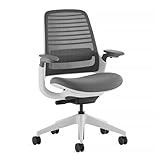
The Steelcase Series 1 is the pick for most people, because it combines the adjustments a back-friendly chair needs without being built for a particular body shape. According to the maker’s product page, the chair supports users up to 400 lbs, the seat adjusts in height and depth with flexible edges, an adjustable lumbar support is standard (a fixed lumbar is offered only on the 3D Microknit back), and the arms come as 4D, height-adjustable or armless. The back tension is weight-activated, with an optional 20% extra tension boost, so it adjusts to your body weight rather than needing a dial. The maker lists a twelve-year, multi-shift warranty.
- Seat height and depth adjustable · flexible seat edges
- Adjustable lumbar standard · weight-activated back tension
- Arm options: 4D, height-adjustable or none (choose your configuration)
- Supports up to 400 lbs per the maker · listing variants are sold for carpet or hard floors
- Maker warranty listed as twelve years
Best for: people who need a chair that adapts and who want a long warranty. Skip if: you need a headrest, or you cannot confirm which configuration the listing is selling.
Pros: adjustable lumbar and seat depth; weight-activated tension; long warranty; wide weight range. Cons: several configurations, so read the listing’s wheel and arm details carefully; no headrest on the base model; not a budget buy.
As an Amazon Associate we earn from qualifying purchases at no extra cost to you.
2. Branch Ergonomic Chair: Best Mid-Range Mesh Chair
The Branch Ergonomic Chair is a straightforward mesh desk chair marketed with adjustable lumbar support, a breathable mesh back and smooth wheels. It is a sensible pick for a home office where you want a clean look and the main adjustments without commercial-grade pricing. The listing text is short on numbers, so check the weight rating and seat height range on the maker’s page, and look at the Branch Ergonomic Chair Pro if you want more adjustment points.
- Adjustable lumbar support · mesh back
- Smooth-rolling wheels · all-black finish
- Weight rating and seat range: check the maker page
Best for: home offices where the chair is on view and sits in the middle of the budget range. Skip if: you need adjustable seat depth on the base model; confirm before you buy.
Pros: breathable back; clean design; mid-range cost. Cons: the listing gives few specs; fewer adjustment points than the Pro version.

3. Herman Miller Classic Aeron (Size B): Best Premium, Three-Size Chair
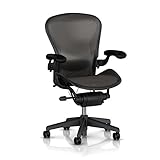
The Aeron is the chair that popularised mesh seating. Herman Miller says it comes in three sizes, A, B and C, intended to cover roughly the first to the 99th percentile of body sizes, and lists PostureFit SL spinal support, an 8Z Pellicle mesh and the Harmonic 2 Tilt. This listing is the Classic Aeron in Size B; the listing title does not say which lumbar option it carries, so check the configuration (PostureFit SL versus a lumbar pad) and the seat and arm options before you order. Size is the first decision: a chair that is too big or too small defeats the purpose.
- Size B (medium) · aluminium frame per the listing
- Maker features: 8Z Pellicle mesh, PostureFit SL, Harmonic 2 Tilt (Aeron family)
- Three sizes A, B, C across the range
- Confirm lumbar and arm configuration in the listing
Best for: long-term buyers who want a premium chair and who can confirm the right size. Skip if: you cannot verify the size and configuration, or want a cushioned seat.
Pros: three sizes; long-running design. Cons: premium tier; the listing is sparse; mesh seat is firm and not for everyone.
4. HON Ignition 2.0: Best Office-Grade Basics
The HON Ignition 2.0 is a commercial-supplier chair with lumbar support and adjustable arms. It is a no-nonsense choice for people who want a familiar office chair rather than a design object. The listing does not state the weight rating, seat depth range or warranty, so use the maker’s page to confirm. Several variants (with and without a headrest, in different fabrics) are listed under similar titles, so match the exact model before you commit.
- Lumbar support · adjustable arms
- Variants with and without headrest are sold
- Check weight rating and seat depth on the maker’s page
Best for: shared home offices and small businesses. Skip if: you need a specific seat depth adjustment.
Pros: familiar office-grade build; several finishes. Cons: several similar listings; specs are thin in the title.

5. SIHOO M57: Best Budget Mesh With a Headrest
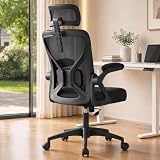
The SIHOO M57 is a mesh chair with 3D armrests, lumbar support and an adjustable headrest, and the listing gives a 330 lb weight rating. It sits in the lower price tier and shows what a budget chair can offer when it includes adjustable parts rather than just a molded shape. The trade-off is durability: lower-cost frames and gas lifts need checking over time, and you should look at the return policy.
- Mesh back · adjustable lumbar support · adjustable headrest
- 3D armrests · listing states 330 lb capacity
- Black finish
Best for: shoppers who want lumbar and a headrest at a lower cost. Skip if: you are over the weight rating or want a long commercial warranty.
Pros: adjustable lumbar and headrest; 3D arms. Cons: budget build; check seat depth, which is not stated.

6. FLEXISPOT ErgoX Premium: Best Dynamic Lumbar and Recline
The FLEXISPOT ErgoX Premium is listed with dynamic lumbar support, recline and tilt functions, adjustable armrests and a footrest. Dynamic lumbar means the support moves with your spine rather than staying fixed, which can be more comfortable if you shift a lot. The listing does not give a weight rating or seat depth, so check those on the maker’s page; a footrest model works best when your desk height lets you tuck your legs under it.
- Dynamic lumbar support · recline and tilt
- Adjustable armrests · mesh back · integrated footrest (model variant)
- Check weight rating, seat depth and warranty on the maker page
Best for: people who like to lean back and change posture. Skip if: your desk is low or you dislike footrests.
Pros: moving lumbar; recline range; footrest option. Cons: the footrest takes floor space; specs are not fully listed.

7. Autonomous ErgoChair Pro: Best Full-Feature Home Chair
The Autonomous ErgoChair Pro is a feature-packed home chair with adjustable lumbar support, a headrest and a roomy seat, listed with a 300 lb capacity. The listing markets it for back pain relief; treat that as marketing language rather than a medical claim, and judge it on fit. It is a good pick if you want one chair that does everything, and it is worth reading the maker’s page for seat depth, armrest range and warranty, because those are not in the listing title.
- Adjustable lumbar support · headrest · swivel wheels
- 300 lb weight rating per the listing
- Foam seat · listing positions it as big and tall friendly within its rating
Best for: people who want a feature-rich chair for long sessions. Skip if: you prefer mesh seats, which run cooler.
Pros: headrest and adjustable lumbar; wide seat. Cons: foam retains heat; fewer maker details in the listing.

Also Consider
SONGMICS Ergonomic Mesh Office Chair (KIME UOBN044BH01S)
A low-cost mesh chair with adjustable lumbar support, a headrest, a 90 to 105 degree tilt and flip-up armrests, per the listing. A reasonable starter chair for a spare-room desk if you accept budget-tier build quality.
Hbada P5 Ergonomic Office Chair
A mesh chair with adjustable lumbar support, height adjustment, a 2D headrest and a footrest, per the listing. It suits people who want a footrest at a modest cost; check the weight rating and seat depth on the maker’s page.

Humanscale World One
A premium-leaning chair whose listing states built-in lumbar support and a design for all body types. It appeals to those who want minimal controls and a chair that adjusts automatically; confirm the options and sizing before you buy.

How We Chose
This is research, not personal use. We read product listings, maker pages (for example Steelcase and Herman Miller) and general ergonomics guidance summarised from the Mayo Clinic Health System and OSHA-based checklists. We compared each chair on adjustable lumbar, seat depth, recline, armrest range, weight rating and warranty, and we capped each brand at one main pick. We have not sat in or used these chairs ourselves, so comfort impressions are not part of the ranking, and we flagged every spec a listing did not state.
Buying Guide: Choosing a Chair for Back Comfort
Start with the fit, not the brand
Sit with your hips at the back of the seat and your feet flat on the floor. General office-ergonomics guidance (Mayo Clinic Health System and OSHA-style checklists) suggests thighs roughly parallel to the floor, knees about level with hips, and a seat that adjusts across a range commonly quoted as 15 to 22 inches. If your feet do not reach the floor, use a footrest rather than perching.
Seat depth: the two-to-three finger rule
With your back against the backrest, you should be able to slide two to three fingers (about 3 to 5 cm) between the seat edge and the back of your knees. Too deep and the front edge presses behind your knees, pulling you forward off the backrest; too shallow and your thighs go unsupported. This is why adjustable seat depth, found on the Steelcase Series 1, is more valuable than a fancy headrest.
Lumbar support: where it sits
The support should meet the curve of your lower back, at roughly belt height, and be adjustable up or down. A fixed lumbar that sits too high or low can feel worse than none. If a chair has no lumbar, a small rolled towel or a removable cushion is a common stopgap.
Recline and tilt
Guidance often favours a slightly reclined posture, roughly 100 to 110 degrees, over sitting bolt upright. Look for a chair that tilts with you and locks in more than one position. The FLEXISPOT ErgoX and SIHOO M57 list recline options; confirm the range on the maker page.
Armrests
Armrests should let you rest your forearms with relaxed shoulders. 4D arms (height, width, depth and pivot) fit the widest range of desks; fixed arms may block you from sliding under the desk edge. Flip-up arms help in tight spaces.
Materials: mesh, foam or leather-look
Mesh runs cooler and conforms to the body; foam adds cushioning but holds heat; leather-look surfaces wipe clean but can feel hot and crack with age. For a back-pain-focused chair, we weight the adjustment mechanism above the upholstery.
Weight rating and size
Check the stated capacity and choose one comfortably above your weight. Chairs sold in sizes, such as the Aeron A, B and C, can fit very small and very large frames better than one-size designs; if you are tall or broad, see our big and tall guide.
Warranty and return terms
Mechanisms wear out before upholstery does. A multi-year warranty on mechanisms is more important than a low price, and return terms matter because comfort is personal. Steelcase lists a twelve-year multi-shift warranty on the Series 1.
Decision Matrix: Match the Chair to Your Situation
| Your situation | Pick | Reason |
|---|---|---|
| Sit eight hours a day, adjust often | Steelcase Series 1 | Seat depth, adjustable lumbar, weight-activated tilt |
| Home office on a moderate budget | Branch Ergonomic Chair | Mesh and adjustable lumbar in a clean design |
| Small or large frame | Herman Miller Classic Aeron | Three sizes |
| Shared office | HON Ignition 2.0 | Familiar office-grade build |
| Tight budget | SIHOO M57 or SONGMICS | Adjustable parts at a lower tier |
| Fidget or lean back often | FLEXISPOT ErgoX Premium | Dynamic lumbar and recline |
| Want a headrest and foam seat | Autonomous ErgoChair Pro | Headrest and full adjustments |
Material and Construction Trade-offs
| Feature | Benefit | Trade-off |
|---|---|---|
| Mesh back | Breathable, conforms to spine | Edges can press; firm feel |
| Foam seat | Cushioned | Holds heat, compresses over time |
| Leather-look cover | Wipes clean | Warm; surface can crack |
| Dynamic lumbar | Moves with your spine | More parts to wear |
| Weight-activated tilt | No dial to set | Less manual control |
| Seat depth slider | Fits different thigh lengths | Mostly on higher tiers |
| Headrest | Supports reclining | Gets in the way if misaligned |
Fit Walkthrough: Set Up Any Chair in Five Minutes
- Raise the seat so your feet are flat on the floor, knees near hip height.
- Slide back until your hips touch the backrest, then set seat depth with two to three fingers behind the knees.
- Move the lumbar support so the curve meets your lower back.
- Set the arm height so shoulders are relaxed and elbows near 90 degrees.
- Choose a slight recline and set the tilt tension so the chair supports you without effort.
- Align the screen and keyboard so you are not leaning toward them; set a reminder to stand or walk every 30 minutes.
Care, Durability and Return Realities
Gas lifts and tilt mechanisms are the first to wear. Work the height lever when the chair arrives and watch for slow sinking over the following weeks. Mesh can stretch if you perch on the edge, and casters wear faster on rough floors; hard-floor casters differ from carpet casters, so match them to your floor, as the Steelcase listings do. Tighten fasteners after the first month. If a chair feels wrong after a week, return it within the window rather than hoping you will adapt.
If you already have a good chair that feels poor, check the set-up before replacing it; a few minutes with the walkthrough above fixes many problems.
Match the Chair to Your Sitting Pattern
People sit differently, and the feature that matters most changes with the pattern. Use this as a quick filter before you read specs.
- The upright typist. You sit square to the keyboard for long stretches. Prioritise a lumbar that adjusts in height and a seat depth you can set precisely; the Steelcase Series 1 and HON Ignition 2.0 fit this style.
- The leaner. You recline to read, take calls or think. Prioritise a smooth recline, a tilt lock and a headrest that lines up with your head when you lean back; the FLEXISPOT ErgoX and Autonomous ErgoChair Pro are built around this.
- The fidgeter. You shift, cross your legs and perch. A weight-activated or dynamic back follows you instead of fighting you, which is where the Steelcase and the FLEXISPOT’s dynamic lumbar come in.
- The hot sleeper. If you run warm, choose mesh over foam or leather-look; the Branch, SIHOO and Aeron all use mesh backs.
- The shared-desk user. If two people with different builds use one chair, pick quick, tool-free adjustments and a wide weight range, and consider a sized chair like the Aeron for the main user.
One more practical point: the best chair cannot compensate for a desk at the wrong height. If your keyboard sits above elbow height, you will shrug and lean forward whatever you sit on. Raise the chair until your forearms are level, then add a footrest if your feet no longer reach the floor, and bring the screen up so your eyes meet the top third of it.
Frequently Asked Questions
What are the best office chairs for back pain?
The ones that fit and adjust: adjustable lumbar, adjustable seat depth, a recline you can control and armrests that let your shoulders relax. In this guide that means the Steelcase Series 1 for most people, with the Branch Ergonomic Chair and HON Ignition 2.0 as lower-cost options.
Can an office chair fix back pain?
No chair treats back pain. A well-fitted chair can reduce a common irritant for some people, but persistent or severe pain, numbness or weakness should be checked by a clinician.
Is lumbar support or seat depth more important?
Both matter. Lumbar support should meet your lower back; seat depth should leave two to three fingers behind your knees. A chair with only one of them fits fewer people.
Is a mesh or a foam office chair better for your back?
Neither is automatically better. Mesh stays cooler and conforms; foam is softer but holds heat. Fit and adjustments matter more than the material.
How long should I sit before standing?
General workplace guidance suggests standing, stretching or walking for a minute or two every 30 minutes. Your clinician may suggest a different pattern.
Do I need a headrest?
Only if you recline while working or reading. A headrest that sits wrongly can push your head forward, so make sure it is adjustable or removable.
Are cheap chairs worth buying for back comfort?
They can be, if they have adjustable lumbar, a usable seat height range and good returns. Expect shorter mechanism life and check weight ratings.
Which One Should You Buy?
- Best all-round: Steelcase Series 1.
- Best mid-range mesh: Branch Ergonomic Chair.
- Best long-term premium with sizing: Herman Miller Classic Aeron (Size B; check size).
- Best office-grade basics: HON Ignition 2.0.
- Best low cost with headrest: SIHOO M57.
- Best for leaning back: FLEXISPOT ErgoX Premium.
- Best headrest and foam seat: Autonomous ErgoChair Pro.
Whichever you choose, check the return window and run the five-minute fit walkthrough on day one. Pain that continues despite a good setup deserves a clinician’s attention.
Sources
- Steelcase Series 1 product page (maker)
- Herman Miller Aeron chair page (maker)
- Mayo Clinic Health System home workspace tips (via search summary)
- Product listings for the chairs named above
Last updated: November 2026
More from Amazon
Programs that pair well with the guide above. Offers and eligibility are set by Amazon and may change.
Free shipping on eligible items, Prime Video and more. Eligible new members can start with a free trial.
Start a Prime free trialAudiobooks and podcasts to listen to on the go. Eligible new members can start with a free trial.
Try Audible freeAd-free music streaming. Eligible new subscribers can start with a free trial.
Try Music Unlimited freeA free business account with business pricing and bulk-buying tools for work, shop or home office.
Create a business accountAs an Amazon Associate we earn from qualifying purchases.
Write Your Review
No reviews yet. Be the first to share your experience!