

Our Short List of 3

- Best for: A modem and router pair at the desk that must ride through flickers and short cuts without rebooting mid-call.
- Brand: Marsriva, per the product title
- Model: KP3, per the product title
- Capacity: 10000mAh, 36Wh, per the product title
- Transfer: 0ms, per the product title

- Best for: A remote worker on an unreliable street who needs the modem and router to survive repeated or lengthy cuts.
- Brand: TalentCell, per the product title
- Model: SL3400, per the product listing
- Capacity: 27000mAh, 97.2Wh, per the product title
- Battery: Lithium ion, per the product title
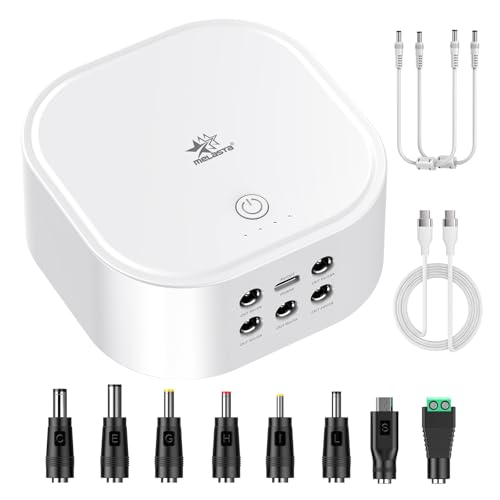
- Best for: A home office link built from mixed-voltage boxes, where one battery has to match several adapter labels.
- Brand: Melasta, per the product title
- Capacity: 56Wh, 10.8V system, per the product title
- DC output: 5V, 9V, 12V, 15V, and 24V multi-voltage, per the product title
- USB-C: PD30W, bidirectional in and out, per the product title
All 3 Picks at a Glance
| Product | Specs | Action |
|---|---|---|
| Marsriva KP3 Mini UPS |
| Check price on Amazon |
| TalentCell Mini UPS SL3400 |
| Check price on Amazon |
| Melasta Mini DC UPS 56Wh |
| Check price on Amazon |
Key takeaways
- Keep your router and modem running through short outages so calls and VPN sessions survive. Compare mini UPS picks by watt-hours, voltage and switching.
The remote-work outage that hurts is rarely the long blackout. It is the forty-minute cut in the middle of a client call, or the two-second flicker that drops a VPN session and locks you out of a presentation. Your laptop survives those moments on its own battery without blinking; your router and modem do not. The real decision is which small battery keeps just the internet link alive, at the right voltage, with a switchover clean enough that the call never notices the grid failed.
This guide is for home-based workers whose modem and router sit near the desk, for hybrid staff whose employer gateway must stay reachable all day, and for anyone whose meetings run over a connection with no second line to fall back on. Every model below was selected from the name and stated details on its Amazon product page, so the capacities and outputs quoted here are the ones the listing itself states.
Quick Picks
As an Amazon Associate we earn from qualifying purchases.
| Product | Best for | Key spec from title |
|---|---|---|
| Marsriva KP3 Mini UPS | A desk modem and router that must never reboot mid-call | 10000mAh, 36Wh, 0ms transfer, multi-port |
| TalentCell Mini UPS SL3400 | A full workday of rolling short outages | 27000mAh, 97.2Wh, DC 12V/9V, 18W USB-A/USB-C PD |
| Melasta Mini DC UPS 56Wh | A mixed desk link with a USB-C device to top up | 56Wh, 5V/9V/12V/15V/24V, PD30W USB-C in/out |
| Skazeke Mini UPS 9000mAh | A single 12V router on a simple, tidy setup | 9000mAh, DC 12V/2A, 4 DC output interfaces |
How to Choose
Protect the link, not the whole desk
It is tempting to shop for a battery big enough to run everything, but the economics point the other way. Your laptop already carries hours of battery, and a monitor can go dark without ending a call if you can still hear and be heard. The devices with no battery at all, the modem and the router, are the ones that end meetings. A mini UPS sized only for that pair works far longer than a general battery spread across a desk of gear, so define the load as the internet chain first and add anything else only with spare capacity in hand.
Size runtime around meetings, not around the longest blackout
Think in watt-hours and in calendar blocks. Add the watts on the modem and router adapters, then divide the battery’s watt-hours by that figure for a rough runtime ceiling. A 36Wh unit covers the typical cluster of short cuts that interrupt a workday, while the 97.2Wh TalentCell below is built for streets where the power drops several times a week and each cut runs long. Also consider recharge behaviour: a unit that lives plugged in and tops itself back up between cuts, ready for the next one, beats a bigger battery that gets forgotten in a drawer.
Check the switchover and the everyday behaviour
A backup that reboots the router while switching has failed at its one job, because a reboot costs you the call, the VPN tunnel, and several minutes of rejoining. Look for listings that state automatic switching, like the PurrPals in the wider mini UPS market and the always-in-line designs here that feed the router through the battery path. Everyday behaviour matters too: the unit will sit near your desk for years, so it should run silently, stay cool at a small continuous load, and show its charge state at a glance rather than announcing itself during recordings.
Keep the power safe: match voltage and respect the load limit
A mini UPS is a low-voltage DC device, and its safety rules are specific. Set each output to the voltage printed on your modem or router adapter, 12V, 9V, or 5V, and confirm the barrel plug size and polarity before connecting, because feeding 12V into a 5V input can destroy the device you are protecting. Stay under the rated total output: these units are built for network gear drawing a handful of watts, not for a monitor, a desktop tower, or a heater. Keep vents clear, charge the battery in the open rather than inside a sealed drawer, and retire a unit whose case swells or runs hot.
The 4 Best Options
Marsriva KP3 Mini UPS
- Best for: A modem and router pair at the desk that must ride through flickers and short cuts without rebooting mid-call.
- Brand: Marsriva, per the product title
- Model: KP3, per the product title
- Capacity: 10000mAh, 36Wh, per the product title
- Transfer: 0ms, per the product title
A modem and router pair at the desk that must ride through flickers and short cuts without rebooting mid-call.
The 36Wh battery targets short cuts, so a street with multi-hour outages needs the larger TalentCell instead; also confirm your gear’s voltage and plug fit before ordering.
The Marsriva KP3 is built around the moment a remote worker fears most: the switch itself. Its title states a 0ms transfer, so when the grid blinks, the modem and router keep running without the reboot that drops a call or kills a VPN session. The 10000mAh, 36Wh battery is sized for the short, repeated cuts that interrupt a workday rather than a day-long blackout, and the multi-port layout covers the modem-and-router pair from one compact unit that sits quietly beside the desk.
TalentCell Mini UPS SL3400
- Best for: A remote worker on an unreliable street who needs the modem and router to survive repeated or lengthy cuts.
- Brand: TalentCell, per the product title
- Model: SL3400, per the product listing
- Capacity: 27000mAh, 97.2Wh, per the product title
- Battery: Lithium ion, per the product title
A remote worker on an unreliable street who needs the modem and router to survive repeated or lengthy cuts.
It is a battery pack you place and cable yourself rather than an AC pass-through box, so the setup takes a few more minutes to arrange neatly.
Where the Marsriva is about a seamless switch, the TalentCell is about endurance. The title states 27000mAh and 97.2Wh, by far the largest battery in this group, with DC 12V and 9V outputs and 18W USB-A and USB-C PD that can keep a phone alive for hotspot fallback. The listing’s technical details describe multiple 12V outputs, enough for a modem, a router, and a gateway box drawing the same voltage. Choose it when your workday regularly crosses several outages, or when a single long cut would otherwise end a training session or a support shift hours from home.
Melasta Mini DC UPS 56Wh
- Best for: A home office link built from mixed-voltage boxes, where one battery has to match several adapter labels.
- Brand: Melasta, per the product title
- Capacity: 56Wh, 10.8V system, per the product title
- DC output: 5V, 9V, 12V, 15V, and 24V multi-voltage, per the product title
- USB-C: PD30W, bidirectional in and out, per the product title
A home office link built from mixed-voltage boxes, where one battery has to match several adapter labels.
Five voltage options mean five chances to set one wrong, so label each cable with its device and voltage when you install it.
The Melasta is the flexible middle option. Its title lists a 56Wh battery with 5V, 9V, 12V, 15V, and 24V outputs, plus a bidirectional USB-C port rated PD30W that both charges the unit and powers a device. The listing describes it as designed for routers, modems, ONT units, and IP cameras, and gives an example runtime for a typical router load. That breadth suits a desk where the work gateway runs on one voltage, the router on another, and a USB-C accessory occasionally needs topping up from the same battery during a cut.
Skazeke Mini UPS 9000mAh
Not every desk link is complicated. If your router is a single 12V box and the modem is integrated or already covered, the Skazeke keeps the plan minimal: a 9000mAh battery with DC 12V/2A output and four DC output interfaces, per its title. The listing notes a range of DC plug sizes in the box, which helps with the barrel-fit problem that trips up many first setups. It will not run a mixed-voltage chain, and it makes no attempt to; it is the tidy, single-purpose backup for the most common router configuration there is.
Specs
- Brand: Skazeke, per the product listing
- Capacity: 9000mAh, per the product title
- DC output: 12V/2A, per the product title
- Outputs: 4 DC output interfaces, per the product title
- Intended devices: Router, LED light strip, CCTV camera, per the product title
- Plug fit: Multiple DC plug sizes, per the product listing
Best for: A lone 12V router that needs a simple backup to survive flickers and short cuts during calls.
Watch out for: With 12V as the only voltage, a 9V or 5V modem in the chain needs a different model from this list.
ASIN: B0B5CBNQP9
Which One Fits Your Situation
Your calls drop whenever the power flickers
The problem is switchover, not capacity. Choose the Marsriva KP3, whose title states a 0ms transfer, or any model here whose listing states automatic switching, and test it once by pulling the wall plug before a quiet meeting rather than during a review. A router that never reboots keeps the call, the VPN, and your screen share exactly where they were.
Your street cuts power several times a week
Endurance wins. The TalentCell SL3400 carries 97.2Wh, enough to treat outages as a routine nuisance instead of a workday risk, and its multiple outputs cover the modem and router together. Pair it with a charged phone for hotspot fallback and even a long cut becomes a connectivity downgrade rather than a disappearance from your team for the afternoon.
Your employer gateway and router run on different voltages
Read both adapter labels, then pick by voltage coverage. The Melasta spans 5V to 24V and adds USB-C PD, so it handles the awkward gateway that rules out simpler models. Where the pair matches and the priority is a switch the call never notices, the Marsriva KP3 and its 0ms transfer cover the job. What matters is that every box in the chain has a correctly set output waiting for it.
You only need the router covered, and you need it tidy
The Skazeke is the honest answer for a single 12V router: small battery, one voltage, several plug sizes in the box, nothing extra to configure. It keeps a lone router alive through the flickers that break calls, and it disappears onto the shelf beside it. If a modem joins the setup later on a different voltage, that is the moment to move up to the Melasta.
Common Mistakes
- Sizing the battery for the whole desk, then watching it die early because a monitor joined the load.
- Never testing the switchover, so the first real outage reveals the router reboots anyway.
- Setting a 12V output for a modem whose adapter says 9V, and damaging the device being protected.
- Leaving the unit unplugged in a drawer, fully discharged, until the day it is actually needed.
- Assuming the backup helps when the provider’s street equipment is down, which no home battery can fix.
Frequently Asked Questions
Will a mini UPS stop a video call from dropping in a flicker?
That is exactly the job it is sized for. If the modem and router stay powered and the unit switches without rebooting them, the call rides through a flicker or a short cut unnoticed. The weak point is a slow switchover, so choose a model whose listing states automatic switching and test the setup once by unplugging it yourself.
How big a mini UPS does a remote worker actually need?
Start from the combined watts of the modem and router, then match watt-hours to your outage pattern. Short, frequent cuts are covered comfortably by a unit in the 36Wh class. Streets with longer or repeated outages justify the 97.2Wh class. Buying far beyond that adds size and cost while protecting against blackouts your laptop battery would outlast anyway.
Is a mini UPS enough, or do I need a full AC UPS for a home office?
For keeping the internet up, the mini UPS is the efficient tool, because it feeds the modem and router DC power directly for hours. A full AC UPS earns its place when a desktop computer, a NAS, or several AC devices also need protection or a safe shutdown window. Many desks run both: the mini unit for the link, the AC unit for the machine.
Where should the mini UPS sit in a home office setup?
Put it in the power path of the modem and router, on an open shelf near those devices, with its vents clear and its charge indicator visible. Short DC cables reduce clutter and voltage drop. Avoid sealed drawers and spots above heaters, and keep it somewhere you will notice if its indicator shows a low battery before the next storm of meetings arrives.
More from Amazon
Programs that pair well with the guide above. Offers and eligibility are set by Amazon and may change.
Free shipping on eligible items, Prime Video and more. Eligible new members can start with a free trial.
Start a Prime free trialAudiobooks and podcasts to listen to on the go. Eligible new members can start with a free trial.
Try Audible freeAd-free music streaming. Eligible new subscribers can start with a free trial.
Try Music Unlimited freeA free business account with business pricing and bulk-buying tools for work, shop or home office.
Create a business accountAs an Amazon Associate we earn from qualifying purchases.







Write Your Review
No reviews yet. Be the first to share your experience!