

Key takeaways
- Compare the best smart locks for a home office door, with keypad, fingerprint and app access that keep work files and gear behind a code or print.
As an Amazon Associate we earn from qualifying purchases.
A home office door has a different job from a front door. It does not need to stop a break-in so much as keep work laptops, client files, and expensive gear behind a code when the cleaner, the kids, or a house guest wanders past. A smart lock also removes the spare-key problem: no key under the mat, no copy handed out and never returned. The five locks below cover the main ways into a home office, from fingerprint deadbolts with built-in Wi-Fi to a simple keypad lever that needs no app at all.

Before you buy, measure the door. Most of these locks fit doors 1-3/8 to 1-3/4 inches thick with a standard 2-3/8 or 2-3/4 inch backset, but an older or thinner office door can rule a model out, and each product section below notes the fit for that exact lock. Connectivity matters just as much: built-in Wi-Fi, Bluetooth with an optional bridge, and no-radio keypad designs behave very differently once installed.
Quick Picks
Disclosure: This post may contain affiliate links. If you buy through these links, we may earn a commission at no extra cost to you.
Our Short List of 3
- Best for: Apple households that want phone-or-watch entry on the office door.
- Lock type: Deadbolt with keypad
- Model: BE499WB CEN 622, Century trim, Matte Black
- Dimensions: 0.89 x 3 x 5 inches
- Material: Zinc
- Best for: The main home office door, where you want fingerprint entry plus remote access with no extra hub to buy.
- Lock type: Deadbolt with fingerprint ID and anti-peep keypad
- Entry methods: Fingerprint, code, app, eKey sharing, voice control, 2 mechanical keys
- Connectivity: Built-in Wi-Fi, 2.4 GHz only, no hub required
- Certification: ANSI Grade 1

- Best for: eufy households that want fingerprint entry and remote access in the same app as their cameras and doorbell.
- Lock type: Deadbolt
- Model: T8506
- Connectivity: Built-in Wi-Fi
- Special features: Self-learning AI fingerprint, 6-way unlocking, real-time notifications
All 4 Picks at a Glance
| Product | Specs | Action |
|---|---|---|
| Schlage Encode Plus Smart WiFi Deadbolt |
| Check price on Amazon |
| ULTRALOQ U-Bolt Pro WiFi |
| Check price on Amazon |
| eufy Security Smart Lock C220 |
| Check price on Amazon |
 Schlage FE595 Camelot Keypad Lever |
| Check price on Amazon |
How to Choose
Deadbolt or Lever: Match the Lock to the Door’s Existing Holes
Start with the holes already in your door. A door prepped for a separate deadbolt has a 2-1/8 inch cross bore above the handle bore, and any deadbolt below drops straight in. Many interior office doors have only the single latch bore for a knob or lever, and fitting a deadbolt there means drilling a second hole and mortising the edge — possible on a solid door, risky on a hollow-core one. If your office door has no deadbolt bore, a keypad lever such as the Schlage FE595 replaces the existing handle in the same hole and locks with a latch instead of a bolt.
Measure Thickness and Backset Before You Order
Two measurements rule models in or out. Door thickness is the first: most interior doors are 1-3/8 inches thick and exterior doors 1-3/4 inches, and the locks below are built around that range, but check the exact figure in each listing because a model that stops at 1-3/4 inches will not clamp correctly on a thicker door. Backset is the distance from the door edge to the center of the bore, almost always 2-3/8 or 2-3/4 inches; most latches and bolts adjust between the two, yet the setting must match your door or the bolt will not throw fully. Measure both before ordering, not after the box arrives.
Pick Your Ways In: Fingerprint, Code, App, or Key
Think about who opens this door and how. Fingerprint entry is fastest for the person who uses the office all day, and both ULTRALOQ models and the eufy C220 add a keypad for codes you can hand to a partner, a cleaner, or a guest and later revoke. App control matters when you want to lock up or let someone in from another room or another city. A mechanical key backup still matters on every model here, because batteries die at the worst moment; keep one key outside the office, since a backup locked inside the room it protects is useless.
Connectivity and Power: Wi-Fi, Bluetooth, or Neither
Connectivity decides what the lock can do when you are not standing at the door. Built-in Wi-Fi, as on the Encode Plus, the U-Bolt Pro WiFi, and the C220, gives remote locking, alerts, and code management with no hub, but every one of them uses 2.4 GHz only, so a weak signal at the office door means missed connections. Bluetooth models manage everything from the phone nearby and need the maker’s bridge for remote access. The FE595 has no radio at all: nothing to hack remotely, nothing to update, and a 9V battery that can last for years of office use.
The 5 Best Options
Schlage Encode Plus Smart WiFi Deadbolt
- Best for: Apple households that want phone-or-watch entry on the office door.
- Lock type: Deadbolt with keypad
- Model: BE499WB CEN 622, Century trim, Matte Black
- Dimensions: 0.89 x 3 x 5 inches
- Material: Zinc
Apple households that want phone-or-watch entry on the office door.
There is no fingerprint reader, and the maker’s guide assumes a standard deadbolt prep, so confirm your door’s thickness and backset against the listing before ordering.
The Encode Plus is the pick for an Apple-centered home office. It is a touchscreen deadbolt with built-in Wi-Fi, so it connects straight to your network with no hub, and it adds Apple Home Key: tap an iPhone or Apple Watch against the lock to open it. It also works with Alexa and Google Assistant for voice locking and status checks. The zinc body is compact at under an inch deep on the outside face, and the Century trim in matte black suits a modern office door. You give up fingerprint entry, which the ULTRALOQ and eufy picks below include.
Watch out for: There is no fingerprint reader, and the maker’s guide assumes a standard deadbolt prep, so confirm your door’s thickness and backset against the listing before ordering.
ULTRALOQ U-Bolt Pro WiFi
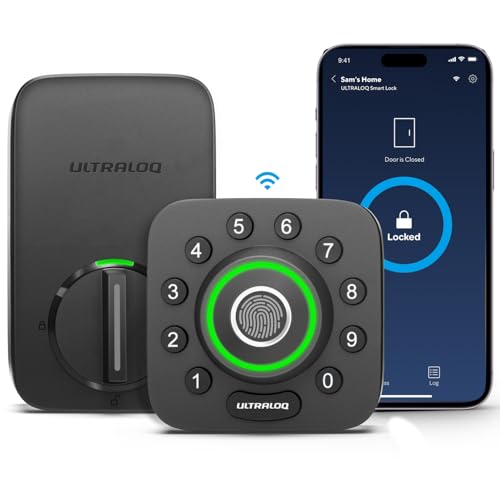
- Best for: The main home office door, where you want fingerprint entry plus remote access with no extra hub to buy.
- Lock type: Deadbolt with fingerprint ID and anti-peep keypad
- Entry methods: Fingerprint, code, app, eKey sharing, voice control, 2 mechanical keys
- Connectivity: Built-in Wi-Fi, 2.4 GHz only, no hub required
- Certification: ANSI Grade 1
The main home office door, where you want fingerprint entry plus remote access with no extra hub to buy.
Wi-Fi is 2.4 GHz only, so check the signal strength at the office door first; a weak signal drains batteries and drops the remote features.
This is the most complete lock in the roundup for a working office. The fingerprint reader, anti-peep keypad, phone app, and two mechanical keys give you several ways in, and the built-in Wi-Fi means remote locking, access logs, and eKey sharing work with no hub on the shelf. A door sensor is included in the box, so the lock knows whether the door is actually shut, not just whether the bolt threw. It carries an ANSI Grade 1 rating and an IP65 weather rating, and the maker backs it with a lifetime mechanical warranty and 18 months on the electronics.
Watch out for: Wi-Fi is 2.4 GHz only, so check the signal strength at the office door first; a weak signal drains batteries and drops the remote features.
ULTRALOQ U-Bolt Pro
The original U-Bolt Pro shares the Grade 1 zinc body, fingerprint reader, and anti-peep keypad of the WiFi model above, but connects by Bluetooth instead. Codes, fingerprints, and access logs are managed in the app while you stand at the door, and auto lock and auto unlock work locally. It runs on four AA batteries, which are included, and the exterior is IP65 rated. For an interior office door, that trade is often the right one: you keep fast fingerprint entry and a proper audit trail, and you skip the Wi-Fi radio that drains batteries on the connected models.
Specs
- Lock type: Deadbolt with fingerprint ID and anti-peep keypad
- Certification: ANSI Grade 1
- Connectivity: Bluetooth; Wi-Fi available via the maker’s bridge, sold separately
- Material: Zinc
- Dimensions: 1.19 x 2.95 x 2.95 inches
- Power: 4 AA batteries, included
- Weather rating: IP65
- Model number: U-Bolt Pro
Best for: An office inside the home where local control is enough and you want the longest stretch between battery changes.
Watch out for: There is no built-in Wi-Fi, so there is no remote unlocking or away-from-home log checking unless you add the bridge later.
eufy Security Smart Lock C220
- Best for: eufy households that want fingerprint entry and remote access in the same app as their cameras and doorbell.
- Lock type: Deadbolt
- Model: T8506
- Connectivity: Built-in Wi-Fi
- Special features: Self-learning AI fingerprint, 6-way unlocking, real-time notifications
eufy households that want fingerprint entry and remote access in the same app as their cameras and doorbell.
A lighter-duty build than the Grade 1 picks above; treat it as an interior-door lock and check the listing’s fit notes against your door thickness before ordering.
The C220 is the value pick among the Wi-Fi fingerprint locks here. It has built-in Wi-Fi, a self-learning AI fingerprint reader, a keypad, app control, and a physical key, and eufy rates the battery life at eight months, the longest claim among the connected deadbolts in this list. It also ties into the wider eufy Security app alongside the brand’s cameras and doorbells, which suits a home office already running that ecosystem. The trade-off sits in the hardware grade: this is a lighter-duty lock than the Grade 1 ULTRALOQ models, so it fits an interior office door better than a street-facing one.
Watch out for: A lighter-duty build than the Grade 1 picks above; treat it as an interior-door lock and check the listing’s fit notes against your door thickness before ordering.
Schlage FE595 Camelot Keypad Lever
- Best for: Interior office doors with no deadbolt bore, and anyone who wants a lock with no app, account, or network.
- Lock type: Keypad entry lever with Flex-Lock
- Model: FE595 V CAM 619 ACC
- Trim: Camelot, with Accent lever
- Finish: Satin Nickel
Interior office doors with no deadbolt bore, and anyone who wants a lock with no app, account, or network.
It secures with a latch, not a deadbolt, so it suits interior doors only; the maker’s instructions list doors 1-3/8 to 1-3/4 inches thick with a 2-3/8 or 2-3/4 inch backset, so measure first.
The FE595 is the odd one out here, deliberately: it is a lever lock, not a deadbolt. That makes it the only pick that fits an interior office door with a single latch bore and no deadbolt hole, swapping straight over the handle you already have. The Flex-Lock feature is the reason it suits an office: set it and the lever relocks itself after the door closes, or leave it passing freely while you are in and out all day. There is no app and no radio; codes are added at the keypad, it holds up to 19 of them, and a 9V battery powers the unit.
Watch out for: It secures with a latch, not a deadbolt, so it suits interior doors only; the maker’s instructions list doors 1-3/8 to 1-3/4 inches thick with a 2-3/8 or 2-3/4 inch backset, so measure first.
Which One Fits Your Situation
Your Office Door Has No Deadbolt Hole
If the office door carries only a knob or lever today, the FE595 is the straightforward answer: it uses the existing latch bore, needs no drilling, and the Flex-Lock setting keeps it locking behind you during the workday. Drilling a hollow-core door for a deadbolt is possible but weakens the door around the new hole, and on a solid door it is a job many people would rather hand to a locksmith than improvise with a borrowed hole saw.
You Want to Lock Up and Check In From Anywhere
Pick one of the built-in Wi-Fi deadbolts: the Encode Plus, the U-Bolt Pro WiFi, or the eufy C220. All three lock, unlock, and report activity through an app with no hub, so you can confirm the office is secured from the sofa or from a trip. The ULTRALOQ adds a door sensor, which closes the common gap where the bolt is thrown but the door itself is standing open. Confirm a strong 2.4 GHz signal at the door first.
Cleaners, Guests, and Family Need Their Own Access
Give each person a code instead of sharing yours. The app-connected deadbolts — Encode Plus, ULTRALOQs, and the C220 — let you create codes for a cleaner or a relative, see in the log which code opened the door, and delete a code the day it is no longer needed. The FE595 also holds codes, up to 19, but you manage them at the keypad and there is no log, so it suits trusted household access rather than monitored access.
You Prefer No App, No Account, No Network
The FE595 is built for you: it has no radio, pairs with nothing, and is programmed entirely at the keypad, and its 9V battery can run for years. The runner-up is the Bluetooth U-Bolt Pro, which still uses an app but keeps everything local to the door unless you add the bridge. Either way you give up remote alerts, so lean on the mechanical key backup and keep one stored outside the office.
Common Mistakes
- Buying a deadbolt for a door that has no deadbolt bore, then discovering the mismatch with the door already taken apart.
- Skipping the thickness and backset measurements because the listing says it fits most doors.
- Storing the only backup key inside the office the lock is meant to protect.
- Sharing one code with everyone, which makes access logs meaningless and revoking one person’s access impossible.
- Assuming Wi-Fi is built in: the Bluetooth U-Bolt Pro needs the maker’s bridge for remote access, and every Wi-Fi model here connects on 2.4 GHz only.
Frequently Asked Questions
Will a smart deadbolt fit my existing deadbolt hole?
Usually, yes. Deadbolts use a standard 2-1/8 inch cross bore with a 2-3/8 or 2-3/4 inch backset, and all four deadbolts above are built to that pattern with adjustable bolts. What varies is the door thickness range and the size of the interior housing, which can crowd a lever mounted close below. Check the exact model’s stated thickness range against your door before ordering.
Do I need Wi-Fi in a lock for an interior office door?
No. Wi-Fi buys remote locking, phone alerts, and code changes from anywhere, which is genuinely useful if other people come and go while you travel. If the office is steps from where you spend the day, Bluetooth or a plain keypad covers the real job — keeping the room closed to everyone but you — with longer battery life and one less device on your network to keep updated.
What happens when the battery dies?
Every lock here warns you through the app or with low-battery indicators, and each one keeps a key cylinder as the fallback, so a dead battery is an inconvenience rather than a lockout — provided the backup key is not inside the office. Change batteries when the warning appears instead of testing how long it lasts; on the Wi-Fi models, a weak battery shows up as dropped connections.
Can I give a cleaner or guest a temporary code?
Yes. The app-based locks let you create a code for someone, and on the connected models you can review the log and delete the code from your phone. The FE595 holds up to 19 codes programmed at the keypad; deleting one means standing at the door with the programming code. One code per person beats one shared code, because you can revoke a person without rekeying the household.
More from Amazon
Programs that pair well with the guide above. Offers and eligibility are set by Amazon and may change.
Free shipping on eligible items, Prime Video and more. Eligible new members can start with a free trial.
Start a Prime free trialAudiobooks and podcasts to listen to on the go. Eligible new members can start with a free trial.
Try Audible freeAd-free music streaming. Eligible new subscribers can start with a free trial.
Try Music Unlimited freeA free business account with business pricing and bulk-buying tools for work, shop or home office.
Create a business accountAs an Amazon Associate we earn from qualifying purchases.


Write Your Review
No reviews yet. Be the first to share your experience!