

Key takeaways
- Compare five AC-powered USB hubs with seven or more ports, individual switches, and dedicated charging ports to keep a busy desk running without dropouts.
- Top Pick: TP-Link UH720 Powered USB Hub
- Runner-up: UGREEN 90307 7-Port USB 3.0 Hub
- Also consider: Sabrent 10-Port USB 3.0 Hub HB-B7C3
A laptop with one or two USB ports cannot carry a full desk on its own. Once a keyboard, a mouse, an external drive, a webcam, a printer, and a phone cable all need a home, something has to give, and the usual answer is a tangle of adapters fighting for the same socket. A powered USB hub ends that scramble by giving every device its own port, fed by a wall adapter rather than by the laptop itself.
The difference between a powered hub and a bus-powered one matters more than the port count on the box. A bus-powered hub draws everything from the host computer, so a spinning hard drive can brown out the whole row. A powered hub brings its own adapter, so each port gets steady current even when the desk is fully loaded. The five hubs below all ship with an AC adapter and at least seven ports.
As an Amazon Associate, we earn from qualifying purchases.
Quick answer
For most crowded desks, the Sabrent 10-port hub covers the common mix of data ports and charging ports with a 60W adapter. Choose the TP-Link UH720 for a simple nine-port layout, the UGREEN 90307 for an aluminum body with per-port switches, the Anker 10-port hub for PowerIQ charging, and the Atolla KR307 for a dedicated 18W charging port with labelled icon switches.
TP-Link UH720 Powered USB Hub

The TP-Link UH720 is the straightforward pick for a desk that needs more ports without extra fuss. Seven USB 3.0 data ports handle the keyboard, mouse, printer, flash drives, and card readers, while two extra ports charge phones and tablets at up to 2.4A each. A single on-off button controls the whole hub, so the row can be powered down at the end of the day without pulling the adapter from the wall.
The included 12V/4A adapter keeps the data ports stable when several devices run at once. Hot-swap support means devices can be plugged in and removed while the computer is running, and the hub works across Windows, Mac, Chrome OS, and Linux without extra software. Data moves at up to 5Gbps on the USB 3.0 ports.
Specs
– Ports: 7 USB 3.0 data ports plus 2 smart charging ports, 9 total
– Data transfer: Up to 5Gbps on the USB 3.0 ports
– Charging ports: 2 ports at 5V/2.4A each
– Power adapter: 12V/4A AC adapter included
– Controls: Single power on-off button for the whole hub
– Compatibility: Windows, Mac, Chrome OS, Linux
– Model: UH720
UGREEN 90307 7-Port USB 3.0 Hub

The UGREEN 90307 suits a desk where each device deserves its own switch. Seven USB-A 3.0 ports sit in an aluminum body, and every port has an independent on-off switch with a blue LED, so a noisy drive or an idle accessory can be silenced without touching the others. Four of the ports also support BC 1.2 charging at up to 7.5W each, which covers phones and small accessories while they stay connected.
A 12V/2A adapter rated at 24W feeds the hub, and the GL3510 chip inside lets each port work independently, with over-current, over-voltage, over-temperature, and short-circuit protection built in. The host connection uses a USB-C input with a one-meter USB-C to USB-A cable in the box, plus a 1.5-meter adapter cable. At 114 by 48 by 23 millimeters, it stays compact for a seven-port unit.
Specs
– Ports: 7 USB-A 3.0 ports
– Data transfer: Up to 5Gbps, backward compatible with USB 2.0 and 1.1
– Charging ports: 4 ports support BC 1.2 charging at up to 7.5W each
– Power adapter: 12V/2A, 24W, included
– Controls: Independent on-off switch and blue LED per port
– Material: Aluminum alloy shell
– Dimensions: 114 x 48 x 23 mm
– Model: 90307, also listed as CM481
Sabrent 10-Port USB 3.0 Hub HB-B7C3
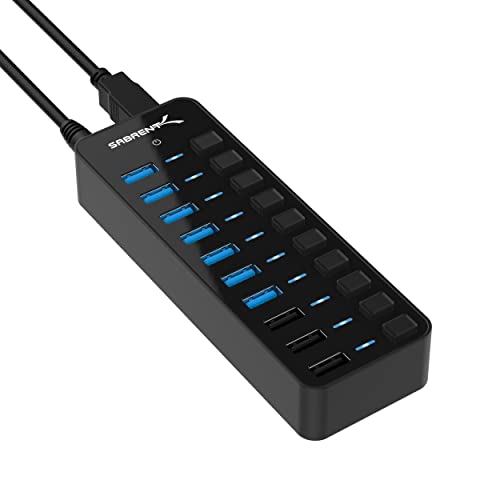
The Sabrent HB-B7C3 is the pick for the busiest desk in this group. Seven USB 3.0 data ports and three smart charging ports give ten connections in total, and every port has its own power switch with an LED indicator, so each device can be controlled on its own. The aluminum enclosure measures 5.7 by 1.9 by 0.94 inches, which keeps a ten-port hub compact.
A 60W adapter rated at 12V/5A powers the whole unit, and the three charging ports deliver up to 2.4A each, which is enough for tablets alongside phones. Data ports run at up to 5Gbps, and the hub works with Windows, macOS, and Linux. The individual switches are the practical highlight: a drive, a printer, or a finished phone can each be handled without disturbing the rest of the desk.
Specs
– Ports: 7 USB 3.0 data ports plus 3 smart charging ports, 10 total
– Data transfer: Up to 5Gbps on the data ports
– Charging ports: 3 ports at up to 2.4A each
– Power adapter: 60W, 12V/5A, included
– Controls: Individual power switch and LED per port
– Material: Aluminum enclosure
– Dimensions: 5.7 x 1.9 x 0.94 in
– Model: HB-B7C3
Anker 10-Port 60W USB 3.0 Hub

The Anker 10-port hub pairs seven USB 3.0 data ports with three PowerIQ charging ports, and the PowerIQ circuit is what sets it apart. Each charging port detects the connected device and adjusts its output, with a ceiling of 2.1A per port, so phones and tablets charge at the rate they can accept. The 60W adapter, rated at 12V/5A, keeps all ten ports fed even when drives and chargers run together.
Data moves at up to 5Gbps across the seven data ports, which covers external drives, card readers, and everyday peripherals. The box includes a 2.6-foot USB 3.0 cable alongside the adapter, so the hub is ready to place on the desk without extra parts. This is an older model in Anker’s line, and it stays in the lineup because seven data ports, three intelligent charging ports, and a full 60W supply still match what a crowded desk asks for.
Specs
– Ports: 7 USB 3.0 data ports plus 3 PowerIQ charging ports, 10 total
– Data transfer: Up to 5Gbps on the data ports
– Charging ports: 3 PowerIQ ports at up to 2.1A each
– Power adapter: 60W, 12V/5A, included
– Cable: 2.6 ft USB 3.0 cable included
– Compatibility: MacBook, iMac, Dell XPS, Surface Pro, and other USB hosts
– Model: AK-A7515111
Atolla KR307 7-Port USB 3.0 Hub

The Atolla KR307 is the most distinctive hub here, and the reason is on its face. Six SuperSpeed data ports and one dedicated 18W fast-charging port are each controlled by a swappable illuminated icon switch, so every port can be labelled with the device it serves. The box includes 13 keycaps, a keycap puller, and a cord organizer.
A 12V/3A adapter feeds the hub, and the dedicated charging port delivers 18W on its own, the strongest single charging port in this group. The data ports run at up to 5Gbps, and the host cable runs about 1.5 meters, which gives room to place the hub where the labelled switches are easy to reach. It works with Windows, macOS, ChromeOS, and Linux. For a desk where ports get swapped between devices through the day, the labelled switches remove the guesswork about which button controls what.
Specs
– Ports: 6 USB 3.0 data ports plus 1 dedicated fast-charging port, 7 total
– Data transfer: Up to 5Gbps on the data ports
– Charging port: 1 dedicated port at 18W
– Power adapter: 12V/3A, included
– Controls: Swappable illuminated icon switch per port, 13 keycaps included
– Cable length: About 1.5 m
– Compatibility: Windows, macOS, ChromeOS, Linux
– Model: KR307, also listed as THX-120300KU
How to choose
Begin with the adapter, because that is what makes a hub powered in the true sense. A 60W adapter, like the ones on the Sabrent and Anker hubs, holds up when several drives and chargers run at once, while a 24W adapter, like the one on the UGREEN, is fine for keyboards, mice, flash drives, and a phone or two. Match the adapter to the hungriest devices on the desk.
Next, count data ports separately from charging ports. Charging-only ports do not carry data, so a hub with ten ports may only offer seven for devices that need to talk to the computer. If the desk holds a printer, a scanner, an external drive, and a webcam, seven data ports is the safer floor. Then look at the switches: per-port switches on the UGREEN, Sabrent, and Atolla hubs let a single device be powered down without disturbing the rest, while the single master switch on the TP-Link is simpler but coarser.
Finally, check the host connection and the cable length. The UGREEN connects through USB-C, while the others use a USB-A host cable, so confirm the computer has a matching port. A cable of about one meter or more keeps the hub on the desk surface rather than dangling behind it.
Who should skip
Skip a powered desktop hub if the desk only needs two or three extra ports and nothing on it draws heavy current. A small bus-powered splitter is simpler and easier to carry, and a powered hub adds an adapter brick and a wall socket for no benefit in that case.
Skip these hubs as well if the goal is video output or a second monitor. None of the five hubs here carries HDMI or DisplayPort, so a monitor still needs its own connection or a docking station. Owners of laptops with only USB-C ports should check the host cable carefully: four of these hubs connect over USB-A, and the UGREEN is the only one with a USB-C host input in the box.
FAQ
Do powered USB hubs work when the computer is asleep?
The hub itself stays powered as long as its adapter is plugged in, so charging ports can keep feeding a phone or tablet. Data ports go quiet with the host computer, since data needs an awake host to move.
Can a powered hub charge a laptop?
No. The hubs in this guide feed their downstream ports, not the host. Laptop charging needs a charger or a docking station with power delivery to the host.
How many hard drives can one powered hub run at once?
That depends on the adapter. A 60W adapter, like the ones on the Sabrent and Anker hubs, handles several spinning drives together, while a 24W adapter is better kept to one drive plus low-draw peripherals.
Do I need to install drivers for these hubs?
No. All five hubs are plug and play across Windows, macOS, ChromeOS, and Linux, with no driver install in the box or on the listing.
Final verdict
For a desk that is already full, the Sabrent HB-B7C3 covers the most ground: ten ports, per-port switches, and a 60W adapter. Choose the TP-Link UH720 for a simple nine-port layout, the UGREEN 90307 for an aluminum body with individual switches, the Anker 10-port hub for PowerIQ charging across three ports, and the Atolla KR307 when a dedicated 18W charging port and labelled switches matter most.
More from Amazon
Programs that pair well with the guide above. Offers and eligibility are set by Amazon and may change.
Free shipping on eligible items, Prime Video and more. Eligible new members can start with a free trial.
Start a Prime free trialAudiobooks and podcasts to listen to on the go. Eligible new members can start with a free trial.
Try Audible freeAd-free music streaming. Eligible new subscribers can start with a free trial.
Try Music Unlimited freeA free business account with business pricing and bulk-buying tools for work, shop or home office.
Create a business accountAs an Amazon Associate we earn from qualifying purchases.






Write Your Review
No reviews yet. Be the first to share your experience!